#include <sys/neutrino.h>

int SchedCtl( int cmd,
              void *data,
              size_t length);

int SchedCtl_r( int cmd,
                void *data,
                size_t length);
Arguments:
cmd
The control command that you want to execute; one of:
SCHED_PROCESSOR_ONLINE — Mark a CPU as online.
SCHED_PROCESSOR_OFFLINE — Mark a CPU as offline.
SCHED_PROCESSORS_STATUS — Query the number of present CPUs and the status of each one,
which is either offline or online.
data
A pointer to the specific data structure for the command.
length
The size of the structure that data points to.
Library:
libc
Use the -l c option to qcc to link against this library.
This library is usually included automatically.
Description:
The SchedCtl() and SchedCtl_r()
kernel calls control the scheduler.
These functions are identical except in the way they indicate errors;
refer to the Returns section for details.
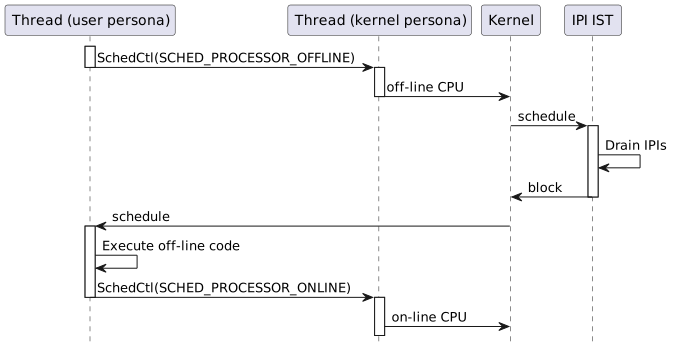
When you call SchedCtl() with the SCHED_PROCESSOR_OFFLINE
command, the kernel considers the CPU unavailable for scheduling. The call drains all
pending IPI actions and ensures that no new IPIs can be sent to the processor. The thread
should then disable interrupts and proceed to execute the code.
Once the thread restores the state of the processor, it notifies the kernel using
SchedCtl() with the SCHED_PROCESSOR_ONLINE command. This
call causes the kernel to resume normal scheduling on the processor. The following image
summarizes the sequence of processor offlining and onlining:Figure 1Basic sequence of processor offlining and onlining For more information on CPU offlining, refer to the CPU offlining section in the System Architecture
guide.
Returns:
The difference between these functions is how they indicate errors:
SchedCtl()
0 if the call succeeds. If an error occurs,
SchedCtl() returns -1 and sets
errno.
SchedCtl_r()
EOK is returned on success.
This function does NOT set errno.
If an error occurs, any value from the Errors
section below may be returned.
Errors:
EAGAIN
(SCHED_PROCESSOR_ONLINE and SCHED_PROCESSOR_OFFLINE only)
The requested CPU status matches the current one.
EINVAL
(SCHED_PROCESSOR_ONLINE and SCHED_PROCESSOR_OFFLINE only)
The calling thread's processor affinity isn't set to a single
processor.
(SCHED_PROCESSORS_STATUS only) An argument is
invalid.
ENOSYS
The provided control command isn't supported.
EPERM
(SCHED_PROCESSOR_ONLINE and SCHED_PROCESSOR_OFFLINE only)
The calling thread doesn't have the required permissions to execute the command.
Note:
Only threads with a SCHED_OFFLINING policy can execute the
SCHED_PROCESSOR_OFFLINE or SCHED_PROCESSOR_ONLINE
command.