
Performance
- Each change to user data can cause up to a dozen blocks to be copied and modified, because the filesystem never modifies the inode and indirect block pointers in place; it has to copy the blocks to a new location and modify the copies. Thus, write operations are longer.
- When taking a snapshot, the filesystem must force all blocks fully to disk before it commits the superblock.
- Although the filesystem tries to form contiguous runs of blocks when creating large files or copying large amounts of data, the nature of COW causes fragmentation over the long term, and this can lead to noticeably degraded performance and failure to allocate large memory blocks.
- There's no constraint on the order in which the blocks (aside from the superblock) can be written.
- The new blocks can be allocated from any free, contiguous space.
- The filesystem has a defragmentation feature, which lets you eliminate,
as much as possible, the fragmentation in the block maps for regular files.
For details, see
Defragmentation
below.
The performance of the filesystem depends on how much buffer cache is available, and on the frequency of the snapshots. Snapshots occur periodically (every 10 seconds, or as specified by the snapshot option to fs-qnx6.so), and when you call sync() for the entire filesystem, or fsync() for a single file.
- an
open(O_CREAT|O_TRUNC)to make the file - a bunch of write() operations to copy the data
- a close(), chmod(), and chown() to copy the metadata
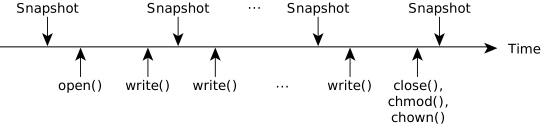
Each snapshot is a valid point-in-time view of the filesystem (i.e., if you've copied 50 MB, the size is 50 MB, and all data up to 50 MB is also correctly copied and available). If there's a power failure, the filesystem is restored to the most recent snapshot. But the filesystem has no concept that the sequence of open(), write(), and close() operations is really one higher-level operation, cp. If you want the higher-level semantics, disable the snapshots around the cp, and then the middle snapshots won't happen, and if a power failure occurs, the file will be either complete or not there at all.
For more information about using this filesystem, see
Power-Safe filesystem
in the Working with Filesystems chapter of the
QNX OS User's Guide.
Defragmentation
The defragmentation operation can run in the foreground, the background, or both. This operation affects only regular files; other files types (directories, FIFOs, sockets, symlinks, etc.) are ignored. For the foreground mode, the defragmentation work is done by a resource manager thread when a file is opened is reading, thereby affecting the file's open latency. For the background mode, the work is done by a dedicated thread that is created when the filesystem is mounted (and then terminated when it is unmounted); this does not affect file open latency as much because a file is enqueued for background defragmentation only after it has been opened (for reading and/or writing) and then closed.
There are file size constraints that determine whether a given file gets selected for foreground defragmentation or for background defragmentation. A file gets enqueued for background defragmentation if its size is lower than a certain threshold. Similary, there is a maximum size threshold for a file to be selected for foreground defragmentation. The rationale for having these maximum size thresholds is to limit the amount of work that needs to be done, especially in foreground mode, where the opening of a file is delayed until defragmentation is complete.
The background thread is started only if the fs-qnx6.so option defrag is enabled. This same option is used to configure other defragmentation settings, such as the delay for starting any defragmentation operations from when the filesystem is mounted, the required idle period for resuming background operations, and more. For full information about these settings, see the fs-qnx6.so defrag description in the Utilities Reference.