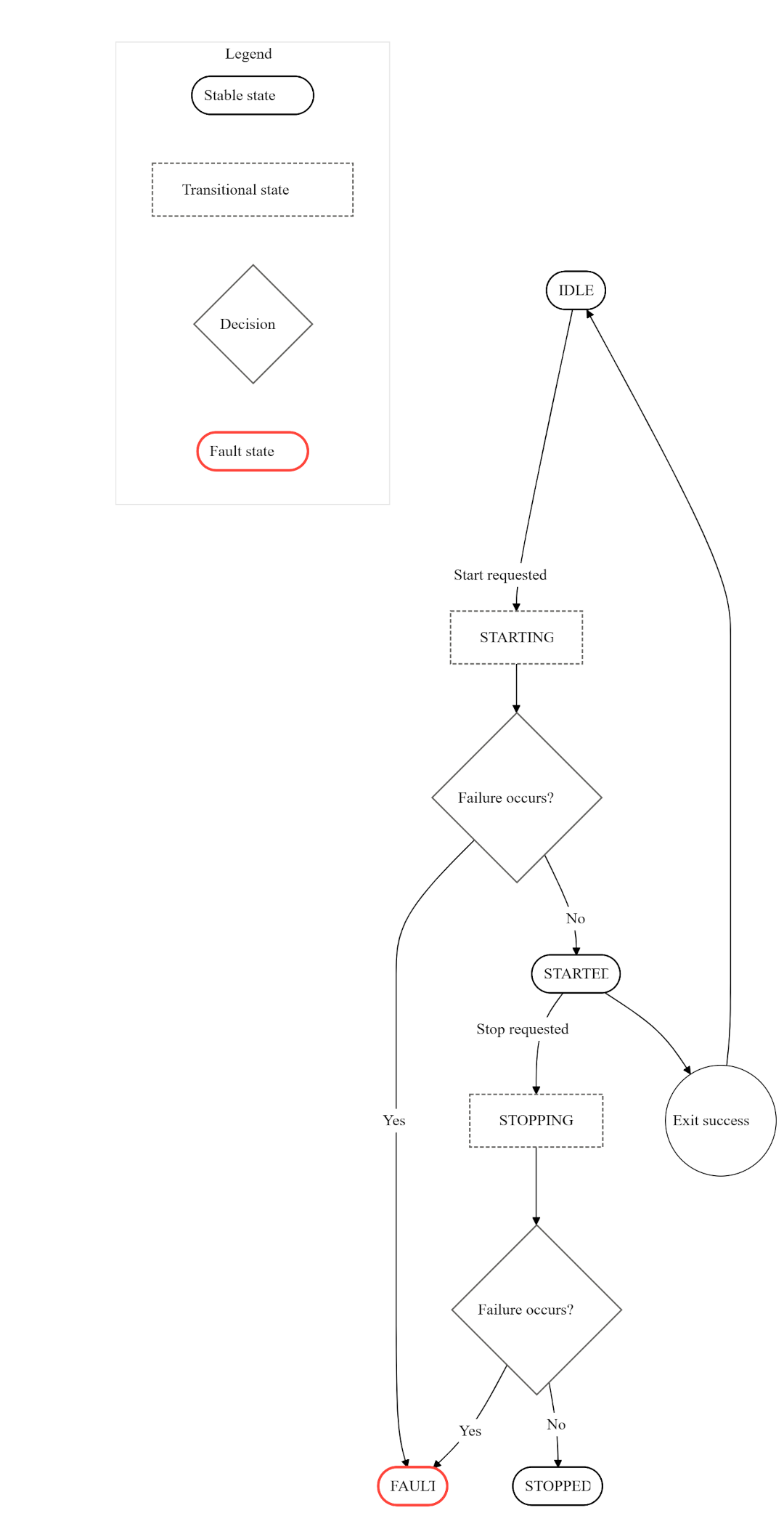
PLMS component states
PLMS uses states to handle the processes it launches and monitors. This section describes the PLMS component states implementation.
States
PLMS components may be in the following states:
- Starting - a component is in starting state when it executes its start_sequeuce task_list.
- Started - when a component’s start_sequence task_list is successfully completed, then the component is considered started.
- Idle - initially, all components are in the idle state. A component can be in the idle state if it has been asked to stop with a stop reason of none.
- Stopping - a liminal (i.e., an in-between) state where the component is terminated by executing stop_sequence tasks.
- Session stopped - indicates that the component is stopped because the components it depends on are stopped.
- Fault - indicates the component has failed and cannot be recovered.
- Defined Safe State (DSS) - a defined safe state that restarts the system by calling sysmgr_reboot().
Starting state
The starting state is an intermediate state in which the component creates processes by executing start_sequence tasks.
You can use a configuration file to specify which components should start immediately at start time. You do this by specifying start actions for the components and their dependencies.
If a component has a recovery action of restart, then start actions are created for the components if the component fails. If any task in the start_sequence fails, PLMS stops executing further tasks in the start_sequence and puts the component into stopping state.
The starting state is preemptable. The preemptable items are any wait conditions. When a component starts, the start_sequence is executed in a worker thread. When a worker thread encounters a waitfor condition, and if the condition is not currently true, then the worker thread ejects the current component action and picks the next action from the queue. The ejected component is revisited in the next traverse of the queue after the polling delay of the waitfor condition.
During the wait, the components are allowed to move to the next possible state. If a component is in start state, and the immediate next action in the queue is another start action for the same component, then the second start action is ignored and discarded.
If a component is in starting state, and the immediate next action in the queue is a stop action for the same component, then the start action is preempted, and the component is moved to stopping state.
Because the starting state can be interrupted (for example, by a waitfor condition or a task failure), a component may be left in a partially initialized state. The stop action is used to return the component to a known, clean state so that it can be restarted if necessary.
Started state
A component reaches the started state when all of its start_sequence tasks have been completed successfully. If the component is configured for watchdog monitoring, the heartbeat of the process is monitored.
Idle state
Initially, all components are in the idle state. A component can be in the idle state if it has been asked to stop with a stop reason of none.
Components in the idle state are not starting or stopping, and this may simply mean that a component’s main task has been run and exited.
Failed components can be moved to the idle state if they have a recovery option of none or stop. A fault or session_stopped component can be moved to idle state on a stop action.
When a component fails, then the component's recovery action is executed. If the recovery action is restart, then the component is immediately moved to the starting state.
A component can be moved from idle to starting state with the start action.
Stopping state
The stopping state is a liminal (i.e., an in-between) state where the component is terminated by executing stop_sequence tasks. A stop action on a component moves the component into a stopping state. The stop action is created when at least one of the following conditions become true:
- The component start fails.
- The started component fails.
- A stateful dependency of the component stops.
- Watchdog monitoring detects a heartbeat failure.
- All dependent components are stopped and set to idle (if configured).
- User issues a stop request (for example, via API).
The stopping state cannot be interrupted. Once a component enters this state, plms executes all tasks in the stop_sequence. If a task fails, plms continues executing the remaining tasks. While the stop sequence is in progress, other actions for the component are deferred until the stop action is complete. The stop_sequence tasks are allowed to fail, and plms will continue to execute the remaining stop_sequence tasks. If the action_queue has multiple actions for the components, the actions will be skipped until the current stop action is completed.
As the stopping state is not pre-emptible, it ensures that the component is completely stopped and the system reaches the determined state to restart the component.
Session stopped state
The session_stopped state indicates that the component is stopped because its dependency components are stopped. The session_stopped components are automatically started when their dependencies are started again.
For example, if a client depends on a server, the client enters the session_stopped state when the server stops, and is restarted when the server restarts.
Fault state
The fault state indicates the component has failed and cannot be recovered.
A component is moved to fault state when it fails and the number of attempts to recover the component by restarting it exceeds the configured maximum retries value (or if the recovery action for the component is specified as fault).
The fault components are not started by the dependency start mechanism. Instead, they require an explicit start action from the user (i.e., from an external application) to avoid infinite restarts.
Consider a component Y that depends on component X. When Y is started, plms attempts to start X if it is not already running. If X is in the fault state, no start action is created for X, and Y remains in the starting state until X becomes available.
A component in the fault state can be restarted only through an explicit request, either from a system application or via a PLMS API such as start_components().
The fault state is assumed to be a transient state where the system application can detect the fault and either fix it immediately or enter DSS. If the on_fault task is specified as DSS, PLMS will move the component to DSS.
DSS (Defined Safe State)
DSS is a defined safe state that restarts the system by calling sysmgr_reboot(). A component enters the DSS state when the on_fault task is specified as DSS or the recovery action is specified as DSS.
State diagram
The following diagram represents the relationships between plms component states: