
Security Policies
Although QNX OS allows a process to set which operations it is permitted to do, a better option is to use the system’s security policies functionality.
Note that some OS components and/or subsystems may have specific security policy practices:
| OS component/subsystem | See: |
|---|---|
| Screen Graphics Subsystem |
Security policiesin the Screen Graphics Subsystem Developer's Guide |
Security policy benefits
Security policies provide the following benefits over manually setting process abilities using procmgr_ability():
- The location in the path space where a process can attach can only be restricted using a security policy.
- A security policy can control a process's ability to perform a ConnectAttach() on a public channel of another process.
- If a process uses procmgr_ability() to set its own permissions independent of an individual system, the developer needs to predict what permissions are required, both now and in the future, or use command-line options to discover them. To solve this issue, developers may assign abilities that are too permissive or not needed, which makes the system less secure. Using security policies allows the system integrator to assign only the abilities that the process needs for the specific system.
- The secpolgenerate utility that generates and updates security policies can determine which privileges processes require without needing to know what an individual process does.
- A system integrator might not be able to examine the arguments to every procmgr_ability() call because he or she does not have access to source code, making it hard to audit a system. Security policies centralize permissions and can be easily audited by the system administrator, even without access to the source code.
- Although a system integrator can view the abilities assigned to a process using pidin, he or she only sees the abilities of running processes. A security policy allows the system integrator to view the abilities assigned to all process, including those that are not currently running.
- Security policies can be extended with other classes as needed.
Security policy development process
QNX OS provides a set of utilities to help with the collection, compilation, and deployment of a security policy on a QNX system.
You run secpolgenerate on your QNX development system to generate
an initial security policy or detect whether any changes to the current policy are
required. It reads from the current policy stored in the system, and, to create an
environment that can detect what might be new or missing, it produces a second
policy that supports the system running with few restrictions on processes (a
mock policy
). The secpolpush utility applies the mock
policy. After checking the results of running secpolgenerate, you
make any edits to the policy as needed, and update the policy stored in the IFS
(compiled using the host utility secpolcompile). As your project
progresses, re-run secpolgenerate periodically and use the
results to keep your policy up to date.
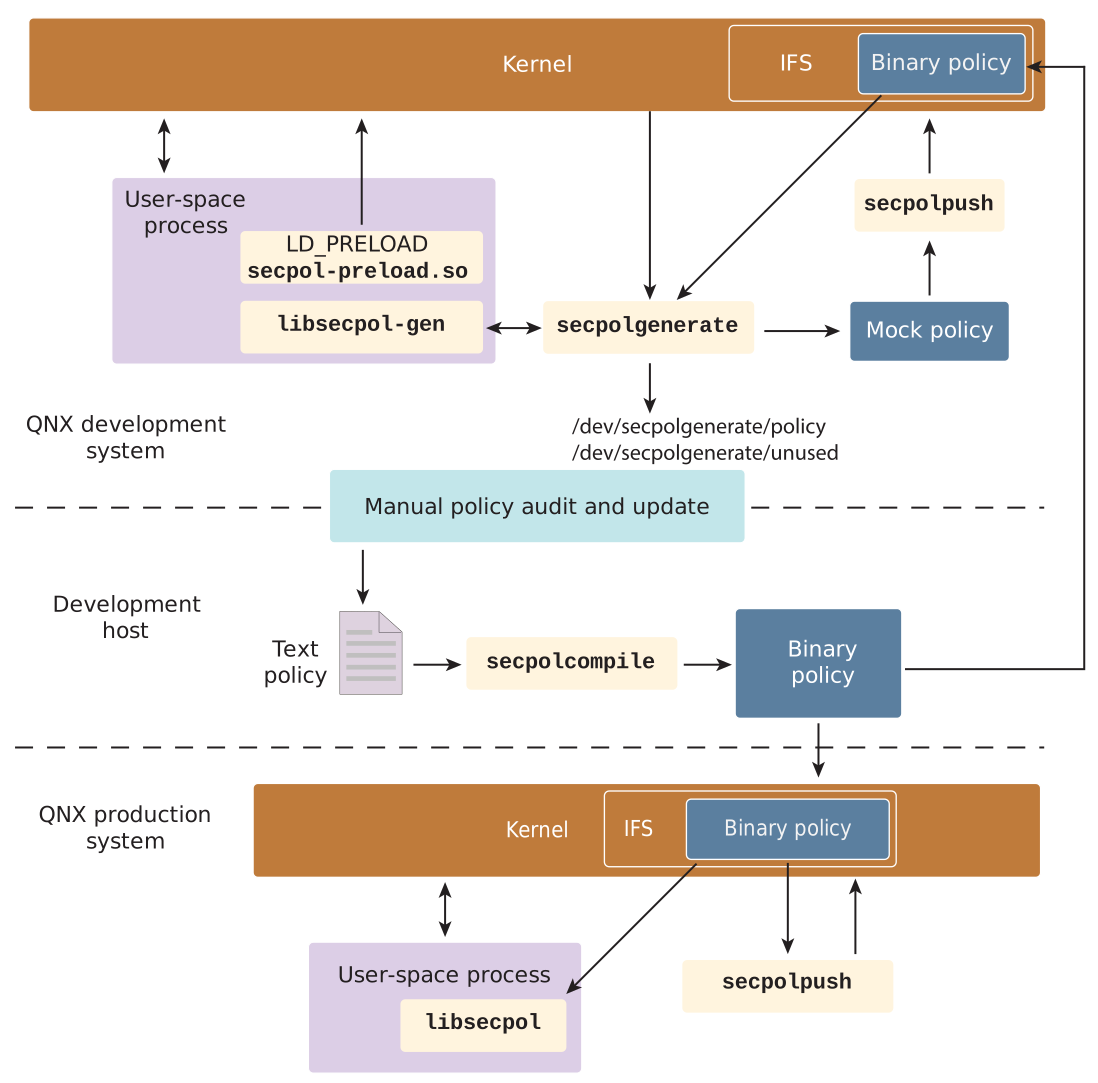
When the development phase of your security policy project is complete, use secpolcompile to prepare the final policy for deployment, where it is applied on the system (as in the development environment) via secpolpush.
The Implementing security policies
section describes using these
utilities in detail.