QNX Technical Articles
QNX® Neutrino® Core OS 6.3.2A Installation Note - QNX Neutrino Hosts
Date of this edition: September 29, 2006
Target OS:
- QNX® Neutrino® 6.3.0 SP1
- QNX® Neutrino® 6.3.0 SP2
- QNX® Neutrino® 6.3.0 SP2 with the 6.3.0 SP2 to SP3 Upgrade
- QNX® Neutrino® 6.3.0 SP3
Host OS:
- QNX® Neutrino® 6.3.0 SP1
- QNX® Neutrino® 6.3.0 SP2
- QNX® Neutrino® 6.3.0 SP2 with the 6.3.0 SP2 to SP3 Upgrade
- QNX® Neutrino® 6.3.0 SP3
Contents
- System requirements
- BIOS settings
- Related products
- Installing the QNX Neutrino Core OS 6.3.2A
- Uninstalling the QNX Neutrino Core OS 6.3.2A
- How can I tell if I've already installed the QNX Neutrino Core OS 6.3.2A?
- Determining your base directory
- Getting started with the documentation
- Technical support
For more information about the QNX Neutrino Core OS 6.3.2A, see the release notes, which you'll find in the base_directory/install/ntocore/6.3.2 directory (see “Determining your base directory,” below) after you've installed the archive. For the most up-to-date version of these notes, go to our website, www.qnx.com, log into your myQNX account, and then go to the Download Center.
System requirements
| Minimum | Recommended | |
|---|---|---|
| OS | QNX Neutrino 6.3.0 SP1 or SP2 | QNX Neutrino 6.3.0 SP1 or SP2 |
| Processor | 2 GHz or more Intel Pentium 4 | 2 GHz or more Intel Pentium 4 |
| RAM | 256 MB | 512 MB |
| Disk space | 2.1 GB | 2.1 GB |
| Monitor | 1024×768 | 1280×1024 |
In order to install the QNX Neutrino Core OS 6.3.2A, you need approximately 48 MB of disk space, which includes the space required for backups and temporary space used in installing the files.
The System Profiler in the SP2 and SP3 version of the IDE requires a minimum color depth of 16 bits.
 |
You must have installed the QNX Neutrino SDK (command-line development tools) portion of the QNX Momentics development suite before installing the QNX Neutrino Core OS 6.3.2A. |
BIOS settings
We recommend you use the following BIOS settings:
- Disable Plug and Play OS.
- Set any parallel ports and onboard serial ports to specific addresses, if possible, instead of using an automatic setting.
Related products
After you've installed the QNX Neutrino Core OS 6.3.2A, you might want to install these related products:
| Product | Version |
|---|---|
| Multi-Core (formerly Symmetric Multiprocessing) Technology Development Kit (TDK) | 1.1.0 |
| Adaptive Partitioning TDK | 1.0.0 |
| Documentation Update | 1.0.0 |
|
The SP2 to SP3 Update and SP3 contain the latest documentation, including the Documentation Update 1.0.0. Don't install the Documentation Update 1.0.0 after installing the SP2 to SP3 Update or SP3, or your system's documentation will be in an inconsistent state. |
Any other products that we've released for SP1, SP2, or SP3 are compatible with the QNX Neutrino Core OS 6.3.2A.
The following patch addresses issues that we discovered since releasing QNX Momentics 6.3.0 Service Pack 2:
- Debug Malloc Library Patch (Patch ID 155)
- A version of the debug malloc library that works correctly on SH platforms. (Ref# 27639)
You can install it before or after installing the QNX Neutrino Core OS 6.3.2A. This patch is included in QNX Momentics 6.3.0 Service Pack 3. For the latest patches, see our website.
There are several ways that you incorporate QNX Momentics 6.3.0 Service Pack 3 in your system, depending on what you've already installed:
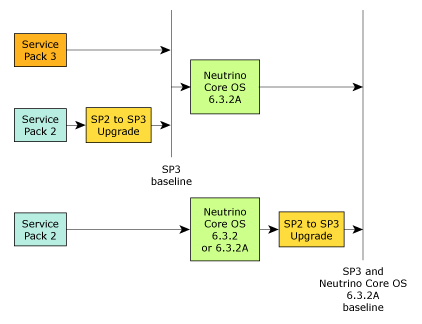
Here's a summary:
- To do a fresh installation, use QNX Momentics 6.3.0 Service Pack 3.
- If you've already installed 6.3.0 SP2, install the 6.3.0 SP2 to SP3 Upgrade.
- You can install the QNX Neutrino Core OS 6.3.2A on a system that has SP3, or SP2 plus the 6.3.0 SP2 to SP3 Upgrade.
- If you've installed the QNX Neutrino Core OS 6.3.2 or
the QNX Neutrino Core OS 6.3.2A on a system that has
6.3.0 SP2, and you want to upgrade to SP3, install the
6.3.0 SP2 to SP3 Upgrade.
Installing the 6.3.0 SP2 to SP3 Upgrade on a system with the QNX Neutrino Core OS 6.3.2 updates the core OS to 6.3.2A.
Installing the QNX Neutrino Core OS 6.3.2A
The installer backs up the affected files, and it stores the backup in base_directory/install/ntocore/6.3.2/backup.tgz (see “Determining your base directory,” below).
If you interrupt the backup, or it fails, the installation is aborted. Before you can try again to install the QNX Neutrino Core OS 6.3.2A, you must delete the base_directory/install/ntocore/6.3.2 directory.
The QNX Neutrino Core OS 6.3.2A doesn't change any user files. For a list of the affected files, see base_directory/install/ntocore/6.3.2/shiplist after installing the archive.
|
|
To install the QNX Neutrino Core OS 6.3.2A, do the following:
- Log in as root.
- Log into your myQNX account on our website, and then go to the Download Center.
- Download the QNX Neutrino Core OS 6.3.2A package, ntocore-6.3.2a-nnnnnnnnnnn-nto.sh, where nnnnnnnnnnn is an 11-digit build number. The package is a shell script.
- Run chmod to make the script executable. For example:
chmod a+x ntocore-6.3.2a-20061234567-nto.sh
- Run the script at the system prompt. For example:
./ntocore-6.3.2a-20061234567-nto.sh
- Follow the instructions on your screen.
The installer automatically installs the following patches:
- Critical qnxactivate and Enumerator Patch (Patch ID 179), which addresses some issues that we've discovered since we released SP1 and SP2. For more information about this patch, see its release notes in the Download Center on our website. (Ref# 28656, 28579)
- qconfig Patch (Patch ID 205), which installs a new version of qconfig that provides more information about the QNX products that you've installed. The Documentation Update 1.0.0 includes updated information about this utility. (Ref# 29317)
|
The installer rebuilds the boot image in /.boot, as follows:
mkifs /boot/build/qnxbasedma.build /.boot If the buildfile that you normally use isn't /boot/build/qnxbasedma.build, run the following before rebooting: mkifs your_build_file /.boot |
Uninstalling the QNX Neutrino Core OS 6.3.2A
 |
If you delete or rename the backup that was made when you installed
the QNX Neutrino Core OS 6.3.2A,
or if the backup has been corrupted, the uninstaller will warn you.
Continuing to uninstall the QNX Neutrino Core OS 6.3.2A will leave your
system with an incomplete
version of QNX Momentics 6.3.0, and you won't be able to reinstall
the QNX Neutrino Core OS 6.3.2A;
you'll likely have to completely reinstall QNX Momentics 6.3.0.
Use our uninstaller to remove the QNX Neutrino Core OS 6.3.2A; if you simply delete the directories, your machine might end up in an inconsistent state, and you might not be able to run the IDE. You should uninstall QNX products in the reverse order in which you installed them. To determine this order, use a command like this: ls -lt `find base_directory -name "*uninstall*.sh"` where base_directory is where you installed QNX Momentics. |
To uninstall the QNX Neutrino Core OS 6.3.2A, do the following:
- Log in as root.
- Go to the base_directory/install/ntocore/6.3.2 directory (see “Determining your base directory,” below).
- Run the uninstaller script:
./uninstall.sh
|
The uninstaller rebuilds the boot image in /.boot and tells
you to rebuild the image manually if you use a custom image, but
mkifs will crash if you do so.
(Ref# 30079)
Workaround: After the uninstaller has rebuilt the boot image, do the following:
|
How can I tell if I've already installed the QNX Neutrino Core OS 6.3.2A?
To determine whether or not you've installed the QNX Neutrino Core OS 6.3.2A, use the qconfig command or check for the existence of the base_directory/install/ntocore/6.3.2 directory (see “Determining your base directory,” below).
Determining your base directory
To determine the base directory for QNX Momentics, open a command shell and use the qconfig command. For example:
$ qconfig
QNX Installations

  Installation Name: QNX Momentics 6.3.0
            Version: 6.3.0
     Base Directory: /usr/qnx630/
           QNX_HOST: /usr/qnx630/host/qnx6/x86/
         QNX_TARGET: /usr/qnx630/target/qnx6/
The base directory in this example is /usr/qnx630/, but it could be different on your machine, depending on where you installed QNX Momentics.
Getting started with the documentation
After you've installed your development suite, you'll find an extensive set of online documentation in HTML format. Choose Help from the Launch menu or from the shelf on the right side of the screen, or look under the following directory:
${QNX_TARGET}/usr/help/product/momentics/bookset.html
This “roadmap” page contains links to the various HTML booksets that accompany the OS (e.g. System Architecture, Programmer's Guide, Library Reference, Utilities Reference, etc.).
You'll find the installation and release notes in the base_directory/install/ntocore/6.3.2 directory (see “Determining your base directory,” above).
|
For the most up-to-date version of the installation and release notes, go to our website, www.qnx.com, log into your myQNX account, and then go to the Download Center. |
You can install and work with multiple versions of QNX Neutrino. Whether you're using the command line or the IDE, you can choose which version of the OS to build programs for. For more information, see the IDE User's Guide or the QNX Neutrino Programmer's Guide.
|
Coexistence of 6.3 and 6.2.1 is supported only on Windows and Solaris hosts. |
Technical support
If you have any questions, comments, or problems with a QNX product, please contact Technical Support. For more information, see the How to Get Help chapter of the Welcome to QNX Momentics guide or visit our website, www.qnx.com.