
Introduction
This guide describes how to configure a license server machine that manages concurrent build licenses and how to connect automated builds executing on build servers to that license server. Continuous Integration Build Server Licenses use the same license management mechanism as floating licenses. Read the following Q&A, which covers the basics of CI licenses and their management.
What is a Continuous Integration Build Server License?
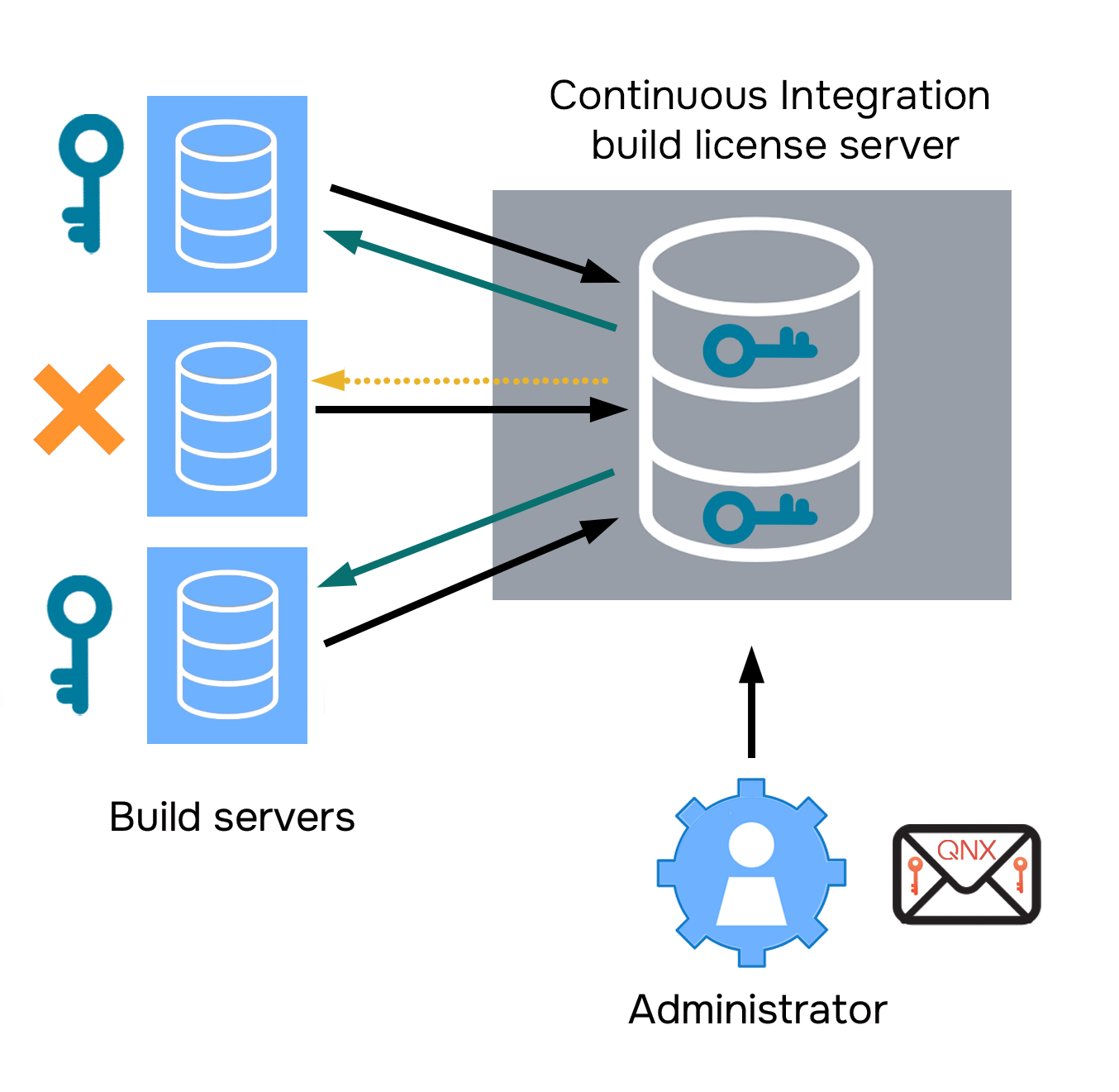
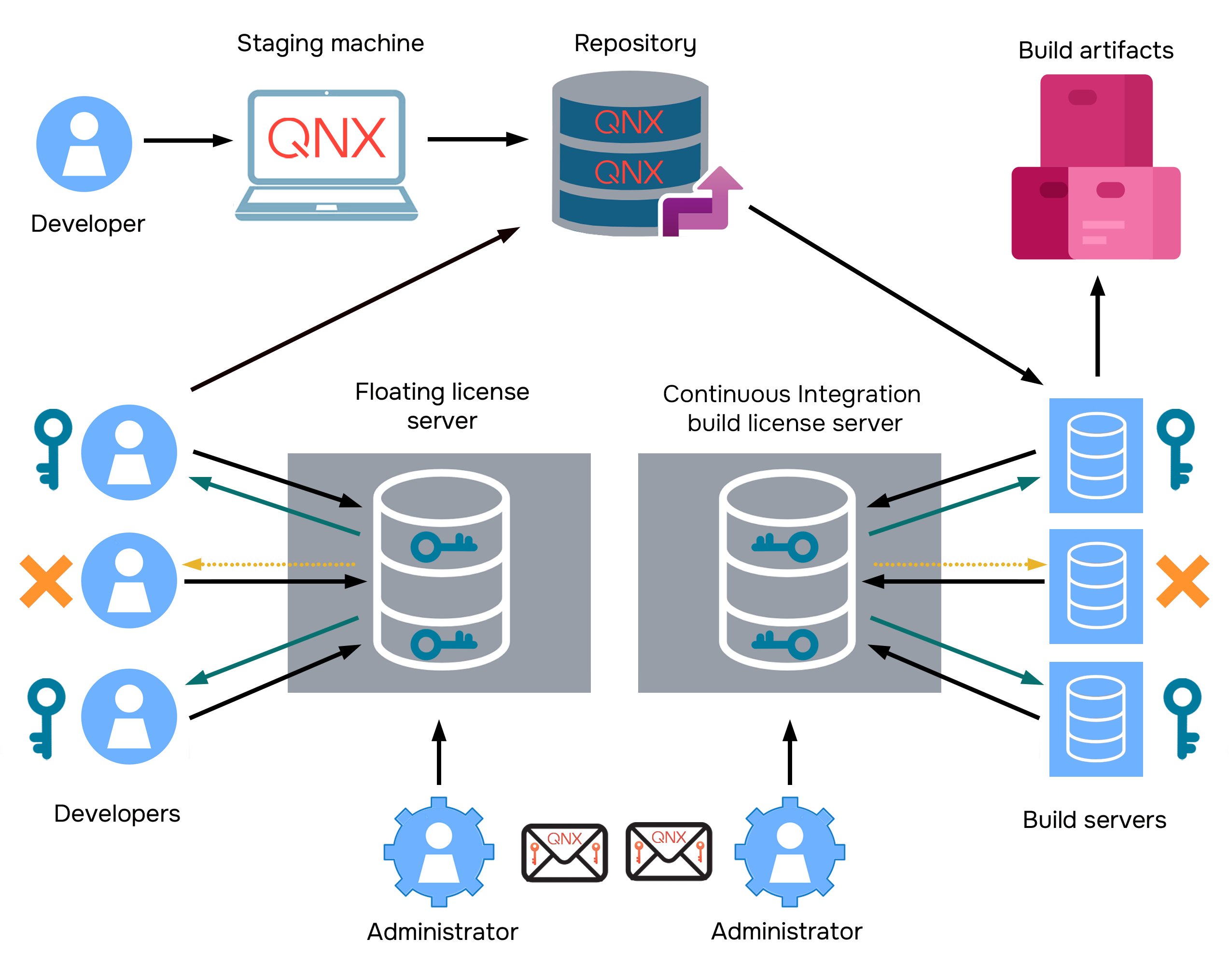
As shown in the figure, developers and build servers acquire their licenses separately, even though the process looks very similar for both. Their license keys, license files, and license servers remain separate. A developer responsible for configuring new installations sets up the staging machine, where QNX-deployable installations are created. These QNX-deployable installations are placed in the code repository, where developers working on code commit their changes. These changes serve as the basis for automated builds. When a trigger activates the build servers, they build these changes, producing build artifacts.
To combine two licenses of the same type in one license key file, do not overwrite the file. Instead, append the license features provided to you by your QNX representative to the existing license key file on your license server. Duplicate feature names are expected.
For more information on combining licenses in one license file and for the list of restrictions, go to the FlexNet Publisher's License Administration Guide. The guide is typically placed in home_directory/flexserver/docs/ when you install the Continuous Integration Build Server License package, or refer to enduser.pdf, available through the QNX Software Center with your QNX SDP installation.
What kind of Continuous Integration Build Server License do I need?
There are two kinds of Continuous Integration Build Server Licenses:
- Continuous Integration Build Server License
- Continuous Integration Build Server – Project Enabled License
Customers who deploy specialized software, such as QNX Hypervisor, QNX OS for Safety, QNX Hypervisor for Safety, or QNX Sound, must purchase Continuous Integration Build Server – Project Enabled License, because the license term for such licenses continues for the term of the development Project, whatever its duration.
What is license management?
Continuous Integration Build Server License management uses a FlexLM-based license mechanism to automatically manage Continuous Integration Build Server license keys, which governs the total maximum number of simultaneous automated builds that can be performed by build server machines. Specifically, it allows the compiler in an automated QNX build running on a build server machine to request a license key from a license server that manages the licenses. If a key is available, the license server assigns it to the compiler development tool in the automated QNX build running on the build server machine, allowing the automated QNX build to start. The license server subsequently reclaims the license key after the automated QNX build is completed, enabling the same or other build server machines to access the key to start another automated QNX build. When properly set up, each automated QNX build uses a license.
Creating and Deploying Installations of QNX SDP in Large Organizationschapter in the QNX Software Center Guide for more details.
How do build server machines sign out a concurrent build license key?
- there is a local license key for this product
- the product license key includes the desired features
- the license key is activated
- the license key is not expired
- the server has an available license for this product
- the license server key is not expired
| Release | Utilities |
|---|---|
| 7.0 | mkefs, mketfs, mkfatfsimg, mkifs, mkqnx6fsimg, mkxfs, qcc,q++ |
| 7.1 | mkefs, mketfs,
mkfatfsimg, mkifs,
mkqnx6fsimg, mkxfs,
qcc,q++, mkqfs, secpolcompile |
| 8.0 | mkefs, mketfs,
mkfatfsimg, mkifs,
mkqnx6fsimg, mkxfs,
qcc,q++, mkqfs, secpolcompile, coreinfo, diskimage, dumpefs, dumpifs, mksquashfsimg, traceprinter, use |
How long can a build server use a Continuous Integration Build Server license key before the key is freed up for another automated QNX build?
A build server can use a Continuous Integration Build Server license key for as long as the build server keeps running.
When an automated QNX build terminates, it holds the license key for a short period of time. The license server then reclaims the key and makes it available to the same or other build servers wanting to start another QNX automated build. This linger time is intended to prevent automated QNX builds from losing their license key prematurely. Its value affects the number of build servers that are able to actively use a single license on a given day and is, therefore, taken into consideration when pricing multiuser licenses.
Build servers with Continuous Integration Build Server Licenses hold the license key for a
minimum of five minutes. For more details, refer to the Environment variables related to concurrent build licenses
section of the
Configuring a Build Server to Use a Concurrent Build License
chapter of this guide.
How do I deploy Continuous Integration Build Server licenses licensed under concurrent build licenses to build server machines?
To deploy concurrent build licenses, use the myQNX License Manager. For details, refer to the myQNX License Manager and QNX Software Center User's Guide.
To use a deployed concurrent build license, a developer must activate the license and
configure their build server, as described in the Configuring a Build Server to Use a Concurrent Build License
chapter.
By design, both 7.x and 8.0.x license keys are compatible with QNX SDP 7.x. To prevent the QNX SDP 7.x users from consuming a 8.0.x license, you can create two license servers and separate 7.x and 8.0.x licenses.
What do I do when my subscription-based license expires?
If you are a developer and your license expires, contact your administrator.
If you are an administrator, you can check the status of support plans via myQNX License
Manager. Contact your QNX sales representative to renew your license in advance of the
upcoming expiry date. After receiving the new license information, you need to redeploy the
QNX deployable installation to developers. Refer to the Creating and Deploying Installations of QNX SDP in Large
Organizations
chapter in the QNX Software Center Guide for more details
on deployed installations.
You also need to update the license file on the concurrent build license server with the new license information.
qnxsoftwarecenter_clt -addLicenseKey <key>qlicensesection in the QNX Utilities Reference for details.
How can our development team help ensure compliance with concurrent build license terms?
For concurrent build licenses, you can simply launch any QNX SDP program that performs a license check. If the program launches without generating a license error message, you can assume that it has obtained a concurrent build license key successfully.
It is important to verify the concurrent build license log on the concurrent build license server to ensure compliance.
The command-line tools that perform a license check are listed above.
checkout failederrors, such as
No such feature exists,
Version of vendor daemon is too old,or
Floating license no expiration date,we recommend that you install the latest version of the license server. To do so, follow the instructions outlined in the
Install the floating license server packagesection of the
Preparing to Configure a License Serverchapter of this guide.
Keep in mind that the above errors can occur for other reasons. Please update your license server and check if errors persist before contacting technical support.