
Lifecycle of a vdev
Here is an overview of the lifecycle of a vdev, from initialization to termination.
For examples of source code that look after each stage of a vdev's lifecycle, see the
next chapter: The Basics: vdev trace
.
The lifecycle of a vdev can be divided into two stages:
- Startup — the vdev parses its options, defines itself, and registers with the VM framework in which it will run
- Running — the vdev runs and does whatever it is designed to do; generally, this involves performing some task and reading and writing to memory to communicate with the guest
The figure below presents the lifecycle of a vdev. Notice the Startup/Running demarcation, identified by the VDEV_CTRL_GUEST_CONFIGURED callback.
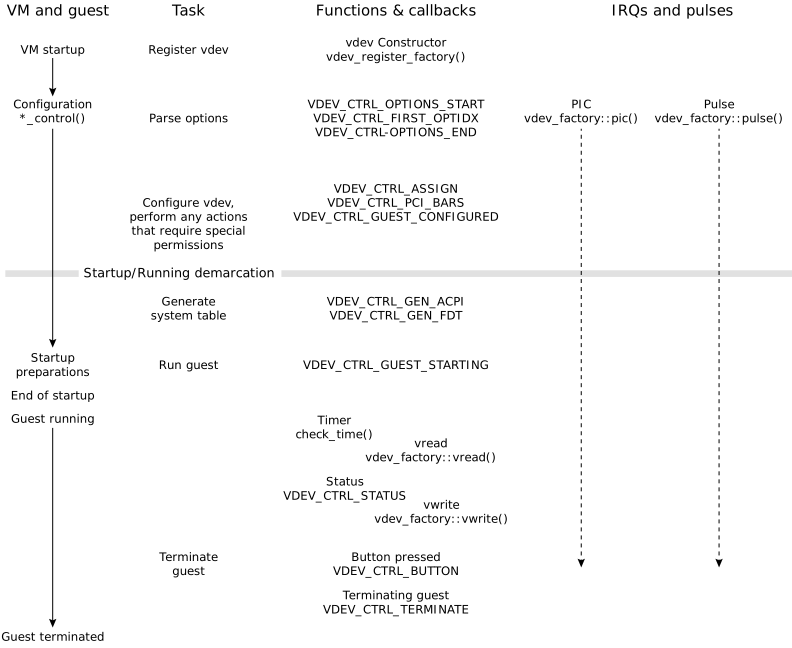
Control callbacks sent to vdev during VM startup
When you write a vdev, you must include code to identify the demarcation between its startup stage and its running stage. This is because some functions may be called only during the startup stage, when the qvm process instance is assembling the VM, including the vdevs. Others may be called only after the startup stage has completed, when the system is running.
As the qvm process configures the VM, it issues callbacks that your vdev can use to know what operations it may perform and to identify the demarcation of the stages. Some of the callbacks which mark the more significant events in the vdev startup include:
- VDEV_CTRL_OPTIONS_END
- The qvm process has finished parsing your vdev's options. It may not have completed configuring the VM, however: it may still have other vdevs and VM components to configure.
- VDEV_CTRL_ASSIGN
- All user-specified options have been processed. The vdev must now check if the loc and intr options have been specified; if they haven't been specified and the vdev will use them, the vdev must specify them for itself.
- VDEV_CTRL_GUEST_CONFIGURED
-
The qvm process has finished configuring the VM for the
guest system. This callback is the demarcation between the startup stage and
the running stage. It is now safe for the vdev to create threads and to call
functions that should be used only after startup is complete
(e.g., vdev_get_path()).
From this point forward, your code must assume that it is running in a
multithreaded environment.
Transition of qvm security state
Although the guest is now configured, the qvm process is not yet in its final security state. For all vdev control messages up to and including VDEV_CTRL_GUEST_CONFIGURED, the process is in its initial security state. This is either one set by a security policy that was in effect when qvm was started, or is root because qvm was started as root.
If the vdev requires special permissions (e.g., root abilities) for some setup action it needs to perform, the vdev must complete this action before returning from this callback. After the callback completes, qvm switches to the requested user ID (assuming one was provided in the VM configuration) and transitions to the next runtime security policy type (assuming the system's security policy file contains a second type that applies to qvm). In performing these two actions, qvm moves to its final security state, which can restrict what the vdev is allowed to do.
- VDEV_CTRL_GUEST_STARTING
-
The qvm process is about to start the guest, meaning it
is about to change the state of the vCPU thread that will run the guest OS
code.
As mentioned above, VDEV_CTRL_GUEST_CONFIGURED is used to determine if the qvm process has finished configuring the VM for the guest system; don't use VDEV_CTRL_GUEST_STARTING for this purpose.
Protecting your vdev in a multithreaded environment
When a qvm process instance is in its startup stage (i.e.,
assembling and configuring the VM), it is single-threaded: it runs with only a
main thread executing code. This means that your vdev can skip
some tasks that are required after the VM is ready and the guest has started
executing. For example, your vdev doesn't need to call
gasp_lock() and gasp_unlock() around other
calls to gasp_*() functions (see Guest memory regions
and the Virtual Device Developer's API Reference
gasp.h chapter).
When the guest starts executing, it requires at least one vCPU, which adds a vCPU thread, so the qvm process instance must run at least two threads: the main thread and the vCPU thread. This means that your vdev is running in a multithreaded environment and must use lock functions such as gasp_lock() to ensure that no other entity in your VM (e.g., another vdev) interferes with your vdev's resources.
Adjusting thread scheduling parameters
Your vdevs are free to adjust the scheduling parameters of any threads they create, such as their policy, priority, and processor affinity mask or runmask, which is the cluster of processors on which a given thread is allowed to run. However, when writing a callback, you must avoid changing the scheduling settings, and in particular the runmask, for the calling VM threads. These calling threads are the vCPUs of the VM, and changing their runmask means the vCPUs can migrate to new processors which can lead to unpredictable behavior.