A widget for selecting printing properties
PtWidget -->
PtBasic -->
PtContainer -->
PtPrintSel
For more information, see the
diagram of the widget hierarchy.

<photon/PtPrintSel.h>
The PtPrintSel widget lets a user select a printer,
change its properties, and optionally select a range of pages and
the number of copies to print.
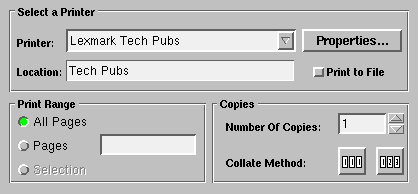
A PtPrintSel widget.
| C type
|
Pt type
|
Default |
| PpPrintContext_t
|
Struct
|
NULL |
The current Print Context settings. This resource isn't available
through PhAB, but you'll need a Print Context in order to do any
printing. Use
PpPrintCreatePC()
to create a Print Context, and
PpPrintSetPC()
to change its settings.
 |
When you use PtGetResources() to get this resource, you
must provide a PpPrintContext_t structure, which is
filled in directly with the values of the context. Unlike most
calls to PtGetResources(), you aren't given a pointer into
the widget's internal memory.
|
| C type
|
Pt type
|
Default |
| unsigned
|
Flag
|
Pt_PRINTSEL_ALL_PANES |
Pt_PRINTSEL_PROP_APP |
Pt_PRINTSEL_NO_SELECT_RANGE |
Flags to modify the appearance of the widget:
- Pt_PRINTSEL_ALL_PANES
- if this flag is set, all the panes of the print selector are
displayed; if cleared, the Print Range and Copies panes
aren't displayed.
- Pt_PRINTSEL_PROP_APP
- enable the Properties button.
- Pt_PRINTSEL_NO_PAGE_RANGE
- if this flag is set, you can't specify a range of pages to
print.
- Pt_PRINTSEL_NO_SELECT_RANGE
- disable the Selection button in the Page Range pane.
- Pt_PRINTSEL_NO_COPIES
- disable the Number of Copies field.
- Pt_PRINTSEL_NO_COLLATE
- disable the Collate Method buttons.
- Pt_PRINTSEL_NO_PREVIEW - disable the Preview
button.
| C type
|
Pt type
|
Default |
| PtCallback_t *
|
Link
|
NULL |
A list of callbacks that are invoked when:
- the Properties button is pressed (reason_subtype is
Pt_PRINTSEL_PROPERTIES)
- the Add Printer button (which appears instead of Properties if no
printer is installed) is pressed (reason_subtype is
Pt_PRINTSEL_ADDNEW)
- the Properties or Add Printer process ends
(reason_subtype is Pt_PRINTSEL_RETURN)
Each callback is passed a
PtCallbackInfo_t
structure that contains at least the following members:
- reason
- Pt_CB_PRINT_PROPS
- reason_subtype
- Defines the Properties action:
- Pt_PRINTSEL_PROPERTIES
- The Properties button was selected. You might use this callback to
block access to the print selector's window while the Properties
dialog is open (the PtPrintSel widget blocks itself
automatically).
- Pt_PRINTSEL_ADDNEW
- No printer has been installed. By default, this callback invokes the
Printer Installation program, prsetup. See the
Printing chapter in the
User's Guide.
- Pt_PRINTSEL_RETURN
- The user has closed the Properties dialog. You might use this
callback to unblock access to the print selector's window
(the PtPrintSel widget unblocks itself automatically).
- cbdata
- A pointer to a string that's the printer's name.
These callbacks should return Pt_CONTINUE.
If the widget modifies an inherited resource, the "Default
override" column indicates the new value. This modification
affects any subclasses of the widget.
- Pt_ARG_DIM
-
The dimension of the PtPrintSel widget is fixed at
418 wide * 186 high (when the Pt_PRINTSEL_ALL_PANES
bit of the Pt_ARG_PRINT_FLAGS resource is set), or 418
wide * 95 high (when the Pt_PRINTSEL_ALL_PANES bit is
clear).
The PtPrintSel class defines the following convenience
function:
- PtPrintSelection()
- Display a modal dialog for initiating printing.
See the Photon Library Reference.
![[Previous]](image-lib/prev.gif)
![[Contents]](image-lib/contents.gif)
![[Index]](image-lib/keyword_index.gif)
![[Next]](image-lib/next.gif)