![[Previous]](image-lib/prev.gif) |
![[Contents]](image-lib/contents.gif) |
![[Index]](image-lib/keyword_index.gif) |
![[Next]](image-lib/next.gif) |
|
|
|
|
Multiline stylized text
PtWidget --> PtBasic --> PtContainer --> PtCompound --> PtMultiText
For more information, see the diagram of the widget hierarchy.

<photon/PtMultiText.h>
The PtMultiText widget class provides display and entry of multilined stylized text.
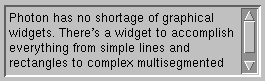
A PtMultiText widget.
Lines can be automatically wrapped on character or word boundaries. Optional scrollbars are provided to make it easy to view wide or long documents. Multiple colors and fonts are supported on any line.
The text buffer of the PtMultiText widget is a zero-terminated string consisting of multibyte (UTF-8) characters. You can set attributes (such as font, color, or style) for any segment of text, but this information isn't embedded in the text buffer.
The MultiText widget provides many features that make it ideal for multilined data entry fields or as the basis for an editor:
All these features can be controlled via the widget's resources and convenience functions. For example, to force the widget to wrap long lines at word boundaries, set the Pt_EMT_WORD bit of the Pt_ARG_MULTITEXT_WRAP_FLAGS resource:
PtSetArg( &argt, Pt_ARG_MULTITEXT_WRAP_FLAGS, Pt_EMT_WORD,
          Pt_EMT_CHAR|Pt_EMT_WORD );
PtSetResources( mtwidget, 1, &argt );
In the above example, we turned off character wrapping because word wrapping is applied if both the word and character wrap flags are on.
You can also control the amount of space left between lines of text using Pt_ARG_LINE_SPACING. The value of this resource is the number of pixels to leave between the descenders of one line of text and the ascenders of the next.
 |
To display a horizontal scrollbar:
|
You can set the contents of the text buffer using the Pt_ARG_TEXT_STRING, Pt_ARG_TEXT_SUBSTRING, or Pt_ARG_MULTITEXT_SEGMENTS resources, or the PtTextModifyText() or PtMultiTextModifyText() convenience functions. The PtMultiText widget automatically wraps the text according to the wrap flags and displays scrollbars if the Pt_ARG_SCROLLBAR_X_DISPLAY and/or Pt_ARG_SCROLLBAR_Y_DISPLAY resources allow for them.
If you set the text using the Pt_ARG_TEXT_STRING resource, the new text replaces the entire text buffer of the widget, and all the lines of text are drawn using the same attributes. The font is the one specified by the Pt_ARG_TEXT_FONT resource inherited from PtLabel. The text foreground and background colors are taken from the values of the Pt_ARG_COLOR and Pt_ARG_FILL_COLOR resources.
If you set the text using Pt_ARG_TEXT_SUBSTRING, only the specified portion of the text buffer is affected. Text can be deleted and/or inserted. The text inserted is drawn with the same attributes as the text at the insertion point.
You can control the following attributes of a range of text:
There are several methods for setting the attributes that affect a given range of text:
When setting the text and attributes via the Pt_ARG_MULTITEXT_SEGMENTS resource, you provide the resource with an array of PtMultiLines_t structures. Each element of the array has a text string and an associated set of attributes that are used when displaying the text.
The following example shows how to create a multiline text widget with two ranges of text with different attributes:
#include <stdio.h>
#include <stdlib.h>
#include <Pt.h>
#include <Ph.h>

PtMultiLines_t hello[] = {
    { "Hello\n", Pt_DEFAULT_FONT, Pt_DEFAULT_COLOR,
      Pt_INHERIT_COLOR },
    { "World!",  "time24", Pg_BLUE, Pt_INHERIT_COLOR }
};

main() {
    PtWidget_t *window;
    PtArg_t args[2];
    int nargs = 0;
    PhDim_t dim = { 300, 150 };

    if( !( window = PtAppInit( NULL, 0, NULL, 0, NULL ) ) )
        exit( EXIT_FAILURE );

    PtSetArg( &args[nargs++], Pt_ARG_DIM, &dim, 0 );
    PtSetArg( &args[nargs++], Pt_ARG_MULTITEXT_SEGMENTS,
        &hello, sizeof( hello )/sizeof(hello[0]) );
    PtCreateWidget( PtMultiText, NULL, nargs, args );

    PtRealizeWidget( window );

    PtMainLoop();
}
You can insert a new range of text into the text buffer and specify its attributes using the PtMultiTextModifyText() function. To delete and/or insert text such that it takes on the attributes in effect at the insertion point, use PtTextModifyText().
The following shows how our "Hello, world" example could be re-written to insert text into the widget:
#include <stdio.h>
#include <stdlib.h>
#include <Pt.h>
#include <Ph.h>

main()
{
  PtWidget_t *window, *mtext;
  PtArg_t args[2];
  int nargs = 0;
  PhDim_t dim = { 300, 150 };
  PtMultiTextAttributes_t attr;

  if( !( window = PtAppInit( NULL, 0, NULL, 0, NULL ) ) )
      exit( EXIT_FAILURE );

  PtSetArg( &args[nargs++], Pt_ARG_DIM, &dim, 0 );
  mtext = PtCreateWidget( PtMultiText, NULL, nargs, args );
  PtTextModifyText( mtext, NULL, NULL, 0, "Hello, \n", 8 );
  attr.font = "time24";
  PtMultiTextModifyText( mtext, NULL, NULL, -1,
      "World! \n", 8, attr, Pt_MT_FONT );

  PtRealizeWidget( window );

  PtMainLoop();
}
With a WYSIWYG editor, a user can select a range of text in the text widget and change the text attributes of that range. This requires the ability to modify the attributes of a range programmatically. Modifying the attributes of a range is also useful for marking blocks of text, as may be done to indicate the results of a search. The attributes of a range of text can be modified by using the PtMultiTextModifyAttributes() function or by setting the Pt_ARG_MULTITEXT_RANGE_ATTRIBUTES resource.
The following example shows how to change the font of the text selection to helv14 using PtMultiTextModifyAttributes():
PtMultiTextAttributes_t attr;
int start, end;

if( PtTextGetSelection( text, &start, &end ) )
{
    attr.font = "helv14";
    PtMultiTextModifyAttributes( text, &start, &end,
                                 &attr, Pt_MT_FONT );
}
This code segment first determines the start and end of the text selection by calling PtTextGetSelection(). This gives the start and end positions to use in a subsequent call to PtMultiTextModifyAttributes().
The following example shows how to change the font of the text selection to helv14 using the Pt_ARG_MULTITEXT_RANGE_ATTRIBUTES resource.
PtMultiTextAttributes_t attr;
PtMultiTextControl_t mtc;

if( PtTextGetSelection( text, &mtc.tc.start, &mtc.tc.end ) )
{
    PtArg_t argt;
    attr.font = "helv14";
    mtc.attributes = &attr;
    PtSetArg( &argt, Pt_ARG_MULTITEXT_RANGE_ATTRIBUTES,
              &mtc, Pt_MT_FONT );
    PtSetResources( text, 1, &argt );
}
The members of the PtMultiTextControl_t structure (also known as PtMultiTextCallback_t) used in the example are:
If you implement editing functions that allow operations that alter the attributes of fonts in text ranges, you should always obtain the current attributes in effect at the start of each range and make changes based on those.
Since the cursor-motion callback notifies the application whenever the cursor is moved, the callback can also notify the application when the user has pressed the pointer button over a "hot-spot" used for a hypertext link.
The data for a hypertext link itself can be stored on the pointer maintained in the tag for the text segment. The cursor-motion callback can then simply:
You can refine this technique further by changing the callback so that it registers only an event handler that invokes the action associated with the hypertext link, then deregisters itself. This lets you define more complex behavior (e.g. proper "activate" behavior for the link). In this case, the link is followed only if the user releases the pointer button when the pointer is over the link.
When dealing with structured text such as hypertext, it's a good idea to break the text down into nodes. Define a data structure for these nodes, defining the type of node and any data associated with the node. Create a range of text for each node, attaching a pointer to the node as the Pt_MT_TAG attribute for the range, and add the range to the widget. The text's original structure can be obtained in callbacks by looking at the tag in the attributes member of the callback data structure.
The following illustrates a simple node structure, allowing either plain text or a hypertext link:
typedef enum text_node_enum { tnText, tnHyperlink }
   TextNodeType_t;
typedef text_node_str {
   TextNodeType_t type;
   void *data;
} TextNode_t;
The following code illustrates how a hypertext link can be activated within a multiline text widget:
struct line_str {
TextNode_t node;
char *text;
} lines[] = {
{ {tnText, NULL}, "Click " },
{ {tnHyper, (void *)"file.html#id"}, "here" },
{ {tnText, NULL}, " to follow a hypertext link"}
};
void
follow_link(PtWidget_t *widget, void *client_data,
PtCallbackInfo_t *info)
{
PtMultiTextCallback_t *cbs =
(PtTextCallback_t *)info->cbdata;
if (info->reason == Pt_CB_MOTION_VERIFY &&
info->event != NULL &&
(info->event->type & Ph_EV_BUT_PRESS))
{
TextNode_t *node =
(TextNode_t *)cbs->attributes->tag;
printf("URL referenced: %s\n", node->data);
}
}
void
init_text(PtWidget_t *text)
{
PtMultiTextAttributes_t reg, hyper;
int nlines;
PtMultiTextCreateAttributes(®);
PtMultiTextCreateAttributes(&hyper);
hyper.text_color = Pg_DGREEN;
for (nlines = 0; nlines < sizeof(lines)/
sizeof(lines[0]); nlines++)
{
PtMultiTextAttributes_t *attr =
lines[nlines].node.type == tnHyper ? &hyper
: ®
PtMultiTextModifyText (text, 0, 0, -1,
lines[nlines].text,
&lines[nlines].node,
attr,
Pt_MT_TAG|Pt_MT_FOREGROUND);
}
PtAddCallback(text, Pt_CB_MOTION_VERIFY, follow_link,
NULL);
}
The data member of a hyperlink node is assumed to be a string indicating what action to take. In this case, it refers to another document to load by a URL of the form used by the Photon Helpviewer.
As for all widgets, Pt_ARG_DIM holds the dimensions of a PtMultiText widget. For example, suppose you have a multitext widget that can show four lines of text. If the user types more than four lines, say six lines, the widget displays a scrollbar to let the user know there are more than lines. Querying Pt_ARG_DIM gives the dimension of the four lines of text.
If you need to determine the dimensions of the entire text - the six lines in our example - you'll need to calculate it as described below:
Use the Pt_ARG_MULTITEXT_QUERY_LINE resource to query the first line (line 1). This gives you information in the form of a PtMultiTextQuery_t structure, which contains a pointer to a PtMultiTextLine_t structure. The PtMultiTextLine_t structure contains a PhRect_t structure that specifies the extent for that line. Calculate the dimensions of the line as:
height = extent.lr.y - extent.ul.y + 1;
width  = extent.lr.x - extent.ul.x + 1;
The lines are organized as a linked list, using the next and previous pointers in the PtMultiTextLine_t structure. Traverse all the lines until the next pointer is NULL, calculating:
When you've examined all the lines, you'll have the "virtual dimensions" of the text input area (i.e. the area that the text would occupy if it had enough room to do so)
If you have only one font in the PtMultiText widget, the method of finding the dimensions can be simplified. For example, to find the virtual height, calculate the height of the first line and multiply it by the number of lines.
| Resource | C type | Pt type | Default |
|---|---|---|---|
| Pt_ARG_MULTITEXT_BOTTOM_LINE | long | Scalar | None (write-only) |
| Pt_ARG_MULTITEXT_FLAGS | long | Flag | See below |
| Pt_ARG_MULTITEXT_NUM_LINES | long | Scalar | 1 (read-only) |
| Pt_ARG_MULTITEXT_NUM_LINES_VISIBLE | short | Scalar | None (read-only) |
| Pt_ARG_MULTITEXT_QUERY_CHARACTER | PtMultiTextQuery_t * | Complex | None (read-only) |
| Pt_ARG_MULTITEXT_QUERY_LINE | PtMultiTextQuery_t * | Complex | None (read-only) |
| Pt_ARG_MULTITEXT_RANGE_ATTRIBUTES | PtMultiTextControl_t * | Complex | None |
| Pt_ARG_MULTITEXT_ROWS | long | Scalar | None (write-only - see below) |
| Pt_ARG_MULTITEXT_SEGMENTS | PtMultiLines_t, short | Array | None (write-only) |
| Pt_ARG_MULTITEXT_TABS | int, int | Array | {20} |
| Pt_ARG_MULTITEXT_TOP_LINE | long | Scalar | 1 |
| Pt_ARG_MULTITEXT_WRAP_FLAGS | short | Flag | See below |
| Pt_ARG_MULTITEXT_X_SCROLL_POS | short | Scalar | 0 |
| Pt_ARG_MULTITEXT_Y_SCROLL_POS | long | Scalar | 1 |
| Pt_ARG_SCROLLBAR_X_DISPLAY | unsigned short | Scalar | Pt_NEVER |
| Pt_ARG_SCROLLBAR_X_HEIGHT | unsigned short | Scalar | 0 (use scrollbar default of 15) |
| Pt_ARG_SCROLLBAR_Y_DISPLAY | unsigned short | Scalar | Pt_NEVER |
| Pt_ARG_SCROLLBAR_Y_WIDTH | unsigned short | Scalar | 0 (use scrollbar default of 15) |
|
The provided convenience functions encompass the functionality of the complex resources. For more info, see the Convenience functions section. |
| C type | Pt type | Default |
|---|---|---|
| long | Scalar | None |
Set the bottom line (top line + number of visible lines -1).
| C type | Pt type | Default |
|---|---|---|
| long | Flag | Pt_EMT_SCROLL_TO_CURSOR |
Flags that affect the appearance and behavior of the widget. The valid bits are:
| C type | Pt type | Default |
|---|---|---|
| long | Scalar | 1 |
The line number of the last line in the buffer. The first line is line 1, not 0.
| C type | Pt type | Default |
|---|---|---|
| short | Scalar | None |
How many lines are currently visible.
| C type | Pt type | Default |
|---|---|---|
| PtMultiTextQuery_t * | Complex | None |
This resource is used to get information about a certain character. This resource is classified as complex, thus requiring special handling. When getting, value is a pointer to an instance of a PtMultiTextQuery_t. The len parameter is the character number of the character to be queried (where the first character is character 0).
| C type | Pt type | Default |
|---|---|---|
| PtMultiTextQuery_t * | Complex | None |
This resource is used to get information about a certain line. This resource is classified as complex, thus requiring special handling. When getting, value is a pointer to an instance of a PtMultiTextQuery_t. The len parameter is the line number of the line to be queried (where the first line is line 1).
| C type | Pt type | Default |
|---|---|---|
| PtMultiTextControl_t * | Complex | None |
This resource modifies/queries the attributes of a specified range. It's classified as complex, thus requiring special handling. When setting, value is a pointer to an instance of a PtMultiTextControl_t structure. The len parameter is a bitmask indicating which attributes to affect in the range. The valid bits for this mask are:
When getting, value is the address of a pointer to a PtMultiTextInfo_t structure, which is the same as PtMultiTextControl_t. The len parameter is a pointer to an instance of a PtTextCallback_t that defines the range to be queried.
| C type | Pt type | Default |
|---|---|---|
| long | Scalar | None (see below) |
Specifies the number of rows. Setting this resource sets the widget's height dimension based on the height of the current font and number of rows specified. There's no default value for this resource because the widget initially uses its dimension to determine the number of rows.
|
This is a "one-shot" resource; it changes the size of the widget when you set it, based on the widget's current settings. If you later change the font, the value of Pt_ARG_MULTITEXT_ROWS isn't used to recalculate the height of the widget. |
| C type | Pt type | Default |
|---|---|---|
| PtMultiLines_t, short | Array | None |
This resource provides an easy way to define a multisegment message. (A segment is a set of contiguous characters that share common attributes, such as font, color, and so on.)
All the text provided in the PtMultiLines_t array is concatenated and used to replace the text in the Pt_ARG_TEXT_STRING resource. The rest of the information in the array is used to build up an index of segments into the text. The array itself isn't preserved within the widget. Consequently, you should treat Pt_ARG_MULTITEXT_SEGMENTS as a write-only resource. To retrieve the text, use the Pt_ARG_TEXT_STRING resource.
| C type | Pt type | Default |
|---|---|---|
| int, int | Array | {20} |
Provides a means of specifying tab stops to the multitext widget. The array provided is an array of integers, each of which is a tab spacing in pixels relative to the last tab position. The last tab spacing is repeated. For example, a tab array of {10,20,10} would produce tab stops at 10, 30, 40, 50, 60, ... pixels.
| C type | Pt type | Default |
|---|---|---|
| long | Scalar | 1 |
Set or get the top line or vertical scroll position, in lines (where the first line is line 1).
| C type | Pt type | Default |
|---|---|---|
| short | Flag | Pt_EMT_WORD|Pt_EMT_NEWLINE |
This resource controls how the multitext widget wraps. The possible values are:
If both the word and character wrap flags are on, word wrapping is applied.
| C type | Pt type | Default |
|---|---|---|
| short | Scalar | 0 |
The horizontal scroll position (in pixels )
| C type | Pt type | Default |
|---|---|---|
| long | Scalar | 1 |
(The same as Pt_ARG_MULTITEXT_TOP_LINE.) Set or get the top line or vertical scroll position in lines. (The first line is line 1.)
| C type | Pt type | Default |
|---|---|---|
| unsigned short | Scalar | Pt_NEVER |
This resource indicates when to display the horizontal scrollbar. The possible values are:
|
In order to display a horizontal scrollbar, you'll need to clear Pt_EMT_WORD and Pt_EMT_CHAR in the widget's Pt_ARG_MULTITEXT_WRAP_FLAGS resource. |
| C type | Pt type | Default |
|---|---|---|
| unsigned short | Scalar | 0 (use scrollbar default of 15) |
The height of the horizontal scrollbar. If this resource is set to 0, the default size of 15 is used.
| C type | Pt type | Default |
|---|---|---|
| unsigned short | Scalar | Pt_NEVER |
This resource indicates when to display the vertical scrollbar. The possible values are:
| C type | Pt type | Default |
|---|---|---|
| unsigned short | Scalar | 0 (use scrollbar default of 15) |
The width of the vertical scrollbar. If this resource is set to 0, the default size of 15 is used.
If the widget modifies an inherited resource, the "Default override" column indicates the new value. This modification affects any subclasses of the widget.
Pt_CB_ACTIVATE is inherited from PtBasic, but its behavior is different for a PtMultiText widget. Each callback is passed a PtCallbackInfo_t structure that contains at least the following members:
If reason_subtype is Pt_EDIT_ACTIVATE or Pt_CHANGE_ACTIVATE, cbdata points to a PtMultiTextCallback_t structure that contains at least the following members:
PtTextCallback_t tc;
PtMultiTextAttributes_t * attributes;
PtMultiTextSegment_t * seg;
void * extended_data;
Before using text, check the length field to make sure text contains valid data. In addition, note that text might not be zero-terminated.
For more information, see PtTextModifyText() or PtMultiTextModifyText().
These callbacks should return Pt_CONTINUE.
Pt_CB_GOT_FOCUS and Pt_CB_LOST_FOCUS are inherited from PtBasic, but the cbdata member of the callback information is different for a PtMultiText widget.
Each callback is passed a PtCallbackInfo_t structure that contains at least the following members:
The members of the PtMultiTextCallback_t structure are used as follows:
These callbacks should return Pt_CONTINUE.
Pt_CB_TEXT_CHANGED (Pt_CB_MODIFY_NOTIFY), and Pt_CB_MOTION_NOTIFY are inherited from PtText but the cbdata member of the callback information is different for a PtMultiText widget.
Each callback is passed a PtCallbackInfo_t structure that contains at least the following members:
The members of the PtMultiTextCallback_t structure are used as follows:
These callbacks should return Pt_CONTINUE.
Pt_CB_MODIFY_VERIFY (Pt_CB_MODIFY_NOTIFY), is inherited from PtText, but the cbdata member of the callback information is different for a PtMultiText widget.
Each callback is passed a PtCallbackInfo_t structure that contains at least the following members:
The members of the PtMultiTextCallback_t structure are used as follows:
Before using text, check the length field to make sure text contains valid data. In addition, note that text might not be zero-terminated.
For more information, see PtTextModifyText() or PtMultiTextModifyText().
These callbacks should return Pt_CONTINUE.
Pt_CB_MOTION_VERIFY (Pt_CB_MODIFY_NOTIFY), is inherited from PtText, but the cbdata member of the callback information is different for a PtMultiText widget.
Each callback is passed a PtCallbackInfo_t structure that contains at least the following members:
If cbinfo->event is NULL, the cursor motion occurred because:
Or:
These callbacks should return Pt_CONTINUE.
The PtMultiText widget defines several convenience functions and data structures that make it easier to use the widget once it's been created. Here's a brief overview:
|
|
|
|