![[Previous]](prev.gif) |
![[Contents]](contents.gif) |
![[Index]](keyword_index.gif) |
![[Next]](next.gif) |
|
|
|
|
 |
This version of this document is no longer maintained. For the latest documentation, see http://www.qnx.com/developers/docs. |
Floating-point numeric widget
PtWidget → PtBasic → PtContainer → PtCompound → PtNumeric → PtNumericFloat
For more information, see the diagram of the widget hierarchy.

<photon/PtNumericFloat.h>
The PtNumericFloat class is a numeric widget that lets you enter floating-point values between given minimum and maximum values. You can also use an incorporated PtScrollbar to increase or decrease the value by a set amount.
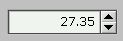
A PtNumericFloat widget.
In addition, you can use the resources defined by PtNumeric to add prefix and suffix strings, and use comma separators. You can use Pt_ARG_NUMERIC_PRECISION to specify the precision of the number (i.e. the number of decimal places, for example, 1,000.00).
PtNumericFloat defines several resources with a C type of double * and a Pt type of Struct. Remember that you can't set and get them as if they were scalar values. Here's how to set the widget's value:
double number = 5.55;

PtSetResource (ABW_base_float, Pt_ARG_NUMERIC_VALUE,
               &number, 0);
Here's how to get the value:
double *number;

PtGetResource (ABW_base_float, Pt_ARG_NUMERIC_VALUE,
               &number, 0);
printf ("Value is %f\n", *number);
 |
PtNumericFloat isn't included in the shared ph library because it uses floating-point operations. If you use it in a non-PhAB application, link with the static library. For more information, see Compiling and linking a non-PhAB application in the Programming Photon without PhAB chapter of the Photon Programmer's Guide. |
| Resource | C type | Pt type | Default |
|---|---|---|---|
| Pt_ARG_NUMERIC_INCREMENT | double * | Struct | 1.0 |
| Pt_ARG_NUMERIC_MAX | double * | Struct | 1000000.00 |
| Pt_ARG_NUMERIC_MIN | double * | Struct | -1000000.00 |
| Pt_ARG_NUMERIC_PRECISION | int | Scalar | 2 |
| Pt_ARG_NUMERIC_VALUE | double * | Struct | 0.0 |
| Pt_CB_NUMERIC_CHANGED | PtCallback_t * | Link | NULL |
| C type | Pt type | Default |
|---|---|---|
| double * | Struct | 1.0 |
The value by which to increase or decrease the value when the up/down buttons are pressed.
| C type | Pt type | Default |
|---|---|---|
| double * | Struct | 1000000.00 |
The maximum value for the widget.
| C type | Pt type | Default |
|---|---|---|
| double * | Struct | -1000000.00 |
The minimum value for the widget.
| C type | Pt type | Default |
|---|---|---|
| int | Scalar | 2 |
The precision or number of displayed decimal places of the widget's current value.
| C type | Pt type | Default |
|---|---|---|
| double * | Struct | 0.0 |
The current value of the widget.
| C type | Pt type | Default |
|---|---|---|
| PtCallback_t * | Link | NULL |
A list of PtCallback_t structures that define the callbacks invoked when the widget's value changes.
If the widget has the Pt_CALLBACKS_ACTIVE bit set in its Pt_ARG_FLAGS resource, these callbacks are also invoked when your application changes the Pt_ARG_NUMERIC_VALUE with a call to PtSetResource() or PtSetResources(), or if the Pt_ARG_NUMERIC_VALUE is changed indirectly by a change to Pt_ARG_NUMERIC_MIN or Pt_ARG_NUMERIC_MAX.
Each callback is passed a PtCallbackInfo_t structure that contains at least the following members:
These callbacks should return Pt_CONTINUE.
Unless the resources are already defined in PtNumericFloat, the PtNumericFloat class uses the resources of its exported subordinate child, PtScrollbar.
The PtNumericFloat class “inherits” all the resources of its exported subordinate child. Where PtNumericFloat and its exported subordinate child both define resources having the same name, the resource defined in PtNumericFloat takes precedence.
If the widget modifies an inherited resource, the “Default override” column indicates the new value. This modification affects any subclasses of the widget.
If cbinfo->reason_subtype is Pt_NUMERIC_ACTIVATE, the callback was invoked because you changed the value and pressed Enter while in PtNumericFloat's text field.
|
|
|
|