![[Previous]](../prev.gif) |
![[Contents]](../contents.gif) |
![[Index]](../keyword_index.gif) |
![[Next]](../next.gif) |
|
|
|
|
 |
This version of this document is no longer maintained. For the latest documentation, see http://www.qnx.com/developers/docs. |
Display a modal dialog for selecting print options
int PtPrintSelection( PtWidget_t *parent,
                      PhPoint_t const *pos,
                      const char *title,
                      PpPrintContext_t *context,
                      unsigned flags);
The parent argument is also used to position the dialog, as described below.
ph
This convenience function displays a PtPrintSel widget and a button-pane in a modal dialog. It lets you select print options and initiate printing:
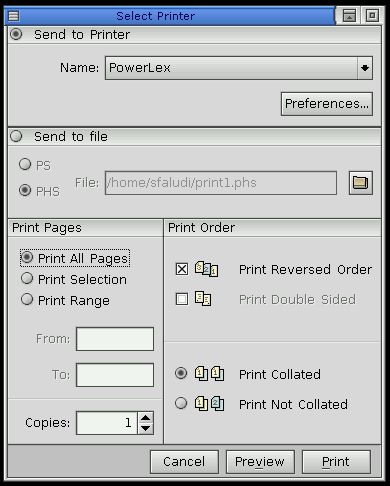
The parent and pos arguments determine where the dialog is to appear:
| parent | pos | Position of dialog |
|---|---|---|
| NULL | NULL | Center of the screen |
| NULL | Non-NULL | pos relative to the screen |
| Non-NULL | NULL | Center of parent |
| Non-NULL | Non-NULL | pos relative to parent |
Your application can call PpSetPC() to modify the print context before calling PtPrintSelection(). These modifications are propagated to the PtPrintSel widget. Note that some modified context settings may not be displayed or may be reset (e.g. if the selected printer doesn't support double-sided printing and the Pp_PC_DUPLEX member was set in the context before calling PtPrintSelection()).
The valid flags are those defined for Pt_ARG_PRINT_FLAGS:
The following flag macros are defined in <PtPrintSel.h>:
The user may click one of these buttons:
An integer that indicates which button was pressed:
The Pp_PC_DO_PREVIEW member of the print context is set when the user presses the Preview button. This means that the context can be passed to the printing function, which spawn the print-preview application if necessary.
See PpContinueJob().
Photon
| Safety: | |
|---|---|
| Interrupt handler | No |
| Signal handler | No |
| Thread | No |
PhPoint_t, PpPrintContext_t, PpPrintWidget(), PpSetPC(), PtPrintSelect(), PtPrintPropSelect()
PtPrintSel in the Photon Widget Reference
"Dialog modules" in the Working with Modules chapter, and the Printing chapter of the Photon Programmer's Guide
|
|
|
|