![[Previous]](../prev.gif) |
![[Contents]](../contents.gif) |
![[Index]](../keyword_index.gif) |
![[Next]](../next.gif) |
|
|
|
|
 |
This version of this document is no longer maintained. For the latest documentation, see http://www.qnx.com/developers/docs. |
Change the printing options for a selected printer via a modal dialog
int PtPrintPropSelect(
       PtWidget_t *parent,
       char const *title,
       PtPrintPropSelectionInfo_t *info );
ph
This function displays a dialog for modifying most of the print parameters for a particular printer:
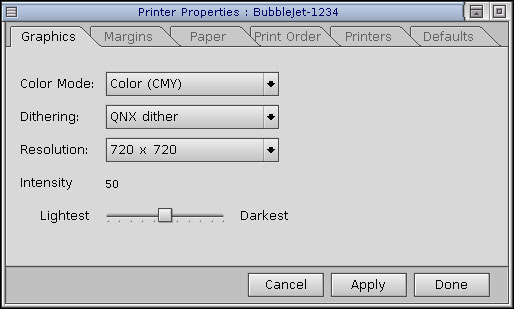
The display is limited to parameters and values that are valid for the selected printer.
A print context is passed to the function in the info argument. This print context is modified according to the state of the dialog when you press the Apply or Done button.
PtPrintPropSelect() also lets you load and save your own preferences, which are stored in personal print configuration files.
The PtPrintSel widget calls PtPrintPropSelect() when you press the Preferences button.
The PtPrintPropSelectionInfo_t structure includes at least:
| parent | Bit | pos |
|---|---|---|
| NULL | Clear | Relative to screen |
| NULL | Set | Ignored; the dialog is centered on the screen |
| non-NULL | Clear | Relative to parent |
| non-NULL | Set | Ignored; the dialog is centered on the parent |
You can customize the print-properties dialog as if it were a widget with resources. You can set or get the values of these pseudo-resources for a PtPrintSel widget (see the Widget Reference).
All the resources are of this type:
| C type | Pt type | Default |
|---|---|---|
| char * | String | See below |
| Resource | Default |
|---|---|
| Pt_ARG_PSP_LBL_CANCEL | Cancel |
| Pt_ARG_PSP_LBL_APPLY | Apply |
| Pt_ARG_PSP_LBL_DONE | Done |
| Resource | Default |
|---|---|
| Pt_ARG_PSP_LBL_TITLE | Printer Properties |
| Pt_ARG_PSP_LBL_TITLE_PAPER | Paper |
| Pt_ARG_PSP_LBL_TITLE_GRAPHICS | Graphics |
| Pt_ARG_PSP_LBL_TITLE_MARGINS | Margins |
| Pt_ARG_PSP_LBL_TITLE_PRINT_ORDER | Print Order |
| Pt_ARG_PSP_LBL_TITLE_PRINTERS | Printers |
| Pt_ARG_PSP_LBL_TITLE_DFLT | Defaults |
| Resource | Default |
|---|---|
| Pt_ARG_PSP_LBL_PAPERSIZE | Paper Size |
| Pt_ARG_PSP_LBL_PAPERSOURCE | Paper Source |
| Pt_ARG_PSP_LBL_PAPERTYPE | Paper Type |
| Pt_ARG_PSP_LBL_ORIENTATION | Orientation |
| Pt_ARG_PSP_LBL_PORTRAIT | Portrait |
| Pt_ARG_PSP_LBL_LANDSCAPE | Landscape |
| Resource | Default |
|---|---|
| Pt_ARG_PSP_LBL_COLORMODE | Color Mode |
| Pt_ARG_PSP_LBL_DITHERING | Dithering |
| Pt_ARG_PSP_LBL_RESOLUTION | Resolution |
| Pt_ARG_PSP_LBL_INTENSITY | Intensity |
| Pt_ARG_PSP_LBL_DARKEST | Darkest |
| Pt_ARG_PSP_LBL_LIGHTEST | Lightest |
| Resource | Default |
|---|---|
| Pt_ARG_PSP_LBL_TOP | Top |
| Pt_ARG_PSP_LBL_BOTTOM | Bottom |
| Pt_ARG_PSP_LBL_LEFT | Left |
| Pt_ARG_PSP_LBL_RIGHT | Right |
| Pt_ARG_PSP_LBL_UNITS | Units |
| Pt_ARG_PSP_LBL_INCHES | 1000th inch |
| Pt_ARG_PSP_LBL_MILLIMETERS | 100th mm |
| Resource | Default |
|---|---|
| Pt_ARG_PSP_LBL_SAVE_DFLT | Save Personal Defaults |
| Pt_ARG_PSP_LBL_LOAD_DFLT | Load Personal Defaults |
| Pt_ARG_PSP_LBL_LOAD_GLOBAL_DFLT | Load Factory Settings |
| Resource | Default |
|---|---|
| Pt_ARG_PSP_LBL_DEFAULT_PRINTER | Default Printer |
| Pt_ARG_PSP_LBL_CURRENT_PRINTER | Current Printer |
| Pt_ARG_PSP_LBL_FONTMAP | Font Map |
| Resource | Default |
|---|---|
| Pt_ARG_PSP_LBL_REVERSED | Print Reversed Order |
| Pt_ARG_PSP_LBL_DOUBLE_SIDED | Print Double Sided |
| Pt_ARG_PSP_LBL_COLLATED | Print Collated |
 |
If you press the Apply button, the contents of the print context might change, no matter which button you ultimately use to close the dialog. If PtPrintPropSelect() returns Pt_PSP_CANCEL, your application shouldn't assume that nothing changed. |
/*************************************
 *
 * psp.c
 *
 * Sample program illustrates usage of
 * PtPrintPropSelect() convenience function.
 *
 * Compile as follows:
 *   $ qcc -lph -o psp psp.c
 *
 * Run as follows:
 *   $ ./psp
 *
 *************************************/

#include <stdio.h>
#include <stdlib.h>
#include <Ph.h>
#include <Pt.h>

int main(int argc, char **argv )
{
   PtWidget_t *win;
   PtPrintPropSelectionInfo_t info;
   int r;
   PhDim_t dim;
   PtArg_t args[3];

   // Set base window dimension to 250x250 pixels
   dim.w = dim.h = 250;
   PtSetArg( args, Pt_ARG_DIM, &dim, 0 );

   // Connect to Photon, initialize widget lib, and
   // create a base window
   if ( NULL == (win = PtAppInit( NULL, &argc,
                                  argv, 1, args )) ) {
      fprintf( stderr, "\nPtAppInit failed.\n" );
      exit( -1 );
   }

   // Realize the base window
   PtRealizeWidget( win );

   // Initialize the info structure
   memset( &info, 0x0, sizeof( PtPrintPropSelectionInfo_t ) );

   // Modify a couple of string resources
   // Change the 'Apply' button's label
   PtSetArg( &args[0], Pt_ARG_PSP_LBL_APPLY,
             "MyApply", 0 );
   // Change the 'Done' button's label
   PtSetArg( &args[1], Pt_ARG_PSP_LBL_DONE,
             "MyDone", 0 );
   // Change the 'Margins' pane
   PtSetArg( &args[2], Pt_ARG_PSP_LBL_TITLE_MARGINS,
             "MyMargins", 0 );

   info.num_args = 3;
   info.args = args;

   // Set up the flags to prevent the display of the
   // 'Cancel' button.
   info.flags = Pt_PSP_NO_CANCEL_BUTTON;

   // Create a print-context.
   if ( NULL == (info.pcontext = PpCreatePC()) ) {
      fprintf( stderr, "\nUnable to create print context.\n" );
      PtExit( -1 );
   }

   // PtPrintPropSelect() will be blocked in its own modal loop
   // until the user presses the 'Esc' key, the 'MyDone' button,
   // or closes the dialog.
   //
   r = PtPrintPropSelect( win, "Adjust Settings", &info );

   // If the 'MyApply' button is pressed, then the current
   // settings in the dialog are applied to the print context.

   if ( Pt_PSP_ERROR == r )
     fprintf( stderr,
       "\nPtPrintPropSelect() failed. The print context was not \
modified.\n" );

   else if ( Pt_PSP_DONE == r )
     fprintf( stderr,
       "\n'MyDone' button pressed. The print context may have \
been modified.\n" );

   else // Pt_PSP_CANCEL == r
     fprintf( stderr,
       "\n'Esc' key pressed or dialog closed. The print \
context may have been modified.\n" );

   // Free the resources used by our print context.
   PpReleasePC( info.pcontext );

   PtMainLoop();
   return EXIT_SUCCESS;
}
Photon
| Safety: | |
|---|---|
| Interrupt handler | No |
| Signal handler | No |
| Thread | No |
PpCreatePC(), PpPrintContext_t, PpSetPC(), PtPrintSelect(), PtPrintSelection()
PtPrintSel in the Widget Reference
"Dialog modules" in the Working with Modules chapter, and the Printing chapter of the Photon Programmer's Guide
|
|
|
|