![[Previous]](image-lib/prev.gif) |
![[Contents]](image-lib/contents.gif) |
![[Index]](image-lib/keyword_index.gif) |
![[Next]](image-lib/next.gif) |
|
|
|
|
A widget for displaying HTML files
PtWidget --> PtBasic --> PtContainer --> PtHtml
For more information, see the diagram of the widget hierarchy.

<photon/PtHtml.h>
 |
You'll need some other definitions and header files, depending on what kinds of images your widget will display. You need to define at least one type of image. See "Supporting images" below. |
The PtHtml widget displays files containing the Hypertext Markup Language (HTML).
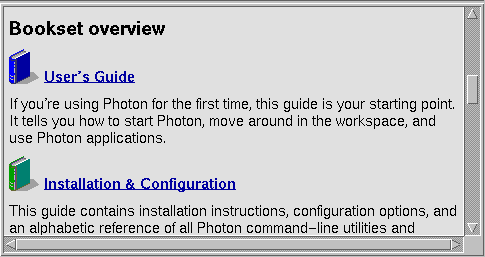
A PtHtml widget.
This widget supports HTML 1.0 with a few extensions (such as simple table support), and can load files only from the local filesystem. For this reason, the widget wouldn't be useful in an application such as a web browser, which would require many more features.
Instead, the widget is intended to be used to create a custom helpviewer or similar applications, which require the display of formatted text and images with hyperlinks.
Given the filename of an HTML file, the widget will load and render the HTML within the canvas (or viewport) of the widget. If the rendered page is larger than the viewport, the widget will create scrollbars so that the user can scroll around the page.
The widget lets you attach callbacks, which will be called before and after a new file is loaded (for example if the user clicks on a hyperlink), and before any inline images are loaded.
The following table summarizes the HTML elements and attributes supported by the PtHtml class.
For some of the elements, the end tag is optional and is indicated by square brackets.
The attributes are shown with the possible attribute values. Where more than one option is shown, one of them must be selected.
| Element | Tags | Attributes |
|---|---|---|
| Comment | <!-- comment --> | |
| Document | <html>...</html> | |
| Head | <head>...</head> | |
| Title | <title>...</title> | |
| Link | <link> | href=url, rel=string |
| Body | <body>...</body> | |
| Heading 1 | <h1>...</h1> | id=string, align={left,center,right} |
| Heading 2 | <h2>...</h2> | id=string, align={left,center,right} |
| Heading 3 | <h3>...</h3> | id=string, align={left,center,right} |
| Heading 4 | <h4>...</h4> | id=string, align={left,center,right} |
| Heading 5 | <h5>...</h5> | id=string, align={left,center,right} |
| Heading 6 | <h6>...</h6> | id=string, align={left,center,right} |
| Rule | <hr> | id=string |
| Paragraph | <p>...[</p>] | id=string |
| Linebreak | <br> | id=string |
| Image | <img> | src=url, align={top,middle,bottom}, alt=string, id=string |
| Anchor | <a>...</a> | href=url, name=string, id=string |
| Preformatted | <pre>...</pre> | id=string |
| Blockquote | <blockquote>...</blockquote> | id=string |
| Address | <address>...</address> | id=string |
| Note | <note>...</note> | src=url, id=string |
| Definition list | <dl>...</dl> | compact, id=string |
| Term | <dt>...[</dt>] | id=string |
| Description | <dd>...[</dd>] | id=string |
| Ordered list | <ol>...</ol> | id=string |
| Unordered list | <ul>...</ul> | id=string |
| List item | <li>...[</li>] | id=string |
| Emphasis | <em>...</em> | id=string |
| Strong | <strong>...</strong> | id=string |
| Code | <code>...</code> | id=string |
| Sample | <samp>...</samp> | id=string |
| Keyboard | <kbd>...</kbd> | id=string |
| Variable | <var>...</var> | id=string |
| Definition | <dfn>...</dfn> | id=string |
| Citation | <cite>...</cite> | id=string |
| Teletype | <tt>...</tt> | id=string |
| Bold | <b>...</b> | id=string |
| Italic | <i>...</i> | id=string |
| Underlined | <u>...</u> | id=string |
| Table | <table>...</table> | border, align={left,center,right}, id=string |
| Table heading | <th>...[</th>] | align={left,center,right}, id=string |
| Table data | <td>...[</td>] | align={left,center,right}, id=string |
| Table row | <tr>...[</tr>] | id=string |
The PtHtml widget supports the standard HTML 1.0 and ISO-8859 character entities. An entity starts with an ampersand, is followed by the entity name, and ends with a semicolon (e.g. © is rendered as ©).
PtHtml also supports the following entities:
| Entity: | Meaning: | Rendered as: |
|---|---|---|
| | Nonbreaking space | Space |
|   | Em-space | Space |
|   | En-space | Space |
| — | Em-dash | Dash (-) |
| – | En-dash | Dash (-) |
| “ | Left double quote | " |
| ” | Right double quote | " |
| ‘ | Left single quote | ' |
| ’ | Right single quote | ' |
| ™ | Trademark | TM |
To have the PtHtml widget support images, include code similar to the following example somewhere in your program (e.g. in the application's init file):
/* image headers */
#define PX_IMAGE_MODULES
#define PX_GIF_SUPPORT
#define PX_BMP_SUPPORT
#include <photon/PxImage.h>
This will cause the code for displaying GIF and BMP images to be linked into your program. For more information, see PxLoadImage() in the Photon Library Reference.
To support printing, the html widget has a special page mode, which you can set in the Pt_ARG_HTML_FLAGS resource. When in page mode, the widget tries to do a clean page break when the height of the current page is greater than the vertical display area. The loaded file is then divided into one or more pages.
The number of pages can be read from the Pt_ARG_HTML_PAGES resource. To display a particular page, you can set the Pt_ARG_HTML_PAGE_N resource. To print the current page, you can use the standard widget-printing mechanisms.
| Resource | C type | Pt type | Default |
|---|---|---|---|
| Pt_ARG_HTML_BORDER_WIDTH | short | Scalar | 1 |
| Pt_ARG_HTML_CURSOR_BUSY | short | Scalar | Ph_CURSOR_CLOCK |
| Pt_ARG_HTML_CURSOR_DEFAULT | short | Scalar | Ph_CURSOR_POINTER |
| Pt_ARG_HTML_CURSOR_LINK | short | Scalar | Ph_CURSOR_FINGER |
| Pt_ARG_HTML_FILL_COLOR | PgColor_t | Scalar | Pg_GREY |
| Pt_ARG_HTML_FLAGS | long | Flag | 0 |
| Pt_ARG_HTML_H1_FONT | char * | String | "helv24" |
| Pt_ARG_HTML_H2_FONT | char * | String | "helv18" |
| Pt_ARG_HTML_H3_FONT | char * | String | "helv14" |
| Pt_ARG_HTML_H4_FONT | char * | String | "helv12" |
| Pt_ARG_HTML_H5_FONT | char * | String | "helv10" |
| Pt_ARG_HTML_H6_FONT | char * | String | "helv08" |
| Pt_ARG_HTML_LINK_COLOR | PgColor_t | Scalar | Pg_DBLUE |
| Pt_ARG_HTML_PAGE_BM | short | Scalar | 5 |
| Pt_ARG_HTML_PAGE_H | int | Scalar | 0 (read-only) |
| Pt_ARG_HTML_PAGE_LM | short | Scalar | 5 |
| Pt_ARG_HTML_PAGE_N | long | Scalar | 0 |
| Pt_ARG_HTML_PAGE_RM | short | Scalar | 5 |
| Pt_ARG_HTML_PAGE_TM | short | Scalar | 5 |
| Pt_ARG_HTML_PAGE_W | int | Scalar | 0 (read-only) |
| Pt_ARG_HTML_PAGE_X | int | Scalar | 0 |
| Pt_ARG_HTML_PAGE_Y | int | Scalar | 0 |
| Pt_ARG_HTML_PAGES | long | Scalar | 0 (read-only) |
| Pt_ARG_HTML_SCROLL_COLOR | PgColor_t | Scalar | Pg_GREY |
| Pt_ARG_HTML_SCROLL_FILL_COLOR | PgColor_t | Scalar | Pg_MGREY |
| Pt_ARG_HTML_SCROLL_HORIZONTAL | short | Scalar | Pt_ALWAYS |
| Pt_ARG_HTML_SCROLL_VERTICAL | short | Scalar | Pt_ALWAYS |
| Pt_ARG_HTML_SCROLL_WIDTH | short | Scalar | 15 |
| Pt_ARG_HTML_TEXT_FONT | char * | String | "helv14" |
| Pt_ARG_HTML_URL | char * | String | NULL |
| Pt_CB_HTML_ERROR | PtCallback_t * | Link | NULL |
| Pt_CB_HTML_FILE_POST | PtCallback_t * | Link | NULL |
| Pt_CB_HTML_FILE_PRE | PtCallback_t * | Link | NULL |
| Pt_CB_HTML_IMAGE | PtCallback_t * | Link | NULL |
| C type | Pt type | Default |
|---|---|---|
| short | Scalar | 1 |
The width of the inside border surrounding the canvas of the widget, and the width of the border of the scrollbars. The width of the outside border of the widget is set using the Pt_ARG_BORDER_WIDTH resource.
| C type | Pt type | Default |
|---|---|---|
| short | Scalar | Ph_CURSOR_CLOCK |
The cursor when loading a file.
| C type | Pt type | Default |
|---|---|---|
| short | Scalar | Ph_CURSOR_POINTER |
The default cursor.
| C type | Pt type | Default |
|---|---|---|
| short | Scalar | Ph_CURSOR_FINGER |
The cursor when over a link.
| C type | Pt type | Default |
|---|---|---|
| PgColor_t | Scalar | Pg_GREY |
The RGB color value used to draw the background of the HTML page.
| C type | Pt type | Default |
|---|---|---|
| long | Flag | 0 |
Flags for changing the behavior of the widget. The possible values are:
| C type | Pt type | Default |
|---|---|---|
| char * | String | "helv24" |
The font to be used to display the heading level 1 text.
| C type | Pt type | Default |
|---|---|---|
| char * | String | "helv18" |
The font to be used to display the heading level 2 text.
| C type | Pt type | Default |
|---|---|---|
| char * | String | "helv14" |
The font to be used to display the heading level 3 text.
| C type | Pt type | Default |
|---|---|---|
| char * | String | "helv12" |
The font to be used to display the heading level 4 text.
| C type | Pt type | Default |
|---|---|---|
| char * | String | "helv10" |
The font to be used to display the heading level 5 text.
| C type | Pt type | Default |
|---|---|---|
| char * | String | "helv08" |
The font to be used to display the heading level 6 text.
| C type | Pt type | Default |
|---|---|---|
| PgColor_t | Scalar | Pg_DBLUE |
The RGB color value used to draw links.
| C type | Pt type | Default |
|---|---|---|
| short | Scalar | 5 |
The width of the bottom margin of the rendered HTML page.
| C type | Pt type | Default |
|---|---|---|
| int | Scalar | 0 |
The height of the rendered HTML page.
| C type | Pt type | Default |
|---|---|---|
| short | Scalar | 5 |
The width of the left margin of the rendered HTML page.
| C type | Pt type | Default |
|---|---|---|
| long | Scalar | 0 |
When the widget is in page mode (i.e. Pt_HTML_PAGE_MODE is set in Pt_ARG_HTML_FLAGS), this resource holds the current page number. You can set this resource to display a particular page. For more information, see "Printing," above.
| C type | Pt type | Default |
|---|---|---|
| short | Scalar | 5 |
The width of the right margin of the rendered HTML page.
| C type | Pt type | Default |
|---|---|---|
| short | Scalar | 5 |
The width of the top margin of the rendered HTML page.
| C type | Pt type | Default |
|---|---|---|
| int | Scalar | 0 |
The width of the rendered HTML page.
| C type | Pt type | Default |
|---|---|---|
| int | Scalar | 0 |
The horizontal position (in pixels) of the top-left hand corner of the viewport relative to the rendered HTML page. Horizontal scrolling changes the x position.
| C type | Pt type | Default |
|---|---|---|
| int | Scalar | 0 |
The vertical position (in pixels) of the top-left hand corner of the viewport relative to the rendered HTML page. Vertical scrolling changes the y position.
| C type | Pt type | Default |
|---|---|---|
| long | Scalar | 0 |
When the widget is in page mode (i.e. Pt_HTML_PAGE_MODE is set in Pt_ARG_HTML_FLAGS), this resource holds the number of pages in the current document. For more information, see "Printing," above.
| C type | Pt type | Default |
|---|---|---|
| PgColor_t | Scalar | Pg_GREY |
The RGB color value used to draw the slider of the scrollbars.
| C type | Pt type | Default |
|---|---|---|
| PgColor_t | Scalar | Pg_MGREY |
The RGB color value used to draw the trough of the scrollbars.
| C type | Pt type | Default |
|---|---|---|
| short | Scalar | Pt_ALWAYS |
The horizontal scrollbar mode. Possible values are:
| C type | Pt type | Default |
|---|---|---|
| short | Scalar | Pt_ALWAYS |
The vertical scrollbar mode. Possible values are:
| C type | Pt type | Default |
|---|---|---|
| short | Scalar | 15 |
The width of the vertical scrollbar and the height of the horizontal scrollbar, in pixels.
| C type | Pt type | Default |
|---|---|---|
| char * | String | "helv14" |
The font to be used to display the body text.
| C type | Pt type | Default |
|---|---|---|
| char * | String | NULL |
The Universal Resource Locator (URL) of the HTML file to be displayed. The URL can have the form:
//node/directory/file.html#name
When the URL resource is set, the widget loads and displays the HTML file (and any images in the file), moving to the position of identifier name on the page. If the given file path is relative (doesn't start with a forward slash) then an absolute path is constructed relative to the currently displayed file.
| C type | Pt type | Default |
|---|---|---|
| PtCallback_t * | Link | NULL |
A list of callbacks the widget invokes when the given URL can't be opened.
Each callback is passed a PtCallbackInfo_t structure that contains at least the following members:
These callbacks should return Pt_CONTINUE.
| C type | Pt type | Default |
|---|---|---|
| PtCallback_t * | Link | NULL |
A list of callbacks that the widget invokes after loading an HTML file.
Each callback is passed a PtCallbackInfo_t structure that contains at least the following members:
These callbacks should return Pt_CONTINUE.
| C type | Pt type | Default |
|---|---|---|
| PtCallback_t * | Link | NULL |
A list of callbacks that the widget invokes before loading an HTML file.
Each callback is passed a PtCallbackInfo_t structure that contains at least the following members:
These callbacks should return Pt_CONTINUE.
| C type | Pt type | Default |
|---|---|---|
| PtCallback_t * | Link | NULL |
A list of callbacks that the widget invokes before loading an image file.
Each callback is passed a PtCallbackInfo_t structure that contains at least the following members:
These callbacks should return Pt_CONTINUE.
If the widget modifies an inherited resource, the "Default override" column indicates the new value. This modification affects any subclasses of the widget.
The following convenience functions are defined by the PtHtml class for accessing some of the data in the HTML file. Here's a brief overview:
|
|
|
|