![[Previous]](image-lib/prev.gif) |
![[Contents]](image-lib/contents.gif) |
![[Index]](image-lib/keyword_index.gif) |
![[Next]](image-lib/next.gif) |
|
|
|
|
An elliptical arc
PtWidget --> PtBasic --> PtGraphic --> PtArc
For more information, see the diagram of the widget hierarchy.

<photon/PtArc.h>
You can create an elliptical arc using the PtArc widget. The arc is defined by:
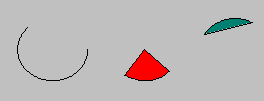
Arcs, circles, ellipses, wedges, and chords created by PtArc.
The ellipse is specified using two control points stored in Pt_ARG_POINTS. These points are relative to the widget's origin, Pt_ARG_ORIGIN (see PtGraphic). If the points aren't set, the ellipse is specified by the widget's dimensions, Pt_ARG_DIM.
An arc is drawn along the ellipse in a counter-clockwise direction starting at the start angle and finishing at the end angle. The start and end angles are specified by two resources: Pt_ARC_START and Pt_ARC_END.
The arc may be scaled directly by scaling its defining points. Scaling a circular arc by unequal amounts in the x and y directions will result in an elliptical arc.
The arc may also be drawn as a closed curve by specifying the arc type with the Pt_ARG_ARC_TYPE resource:
| Resource | C type | Pt type | Default |
|---|---|---|---|
| Pt_ARG_ARC_END | unsigned short | Scalar | 0 |
| Pt_ARG_ARC_START | unsigned short | Scalar | 0 |
| Pt_ARG_ARC_TYPE | unsigned short | Scalar | Pt_ARC_CURVE |
| C type | Pt type | Default |
|---|---|---|
| unsigned short | Scalar | 0 |
The end angle in tenths of a degree.
| C type | Pt type | Default |
|---|---|---|
| unsigned short | Scalar | 0 |
The start angle in tenths of a degree. If this angle is 0, the arc starts on the horizon, to the right of the center. Angles increase in a counter-clockwise direction.
| C type | Pt type | Default |
|---|---|---|
| unsigned short | Scalar | Pt_ARC_CURVE |
The type of arc. Possible values:
If the widget modifies an inherited resource, the "Default override" column indicates the new value. This modification affects any subclasses of the widget.
|
|
|
|