![[Previous]](prev.gif) |
![[Contents]](contents.gif) |
![[Index]](keyword_index.gif) |
![[Next]](next.gif) |
|
|
|
|
 |
This version of this document is no longer maintained. For the latest documentation, see http://www.qnx.com/developers/docs. |
This chapter discusses:
You can access any module directly from your application code by creating an internal link to that module.
An internal link is like a link callback—it lets you specify the module type, a setup function, and, where appropriate, a location. But unlike a link callback, which is always associated directly with a widget callback, an internal link has no association with any widget. Instead, PhAB will generate a manifest that you use in your application code to specify which internal link you want to use. PhAB provides several functions to help you use internal links (discussed below).
You can use internal links to:
Here are some common situations where you should use an internal link to create a module:
Note that when you create a picture module using ApCreateModule(), you must specify the parent container widget.
To create an internal link:
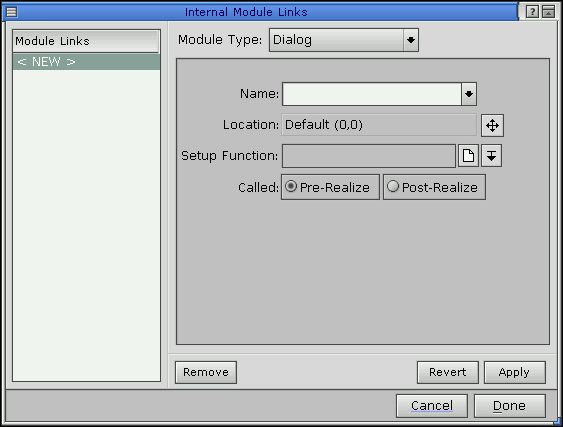
Internal Module Links dialog.
 |
You can create only one internal link per module. |
The fields in the Internal Module Links dialog include:
For every internal link defined in your application, PhAB generates a manifest so you can identify and access the link.
Since PhAB derives the manifest name from the module name, each module can have only one internal link. This may appear limiting, but PhAB provides module-related functions (see below) that let you customize a module's setup function and location from within your application code.
To create the manifest name, PhAB takes the module's name and adds ABM_ as a prefix. So, for example, if you create an internal link to a module named mydialog, PhAB creates the manifest ABM_mydialog.
The manifest is used by the following PhAB API functions:
A module created with this function behaves exactly as if it were linked directly with a link callback. For example, if you define a location and a setup function for the internal link, the module will appear at that location and the setup function will be called. Furthermore, widget callbacks, hotkeys, and so on will become active.
For more info on the above functions, see the Photon Library Reference.
Here's how you can display a menu module when the user presses the right mouse button while pointing at a widget:
int
text_menu_cb( PtWidget_t *widget, ApInfo_t *apinfo,
              PtCallbackInfo_t *cbinfo )
    {

    /* eliminate 'unreferenced' warnings */
    widget = widget, apinfo = apinfo, cbinfo = cbinfo;

    ApCreateModule (ABM_my_menu, widget, cbinfo);

    return( Pt_CONTINUE );

    }
The widget passed to ApCreateModule() is used if the menu is to be positioned relative to the widget; the cbinfo argument is used if the menu is to be positioned relative to the pointer.
Picture modules have two purposes:
If you plan to use a widget several times within your application, a widget database lets you design the widget just once. It also saves you from a lot of coding. All you have to do is preset the widget's resources and then, using PhAB's widget-database API functions, create a copy of the widget wherever you'd normally create the widget within your code.
Here's an example of a widget database—it's part of the one that PhAB uses for its own interface:
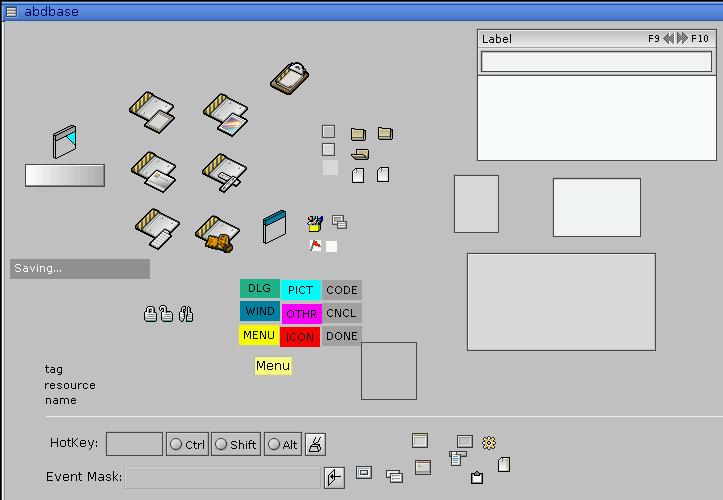
Widget database used for PhAB's interface.
To create a widget database:
For example, let's say you need to create a certain icon many times in your application. By creating the icon inside the picture module, you can create as many copies of the icon as you need at run time.
Besides being able to preset all of a widget's resources in the database module, you can also preattach its callbacks. When you create the widget dynamically, any callbacks you attached will also be created.
By presetting the resources and callbacks of a database widget, you can easily reduce the code required to dynamically create the widget to a single line.
|
Preattached callbacks work only with modules and functions that are part of your executable. If your application opens an external file as a widget database, the PhAB library won't be able to find the code to attach to the callback. |
Assign each widget in a widget database an instance name—this lets you refer to the widgets when using database-related API functions.
You can also create a widget database that you can change dynamically. To do this, open an external widget database—that is, one that isn't bound into your executable—with ApOpenDBaseFile() instead of ApOpenDBase(). ApOpenDBaseFile() lets you access a module file directly and open it as a database.
Once you've opened the module file, you can copy the widgets from that file to your application's internal database and save the resulting database to a new file that you can reopen later.
PhAB provides several support functions to let you open a widget database and copy its widgets into modules—you can copy the widgets as often as needed. PhAB also provides convenience functions to let you copy widgets between databases, create widgets, delete widgets, and save widget databases.
To ensure that the database is always available, you typically use ApOpenDBase() in the application's initialization function.
For a noncontainer-class widget, ApCreateWidgetFamily() and ApCreateDBWidgetFamily() create a single widget; for a container-class widget, they create all the widgets within the container.
These functions differ in the parent used for the widgets:
|
Don't use the manifests generated for the widget database's picture module. Instead, use the widget pointers returned by ApCreateWidget() or ApCreateDBWidget(). |
|
If you use a widget database to create widgets that have PhImage_t data attached to them, don't close the database with ApCloseDBase() until after those widgets are destroyed. (Closing the database frees the memory used by the image.) If you must close the database, make sure to copy the image data within your application code and to reset the image data resource to point to your new copy. |
For more information, see the “Animation” section in the chapter on Drawing.
For more info on widget database functions, see the Photon Library Reference.
|
|
|
|