Display a message and wait for acknowledgment
void PtNotice( PtWidget_t *parent,
        PhPoint_t const *location,
        char const *title,
        PhImage_t const *image,
        char const *message,
        char const *msgFont,
        char const *btnText,
        char const *btnFont,
        int flags );
- parent
- A pointer to the parent widget of the dialog (usually a window).
By setting the flags, you can block the parent and/or
position the dialog relative to it.
- location
- A pointer to a
PhPoint_t
structure that specifies the location of the dialog relative to the
parent or console, depending on the flags.
If location is NULL, the dialog is centered.
- title
- The title for the dialog.
If you don't want a title bar, set this argument to NULL.
- image
- A pointer to a
PhImage_t
that specifies an icon to be displayed beside the message.
If you don't want an icon, set this argument to NULL.
- message
- The message to display.
- msgFont
- The font for the message text; the default is TextFont09.
You should create the font name by calling
PfGenerateFontName().
- btnText
- The text to be displayed in the button.
If this is set to NULL, a default of
&OK is used.
The btnText argument lets you define a shortcut key --
place an ampersand (&) in front of the character to be
used as the shortcut.
- btnFont
- The font to use in the button.
If this is NULL, a default font of TextFont09
is used.
You should create the font names by calling
PfGenerateFontName().
- flags
- Flags that specify the behavior for the dialog.
This can be up to one of the following:
- Pt_CENTER -- center the dialog.
- Pt_LEFT -- left-align the dialog (the default).
- Pt_RIGHT -- right-align the dialog.
with any combination of the following:
- Pt_BLOCK_ALL -- block all of the application's
windows while the dialog is displayed.
- Pt_BLOCK_PARENT -- block the widget specified
by the parent argument (if non-NULL).
- Pt_ESC_DISABLE -- disable the ESC key
as a means of dismissing the dialog.
- Pt_MODAL -- the same as (Pt_WAIT |
Pt_BLOCK_ALL).
- Pt_RELATIVE -- position the dialog relative to
the given parent widget.
If this bit isn't set or parent is NULL, the
dialog is positioned relative to the current console.
- Pt_WAIT -- don't return from the function until
the user dismisses the dialog.
Pt_BLOCK_ALL overrides Pt_BLOCK_PARENT.
ph
This function displays a message and waits for you to acknowledge it.
By setting the flags, you can make PtNotice() work
modally, meaning that it doesn't return
until you respond.
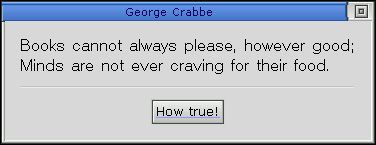
A sample dialog displayed by PtNotice().
char Helvetica12[MAX_FONT_TAG];

PtNotice( ABW_base, NULL, "George Crabbe", NULL,
  "Books cannot always please, however good;\n\
Minds are not ever craving for their food.",
  PfGenerateFontName("Helvetica", 0, 12, Helvetica12),
  "How &true!", NULL, Pt_BLOCK_PARENT);
Photon
| Safety: | |
|---|
| Interrupt handler |
No |
| Signal handler |
No |
| Thread |
No |
ApError(),
PfGenerateFontName(),
PhImage_t,
PhPoint_t,
PtAlert(),
PtPassword(),
PtPrompt()
"Dialog modules"
in the Working with Modules chapter of the
Photon Programmer's Guide
![[Previous]](../prev.gif)
![[Contents]](../contents.gif)
![[Index]](../keyword_index.gif)
![[Next]](../next.gif)
