![[Previous]](../prev.gif) |
![[Contents]](../contents.gif) |
![[Index]](../keyword_index.gif) |
![[Next]](../next.gif) |
|
|
|
|
 |
This version of this document is no longer maintained. For the latest documentation, see http://www.qnx.com/developers/docs. |
Draw an arc, pie, or chord
int  PgDrawArc( PhPoint_t const *center,
                PhPoint_t const *radii,
                unsigned int start,
                unsigned int end,
                int flags );

int  PgDrawArcCx( void *dc,
                  PhPoint_t const *center,
                  PhPoint_t const *radii,
                  unsigned int start,
                  unsigned int end,
                  int flags );
ph
These functions build a command in the draw buffer to draw an arc. PgDrawArc() works on the current draw context, while you can specify the draw context for PgDrawArcCx().
The arc is drawn counter-clockwise, from the start angle to the end angle. To draw a complete circle, make the two angles equal to each other. An angle of 0 bi-grads is on the horizon to the right of the center.
 |
A circle is divided into 65536 gradations called binary gradations or bi-grads. Thus, 0x2000 is 45 degrees, 0x4000 is 90 degrees, 0x8000 is 180 degrees, and 0xC000 is 270 degrees. |
The flags argument controls what type of arc is drawn:
You can OR one of the following into any flags value:
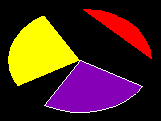
The following example:
DrawFillArc() {
    PhPoint_t   c = { 80, 60 };
    PhPoint_t   r = { 72, 52 };

    PgSetFillColor( Pg_RED );
    PgDrawArc( &c, &r, 0x0000, 0x4000, Pg_DRAW_FILL |
                                       Pg_ARC_CHORD);
    PgSetFillColor( Pg_YELLOW );
    PgDrawArc( &c, &r, 0x5555, 0x9555, Pg_DRAW_FILL |
                                       Pg_ARC_PIE);
    PgSetStrokeColor( Pg_WHITE );
    PgSetFillColor( Pg_PURPLE );
    PgDrawArc( &c, &r, 0xAAAA, 0xEAAA,
               Pg_DRAW_FILL_STROKE | Pg_ARC_PIE);
}
will draw:
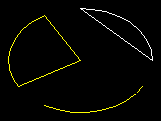
The following example:
DrawStrokeArc() {
    PhPoint_t   c = { 80, 60 };
    PhPoint_t   r = { 72, 52 };

    PgSetStrokeColor( Pg_WHITE );
    PgDrawArc( &c, &r, 0x0000, 0x4000, Pg_DRAW_STROKE |
                                       Pg_ARC_CHORD );
    PgSetStrokeColor( Pg_YELLOW );
    PgDrawArc( &c, &r, 0x5555, 0x9555, Pg_DRAW_STROKE |
                                       Pg_ARC_PIE );
    PgSetStrokeColor( Pg_YELLOW );
    PgDrawArc( &c, &r, 0xAAAA, 0xEAAA, Pg_DRAW_STROKE |
                                       Pg_ARC );
}
will draw:
Photon
| Safety: | |
|---|---|
| Interrupt handler | No |
| Signal handler | No |
| Thread | No |
To draw stroked arcs, see also:
PgSetStrokeCap*(), PgSetStrokeColor*(), PgSetStrokeDash*(), PgSetStrokeDither*(), PgSetStrokeJoin*(), PgSetStrokeWidth*()
To draw filled arcs, see also:
PgSetFillColor*(), PgSetFillDither*(), PgSetFillTransPat*()
"Arcs, ellipses, polygons, and rectangles" in the Raw Drawing and Animation chapter of the Photon Programmer's Guide
|
|
|
|