Middleware, development tools, realtime operating system
software and services for superior embedded design


Home
QNX Community Resources
QNX Documentation Library
PgContrastBevelBox, PgContrastBevelBoxCx

PgContrastBevelBox, PgContrastBevelBoxCx

QNX Software Systems
Developer Resources
Blogs
Board support packages
Foundry27 projects
Forums
Hardware support listing
Online video tutorials
Product documentation
Technical Articles

PgContrastBevelBox(), PgContrastBevelBoxCx()

Draw a beveled box with gradients and a given level of contrast

Synopsis:

int PgContrastBevelBox( PhPoint_t *ul,
                        PhPoint_t *lr,
                        PgColor_t flat_color,
                        int contrast,
                        short depth,
                        short width,
                        PgColor_t outline_color,
                        PgColor_t inline_color,
                        int flags );

int PgContrastBevelBoxCx( void *dc,
                          PhPoint_t *ul,
                          PhPoint_t *lr,
                          PgColor_t flat_color,
                          int contrast,
                          short depth,
                          short width,
                          PgColor_t outline_color,
                          PgColor_t inline_color,
                          int flags );
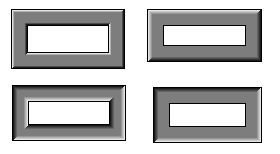
Arguments:

dc
PgContrastBevelBoxCx() only. A void pointer to any type of draw context. Examples of draw contexts are:
ul, lr
Pointers to PhPoint_t that define the upper left and lower right corners of the beveled box.
flat_color
A PgColor_t that defines the middle/neutral color in the bevel-gradients, and the box's fill color if you set Pg_BVB_FILL in the flags.
contrast
The contrast in the light-to-flat and flat-to-dark gradients, in the range 0 (low/no contrast) to 255 (high/max contrast).
depth
The number of isochrome lines in the light-to-flat and flat-to-dark bevel gradients. The sign of the depth controls the location of an (imaginary) light source:

Light sources for a beveled box

  • Positive depth -- illuminated from the top left.
  • Negative depth -- illuminated from the bottom right.
width
The width of the bevel, not including outlines and inlines.
outline_color
The color of the outline rectangle.
inline_color
The color of the inline rectangle.
flags
Flags that affect the appearance of the beveled box:
  • Pg_BVB_FILL -- fill the beveled box with flat-color.
  • Pg_BVB_FULL_GRADIENTS -- each bevel has two gradients: light-to-flat and flat-to-dark. If this isn't set, the bevels have only one gradient; see the illustration above.
  • Pg_BVB_DRAW_LEFT -- draw the left edge of the beveled box.
  • Pg_BVB_DRAW_RIGHT -- draw the right edge of the beveled box.
  • Pg_BVB_DRAW_TOP -- draw the top edge of the beveled box.
  • Pg_BVB_DRAW_BOTTOM -- draw the bottom edge of the beveled box.
  • Pg_BVB_DRAW_ALL -- draw all edges of the beveled box.
  • Pg_BVB_DRAW_BITS -- turn on all of the above flag bits.

Library:

ph

Description:

These functions draw a beveled box with gradients and a given level of contrast. PgContrastBevelBox() works on the current draw context, while you can specify the draw context for PgContrastBevelBoxCx().

Returns:

0
Success.
-1
An error occurred.

Classification:

Photon

Safety:
Interrupt handler No
Signal handler No
Thread No

See also:

PgColor_t, PgBevelBox*(), PgDrawGradientBevelBox*(), PhPoint_t

"Gradients" in the Raw Drawing and Animation chapter of the Photon Programmer's Guide