Capture a screen image
snapshot [-S i|n] [-s server] [-x position[%][r]]
         [-y position[%][r]]
Neutrino
- -Si|n
- The initial state of the main window (iconified or normal).
- -s server_name
- The name of the Photon server:
| If server_name is:
|
This server is used:
|
| node_path
|
node_path/dev/photon
|
| fullpath
|
fullpath
|
| relative_path
|
/dev/relative_path
|
- -x position[%][r]
- The x coordinate of the upper-left corner of the window, in pixels,
or as a percentage of screen width if % is specified.
If r is specified, the coordinate is relative to the
current console.
- -y position[%][r]
- The y coordinate of the upper-left corner of the window, in pixels,
or as a percentage of screen height if % is specified.
If r is specified, the coordinate is relative to the
current console.
The snapshot utility captures portions of the Photon workspace.
The main window looks like this:
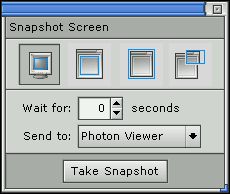
The snapshot window.
The controls across the top of the window let you choose the source
of the snapshot, which is one of:
- the entire screen
- a selected window, not including its frame
- a selected window, including its frame
- an area that you select.
You can send the image to:
- the Photon image viewer,
pv
- the Photon clipboard
- ${HOME}/snap.bmp
- ${HOME}/snap.jpg
If you want a snapshot of a menu or other popup item, set the snapshot options
as you wish, and then:
- Specify the number of seconds to wait.
- Click on the Take Snapshot button and select the appropriate window or
area.
- Before the timer counts down, display the menu or popup item.
- Wait for the timer to expire.
 |
snapshot does not work within a phditto window. |
Run using Photon server on node my_node:
snapshot -s/net/my_node/dev/photon
Run at initial position (10,10):
snapshot -x10 -y10
- PWM_PRINTSCRN_APP
- The application to start when the Print Scrn key is pressed.
By default, snapshot is started.
pv
![[Previous]](../prev.gif)
![[Contents]](../contents.gif)
![[Index]](../keyword_index.gif)
![[Next]](../next.gif)
