![[Previous]](../prev.gif) |
![[Contents]](../contents.gif) |
![[Index]](../keyword_index.gif) |
![[Next]](../next.gif) |
|
|
|
|
 |
This version of this document is no longer maintained. For the latest documentation, see http://www.qnx.com/developers/docs. |
Media player for Photon
 |
This utility is available only in the Multimedia Technology Development Kit (TDK). |
phplay [options] [url]
Neutrino
The CDDA_MILLISECONDS environment variable controls the buffer size:
| If server_name is: | This server is used: |
|---|---|
| node_path | node_path/dev/photon |
| fullpath | fullpath |
| relative_path | /dev/relative_path |
The phplay command starts the media player:
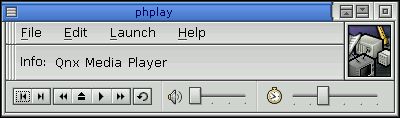
The hotkeys include:
If the video window has focus, the following hotkeys are also defined:
The audio drivers support multichannel mixing. You have subchannel control through phplay's volume sliders. This means you can open up to 8 concurrent instances of phplay using software mixing. The number of hardware mixers depends on the hardware.
|
For hardware reasons, you can have only one video overlay open at a time, but you can have many mp3s mixing together. |
The setup window lets you configure the audio card/device. There's a button for restoring the defaults if you edit the file and need to get to a stable set of settings. These settings are stored in ${HOME}/.ph/mpsettings. It's easy to use a text editor to modify this file, but you can also edit it through phplay. Things you might want to do include bypassing software mixing for performance reasons. To do this on an audiopci card, change PCM(A) Playback from card 1 to card 0.
When you start phplay, the application queries the registry file, /etc/config/media/mpregistry, to determine which audio CD plugin to load.
In order to load the audiocdda plugin, you must:
Or:
phplay -p audiocdda.so
Run using the Photon server on node my_node:
phplay -s my_node
Run at initial position 10,10 with initial dimension of 200x300:
phplay -x10 -y10
Run, loading the audio CD shared object immediately:
phplay -p audiocd.so
Run, loading the soundfile.so shared object and playing revenge.wav:
phplay file:///var/media/revenge.wav
You need hardware with an FPU for MPEG decoding because floating-point emulation is too slow. We don't currently support a fixed-point MPEG audio decoder.
|
|
|
|