![[Previous]](prev.gif) |
![[Contents]](contents.gif) |
![[Index]](keyword_index.gif) |
![[Next]](next.gif) |
|
|
|
|
 |
This version of this document is no longer maintained. For the latest documentation, see http://www.qnx.com/developers/docs. |
This chapter contains the following topics:
 |
This chapter assumes that you're familiar with message passing. If you're not, see the Neutrino Microkernel chapter in the System Architecture book as well as the MsgSend(), MsgReceivev(), and MsgReply() series of calls in the Library Reference. The code samples used in this chapter are not always POSIX-compliant. |
This section contains the following:
A resource manager is a user-level server program that accepts messages from other programs and, optionally, communicates with hardware. It's a process that registers a pathname prefix in the pathname space (e.g. /dev/ser1), and when registered, other processes can open that name using the standard C library open() function, and then read() from, and write() to, the resulting file descriptor. When this happens, the resource manager receives an open request, followed by read and write requests.
A resource manager isn't restricted to handling just open(), read(), and write() calls -- it can support any functions that are based on a file descriptor or file pointer, as well as other forms of IPC.
In Neutrino, resource managers are responsible for presenting an interface to various types of devices. In other operating systems, the managing of actual hardware devices (e.g. serial ports, parallel ports, network cards, and disk drives) or virtual devices (e.g. /dev/null, a network filesystem, and pseudo-ttys), is associated with device drivers. But unlike device drivers, the Neutrino resource managers execute as processes separate from the kernel.
|
A resource manager looks just like any other user-level program. |
Adding resource managers in Neutrino won't affect any other part of the OS -- the drivers are developed and debugged like any other application. And since the resource managers are in their own protected address space, a bug in a device driver won't cause the entire OS to shut down.
If you've written device drivers in most UNIX variants, you're used to being restricted in what you can do within a device driver; but since a device driver in Neutrino is just a regular process, you aren't restricted in what you can do (except for the restrictions that exist inside an ISR).
|
In order to register a prefix in the pathname space, a resource manager must be run as root. |
A serial port may be managed by a resource manager called devc-ser8250, although the actual resource may be called /dev/ser1 in the pathname space. When a process requests serial port services, it does so by opening a serial port (in this case /dev/ser1).
fd = open("/dev/ser1", O_RDWR);
for (packet = 0; packet < npackets; packet++)
    write(fd, packets[packet], PACKET_SIZE);
close(fd);
Because resource managers execute as processes, their use isn't restricted to device drivers -- any server can be written as a resource manager. For example, a server that's given DVD files to display in a GUI interface wouldn't be classified as a driver, yet it could be written as a resource manager. It can register the name /dev/dvd and as a result, clients can do the following:
fd = open("/dev/dvd", O_WRONLY);
while (data = get_dvd_data(handle, &nbytes)) {
    bytes_written = write(fd, data, nbytes);
    if (bytes_written != nbytes) {
        perror ("Error writing the DVD data");
    }
}
close(fd);
Here are a few reasons why you'd want to write a resource manager:
The API for communicating with the resource manager is for the most part, POSIX. All C programmers are familiar with the open(), read(), and write() functions. Training costs are minimized, and so is the need to document the interface to your server.
If you have many server processes, writing each server as a resource manager keeps the number of different interfaces that clients need to use to a minimum.
An example of this is if you have a team of programmers building your overall application, and each programmer is writing one or more servers for that application. These programmers may work directly for your company, or they may belong to partner companies who are developing add-on hardware for your modular platform.
If the servers are resource managers, then the interface to all of those servers is the POSIX functions: open(), read(), write(), and whatever else makes sense. For control-type messages that don't fit into a read/write model, there's devctl() (although devctl() isn't POSIX).
Since the API for communicating with a resource manager is the POSIX set of functions, and since standard POSIX utilities use this API, the utilities can be used for communicating with the resource managers.
For instance, the tiny TCP/IP protocol module contains resource-manager code that registers the name /proc/ipstats. If you open this name and read from it, the resource manager code responds with a body of text that describes the statistics for IP.
The cat utility takes the name of a file and opens the file, reads from it, and displays whatever it reads to standard output (typically the screen). As a result, you can type:
cat /proc/ipstats
The resource manager code in the TCP/IP protocol module responds with text such as:
Ttcpip Sep  5 2000 08:56:16

verbosity level 0
ip checksum errors: 0
udp checksum errors: 0
tcp checksum errors: 0

packets sent: 82
packets received: 82

lo0   : addr 127.0.0.1       netmask 255.0.0.0       up

DST: 127.0.0.0       NETMASK: 255.0.0.0       GATEWAY: lo0

TCP 127.0.0.1.1227        > 127.0.0.1.6000        ESTABLISHED snd    0 rcv    0
TCP 127.0.0.1.6000        > 127.0.0.1.1227        ESTABLISHED snd    0 rcv    0
TCP 0.0.0.0.6000                                  LISTEN
You could also use command-line utilities for a robot-arm driver. The driver could register the name, /dev/robot/arm/angle, and any writes to this device are interpreted as the angle to set the robot arm to. To test the driver from the command line, you'd type:
echo 87 >/dev/robot/arm/angle
The echo utility opens /dev/robot/arm/angle and writes the string ("87") to it. The driver handles the write by setting the robot arm to 87 degrees. Note that this was accomplished without writing a special tester program.
Another example would be names such as /dev/robot/registers/r1, r2, ... Reading from these names returns the contents of the corresponding registers; writing to these names set the corresponding registers to the given values.
Even if all of your other IPC is done via some non-POSIX API, it's still worth having one thread written as a resource manager for responding to reads and writes for doing things as shown above.
Despite the fact that you'll be using a resource manager API that hides many details from you, it's still important to understand what's going on under the covers. For example, your resource manager is a server that contains a MsgReceive() loop, and clients send you messages using MsgSend*(). This means that you must reply either to your clients in a timely fashion, or leave your clients blocked but save the rcvid for use in a later reply.
To help you understand, we'll discuss the events that occur under the covers for both the client and the resource manager.
When a client calls a function that requires pathname resolution (e.g. open(), rename(), stat(), or unlink()), the function subsequently sends messages to both the process and the resource managers to obtain a file descriptor. Once the file descriptor is obtained, the client can use it to send messages directly to the device associated with the pathname.
In the following, the file descriptor is obtained and then the client writes directly to the device:
/*
 * In this stage, the client talks
 * to the process manager and the resource manager.
 */
fd = open("/dev/ser1", O_RDWR);

/*
 * In this stage, the client talks directly to the
 * resource manager.
 */
for (packet = 0; packet < npackets; packet++)
    write(fd, packets[packet], PACKET_SIZE);
close(fd);
For the above example, here's the description of what happened behind the scenes. We'll assume that a serial port is managed by a resource manager called devc-ser8250, that's been registered with the pathname prefix /dev/ser1:
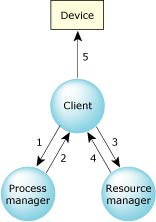
Under-the-cover communication between the client, the process manager, and the resource manager.
Here's what went on behind the scenes...
When the devc-ser8250 resource manager registered its name (/dev/ser1)
in the namespace, it called the process manager.
The process manager is responsible for maintaining information about pathname prefixes.
During registration, it adds an entry to its table that looks similar
to this:
0, 47167, 1, 0, 0, /dev/ser1
The table entries represent:
A resource manager is uniquely identified by a node descriptor, process ID, and a channel ID. The process manager's table entry associates the resource manager with a name, a handle (to distinguish multiple names when a resource manager registers more than one name), and an open type.
When the client's library issued the query call in step 1, the process manager looked through all of its tables for any registered pathname prefixes that match the name. Previously, had another resource manager registered the name /, more than one match would be found. So, in this case, both / and /dev/ser1 match. The process manager will reply to the open() with the list of matched servers or resource managers. The servers are queried in turn about their handling of the path, with the longest match being asked first.
fd = ConnectAttach(nd, pid, chid, 0, 0);
The file descriptor that's returned by ConnectAttach() is also a connection ID and is used for sending messages directly to the resource manager. In this case, it's used to send a connect message (_IO_CONNECT defined in <sys/iomsg.h>) containing the handle to the resource manager requesting that it open /dev/ser1.
|
Typically, only functions such as open() call ConnectAttach() with an index argument of 0. Most of the time, you should OR _NTO_SIDE_CHANNEL into this argument, so that the connection is made via a side channel, resulting in a connection ID that's greater than any valid file descriptor. |
When the resource manager gets the connect message, it performs validation using the access modes specified in the open() call (i.e. are you trying to write to a read-only device?, etc.)
In the sample code, it looks as if the client opens and writes directly to the device. In fact, the write() call sends an _IO_WRITE message to the resource manager requesting that the given data be written, and the resource manager responds that it either wrote some of all of the data, or that the write failed.
Eventually, the client calls close(), which sends an _IO_CLOSE_DUP message to the resource manager. The resource manager handles this by doing some cleanup.
The resource manager is a server that uses the Neutrino send/receive/reply messaging protocol to receive and reply to messages. The following is pseudo-code for a resource manager:
initialize the resource manager
register the name with the process manager
DO forever
    receive a message
    SWITCH on the type of message
        CASE _IO_CONNECT:
            call io_open handler
            ENDCASE
        CASE _IO_READ:
            call io_read handler
            ENDCASE
        CASE _IO_WRITE:
            call io_write handler
            ENDCASE
        .   /* etc. handle all other messages */
        .   /* that may occur, performing     */
        .   /* processing as appropriate      */
    ENDSWITCH
ENDDO
Many of the details in the above pseudo-code are hidden from you by a resource manager library that you'll use. For example, you won't actually call a MsgReceive*() function -- you'll call a library function, such as resmgr_block() or dispatch_block(), that does it for you. If you're writing a single-threaded resource manager, you might provide a message handling loop, but if you're writing a multi-threaded resource manager, the loop is hidden from you.
You don't need to know the format of all the possible messages, and you don't have to handle them all. Instead, you register "handler functions," and when a message of the appropriate type arrives, the library calls your handler. For example, suppose you want a client to get data from you using read() -- you'll write a handler that's called whenever an _IO_READ message is received. Since your handler handles _IO_READ messages, we'll call it an "io_read handler."
The resource manager library:
However, it's still your responsibility to reply to the _IO_READ message. You can do that from within your io_read handler, or later on when data arrives (possibly as the result of an interrupt from some data-generating hardware).
The library does default handling for any messages that you don't want to handle. After all, most resource managers don't care about presenting proper POSIX filesystems to the clients. When writing them, you want to concentrate on the code for talking to the device you're controlling. You don't want to spend a lot of time worrying about the code for presenting a proper POSIX filesystem to the client.
In considering how much work you want to do yourself in order to present a proper POSIX filesystem to the client, you can break resource managers into two types:
Device resource managers create only single-file entries in the filesystem, each of which is registered with the process manager. Each name usually represents a single device. These resource managers typically rely on the resource-manager library to do most of the work in presenting a POSIX device to the user.
For example, a serial port driver registers names such as /dev/ser1 and /dev/ser2. When the user does ls -l /dev, the library does the necessary handling to respond to the resulting _IO_STAT messages with the proper information. The person who writes the serial port driver is able to concentrate instead on the details of managing the serial port hardware.
Filesystem resource managers register a mountpoint with the process manager. A mountpoint is the portion of the path that's registered with the process manager. The remaining parts of the path are managed by the filesystem resource manager. For example, when a filesystem resource manager attaches a mountpoint at /mount, and the path /mount/home/thomasf is examined:
Examples of using filesystem resource managers are:
A resource manager is composed of some of the following layers:
This top layer consists of a set of functions that take care of most of the POSIX filesystem details for you -- they provide a POSIX-personality. If you're writing a device resource manager, you'll want to use this layer so that you don't have to worry too much about the details involved in presenting a POSIX filesystem to the world.
This layer consists of default handlers that the resource manager library uses if you don't provide a handler. For example, if you don't provide an io_open handler, iofunc_open_default() is called.
It also contains helper functions that the default handlers call. If you override the default handlers with your own, you can still call these helper functions. For example, if you provide your own io_read handler, you can call iofunc_read_verify() at the start of it to make sure that the client has access to the resource.
The names of the functions and structures for this layer have the form iofunc_*. The header file is <sys/iofunc.h>. For more information, see the Library Reference.
This layer manages most of the resource manager library details. It:
If you don't use this layer, then you'll have to parse the messages yourself. Most resource managers use this layer.
The names of the functions and structures for this layer have the form resmgr_*. The header file is <sys/resmgr.h>. For more information, see the Library Reference.
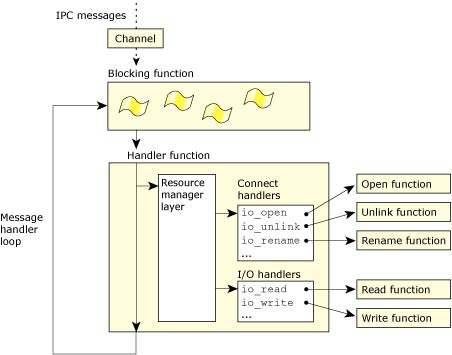
You can use the resmgr layer to handle _IO_* messages.
This layer acts as a single blocking point for a number of different types of things. With this layer, you can handle:
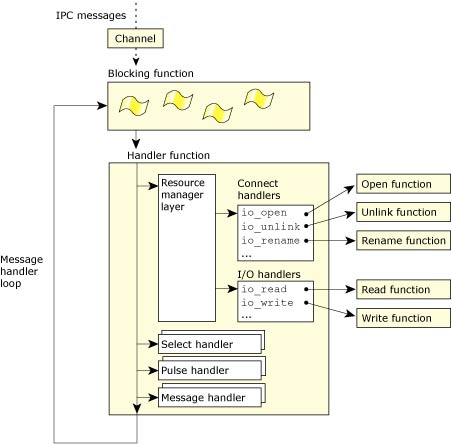
You can use the dispatch layer to handle _IO_* messages, select, pulses, and other messages.
The following describes the manner in which messages are handled via the dispatch layer (or more precisely, through dispatch_handler()). Depending on the blocking type, the handler may call the message_*() subsystem. A search is made, based on the message type or pulse code, for a matching function that was attached using message_attach() or pulse_attach(). If a match is found, the attached function is called.
If the message type is in the range handled by the resource manager (I/O messages) and pathnames were attached using resmgr_attach(), the resource manager subsystem is called and handles the resource manager message.
If a pulse is received, it may be dispatched to the resource manager subsystem if it's one of the codes handled by a resource manager (UNBLOCK and DISCONNECT pulses). If a select_attach() is done and the pulse matches the one used by select, then the select subsystem is called and dispatches that event.
If a message is received and no matching handler is found for that message type, MsgError(ENOSYS) is returned to unblock the sender.
This layer allows you to have a single- or multi-threaded resource manager. This means that one thread can be handling a write() while another thread handles a read().
You provide the blocking function for the threads to use as well as the handler function that's to be called when the blocking function returns. Most often, you give it the dispatch layer's functions. However, you can also give it the resmgr layer's functions or your own.
You can use this layer independently of the resource manager layer.
The following are two complete but simple examples of a device resource manager:
|
As you read through this chapter, you'll encounter many code snippets. Most of these code snippets have been written so that they can be combined with either of these simple resource managers. |
Both of these simple device resource managers model their functionality after that provided by /dev/null:
Here's the complete code for a simple single-threaded device resource manager:
#include <errno.h>
#include <stdio.h>
#include <stddef.h>
#include <stdlib.h>
#include <unistd.h>
#include <sys/iofunc.h>
#include <sys/dispatch.h>

static resmgr_connect_funcs_t    connect_funcs;
static resmgr_io_funcs_t         io_funcs;
static iofunc_attr_t             attr;

main(int argc, char **argv)
{
    /* declare variables we'll be using */
    resmgr_attr_t        resmgr_attr;
    dispatch_t           *dpp;
    dispatch_context_t   *ctp;
    int                  id;

    /* initialize dispatch interface */
    if((dpp = dispatch_create()) == NULL) {
        fprintf(stderr,
                "%s: Unable to allocate dispatch handle.\n",
                argv[0]);
        return EXIT_FAILURE;
    }

    /* initialize resource manager attributes */
    memset(&resmgr_attr, 0, sizeof resmgr_attr);
    resmgr_attr.nparts_max = 1;
    resmgr_attr.msg_max_size = 2048;

    /* initialize functions for handling messages */
    iofunc_func_init(_RESMGR_CONNECT_NFUNCS, &connect_funcs,
                     _RESMGR_IO_NFUNCS, &io_funcs);

    /* initialize attribute structure used by the device */
    iofunc_attr_init(&attr, S_IFNAM | 0666, 0, 0);

    /* attach our device name */
    id = resmgr_attach(
            dpp,            /* dispatch handle        */
            &resmgr_attr,   /* resource manager attrs */
            "/dev/sample",  /* device name            */
            _FTYPE_ANY,     /* open type              */
            0,              /* flags                  */
            &connect_funcs, /* connect routines       */
            &io_funcs,      /* I/O routines           */
            &attr);         /* handle                 */
    if(id == -1) {
        fprintf(stderr, "%s: Unable to attach name.\n", argv[0]);
        return EXIT_FAILURE;
    }

    /* allocate a context structure */
    ctp = dispatch_context_alloc(dpp);

    /* start the resource manager message loop */
    while(1) {
        if((ctp = dispatch_block(ctp)) == NULL) {
            fprintf(stderr, "block error\n");
            return EXIT_FAILURE;
        }
        dispatch_handler(ctp);
    }
}
|
Include <sys/dispatch.h> after <sys/iofunc.h> to avoid warnings about redefining the members of some functions. |
Let's examine the sample code step-by-step.
Here's an outline of the steps we followed:
/* initialize dispatch interface */
if((dpp = dispatch_create()) == NULL) {
    fprintf(stderr, "%s: Unable to allocate dispatch handle.\n",
            argv[0]);
    return EXIT_FAILURE;
}
We need to set up a mechanism so that clients can send messages to the resource manager. This is done via the dispatch_create() function which creates and returns the dispatch structure. This structure contains the channel ID. Note that the channel ID isn't actually created until you attach something, as in resmgr_attach(), message_attach(), and pulse_attach().
|
The dispatch structure (of type dispatch_t) is opaque; you can't access its contents directly. Use message_connect() to create a connection using this hidden channel ID. |
/* initialize resource manager attributes */
memset(&resmgr_attr, 0, sizeof resmgr_attr);
resmgr_attr.nparts_max = 1;
resmgr_attr.msg_max_size = 2048;
The resource manager attribute structure is used to configure:
For more information, see resmgr_attach() in the Library Reference.
/* initialize functions for handling messages */
iofunc_func_init(_RESMGR_CONNECT_NFUNCS, &connect_funcs,
                 _RESMGR_IO_NFUNCS, &io_funcs);
Here we supply two tables that specify which function to call when a particular message arrives:
Instead of filling in these tables manually, we call iofunc_func_init() to place the iofunc_*_default() handler functions into the appropriate spots.
/* initialize attribute structure used by the device */
iofunc_attr_init(&attr, S_IFNAM | 0666, 0, 0);
The attribute structure contains information about our particular device associated with the name /dev/sample. It contains at least the following information:
Effectively, this is a per-name data structure. Later on, we'll see how you could extend the structure to include your own per-device information.
/* attach our device name */
id = resmgr_attach(dpp,            /* dispatch handle        */
                   &resmgr_attr,   /* resource manager attrs */
                   "/dev/sample",  /* device name            */
                   _FTYPE_ANY,     /* open type              */
                   0,              /* flags                  */
                   &connect_funcs, /* connect routines       */
                   &io_funcs,      /* I/O routines           */
                   &attr);         /* handle                 */
if(id == -1) {
    fprintf(stderr, "%s: Unable to attach name.\n", argv[0]);
    return EXIT_FAILURE;
}
Before a resource manager can receive messages from other programs, it needs to inform the other programs (via the process manager) that it's the one responsible for a particular pathname prefix. This is done via pathname registration. When registered, other processes can find and connect to this process using the registered name.
In this example, a serial port may be managed by a resource manager called devc-xxx, but the actual resource is registered as /dev/sample in the pathname space. Therefore, when a program requests serial port services, it opens the /dev/sample serial port.
We'll look at the parameters in turn, skipping the ones we've already discussed.
Some resource managers legitimately limit the types of open requests they handle. For instance, the POSIX message queue resource manager accepts only open messages of type _FTYPE_MQUEUE.
/* allocate a context structure */
ctp = dispatch_context_alloc(dpp);
The context structure contains a buffer where messages will be received. The size of the buffer was set when we initialized the resource manager attribute structure. The context structure also contains a buffer of IOVs that the library can use for replying to messages. The number of IOVs was set when we initialized the resource manager attribute structure.
For more information, see dispatch_context_alloc() in the Library Reference.
/* start the resource manager message loop */
while(1) {
    if((ctp = dispatch_block(ctp)) == NULL) {
        fprintf(stderr, "block error\n");
        return EXIT_FAILURE;
    }
    dispatch_handler(ctp);
}
Once the resource manager establishes its name, it receives messages when any client program tries to perform an operation (e.g. open(), read(), write()) on that name. In our example, once /dev/sample is registered, and a client program executes:
fd = open ("/dev/sample", O_RDONLY);
the client's C library constructs an _IO_CONNECT message which it sends to our resource manager. Our resource manager receives the message within the dispatch_block() function. We then call dispatch_handler() which decodes the message and calls the appropriate handler function based on the connect and I/O function tables that we passed in previously. After dispatch_handler() returns, we go back to the dispatch_block() function to wait for another message.
At some later time, when the client program executes:
read (fd, buf, BUFSIZ);
the client's C library constructs an _IO_READ message, which is then sent directly to our resource manager, and the decoding cycle repeats.
Here's the complete code for a simple multi-threaded device resource manager:
#include <errno.h>
#include <stdio.h>
#include <stddef.h>
#include <stdlib.h>
#include <unistd.h>

/*
 * define THREAD_POOL_PARAM_T such that we can avoid a compiler
 * warning when we use the dispatch_*() functions below
 */
#define THREAD_POOL_PARAM_T dispatch_context_t

#include <sys/iofunc.h>
#include <sys/dispatch.h>

static resmgr_connect_funcs_t    connect_funcs;
static resmgr_io_funcs_t         io_funcs;
static iofunc_attr_t             attr;

main(int argc, char **argv)
{
    /* declare variables we'll be using */
    thread_pool_attr_t   pool_attr;
    resmgr_attr_t        resmgr_attr;
    dispatch_t           *dpp;
    thread_pool_t        *tpp;
    dispatch_context_t   *ctp;
    int                  id;

    /* initialize dispatch interface */
    if((dpp = dispatch_create()) == NULL) {
        fprintf(stderr, "%s: Unable to allocate dispatch handle.\n",
                argv[0]);
        return EXIT_FAILURE;
    }

    /* initialize resource manager attributes */
    memset(&resmgr_attr, 0, sizeof resmgr_attr);
    resmgr_attr.nparts_max = 1;
    resmgr_attr.msg_max_size = 2048;

    /* initialize functions for handling messages */
    iofunc_func_init(_RESMGR_CONNECT_NFUNCS, &connect_funcs,
                     _RESMGR_IO_NFUNCS, &io_funcs);

    /* initialize attribute structure used by the device */
    iofunc_attr_init(&attr, S_IFNAM | 0666, 0, 0);

    /* attach our device name */
    id = resmgr_attach(dpp,            /* dispatch handle        */
                       &resmgr_attr,   /* resource manager attrs */
                       "/dev/sample",  /* device name            */
                       _FTYPE_ANY,     /* open type              */
                       0,              /* flags                  */
                       &connect_funcs, /* connect routines       */
                       &io_funcs,      /* I/O routines           */
                       &attr);         /* handle                 */
    if(id == -1) {
        fprintf(stderr, "%s: Unable to attach name.\n", argv[0]);
        return EXIT_FAILURE;
    }

    /* initialize thread pool attributes */
    memset(&pool_attr, 0, sizeof pool_attr);
    pool_attr.handle = dpp;
    pool_attr.context_alloc = dispatch_context_alloc;
    pool_attr.block_func = dispatch_block;
    pool_attr.unblock_func = dispatch_unblock;
    pool_attr.handler_func = dispatch_handler;
    pool_attr.context_free = dispatch_context_free;
    pool_attr.lo_water = 2;
    pool_attr.hi_water = 4;
    pool_attr.increment = 1;
    pool_attr.maximum = 50;

    /* allocate a thread pool handle */
    if((tpp = thread_pool_create(&pool_attr,
                                 POOL_FLAG_EXIT_SELF)) == NULL) {
        fprintf(stderr, "%s: Unable to initialize thread pool.\n",
                argv[0]);
        return EXIT_FAILURE;
    }

    /* start the threads, will not return */
    thread_pool_start(tpp);
}
Most of the code is the same as in the single-threaded example, so we will cover only those parts that not are described above. Also, we'll go into more detail on multi-threaded resource managers later in this chapter, so we'll keep the details here to a minimum.
Here's an outline of the steps we'll cover:For this code sample, the threads are using the dispatch_*() functions (i.e. the dispatch layer) for their blocking loops.
/*
 * define THREAD_POOL_PARAM_T such that we can avoid a compiler
 * warning when we use the dispatch_*() functions below
 */
#define THREAD_POOL_PARAM_T dispatch_context_t

#include <sys/iofunc.h>
#include <sys/dispatch.h>
The THREAD_POOL_PARAM_T manifest tells the compiler what type of parameter is passed between the various blocking/handling functions that the threads will be using. This parameter should be the context structure used for passing context information between the functions. By default it is defined as a resmgr_context_t but since this sample is using the dispatch layer, we need it to be a dispatch_context_t. We define it prior to doing the includes above since the header files refer to it.
/* initialize thread pool attributes */
memset(&pool_attr, 0, sizeof pool_attr);
pool_attr.handle = dpp;
pool_attr.context_alloc = dispatch_context_alloc;
pool_attr.block_func = dispatch_block;
pool_attr.unblock_func = dispatch_unblock;
pool_attr.handler_func = dispatch_handler;
pool_attr.context_free = dispatch_context_free;
pool_attr.lo_water = 2;
pool_attr.hi_water = 4;
pool_attr.increment = 1;
pool_attr.maximum = 50;
The thread pool attributes tell the threads which functions to use for their blocking loop and control how many threads should be in existence at any time. We go into more detail on these attributes when we talk about multi-threaded resource managers in more detail later in this chapter.
/* allocate a thread pool handle */
if((tpp = thread_pool_create(&pool_attr,
                             POOL_FLAG_EXIT_SELF)) == NULL) {
    fprintf(stderr, "%s: Unable to initialize thread pool.\n",
            argv[0]);
    return EXIT_FAILURE;
}
The thread pool handle is used to control the thread pool. Amongst other things, it contains the given attributes and flags. The thread_pool_create() function allocates and fills in this handle.
/* start the threads, will not return */
thread_pool_start(tpp);
The thread_pool_start() function starts up the thread pool. Each newly created thread allocates a context structure of the type defined by THREAD_POOL_PARAM_T using the context_alloc function we gave above in the attribute structure. They'll then block on the block_func and when the block_func returns, they'll call the handler_func, both of which were also given through the attributes structure. Each thread essentially does the same thing that the single-threaded resource manager above does for its message loop. THREAD_POOL_PARAM_T
From this point on, your resource manager is ready to handle messages. Since we gave the POOL_FLAG_EXIT_SELF flag to thread_pool_create(), once the threads have been started up, pthread_exit() will be called and this calling thread will exit.
The resource manager library defines several key structures for carrying data:
This picture may help explain their interrelationships:
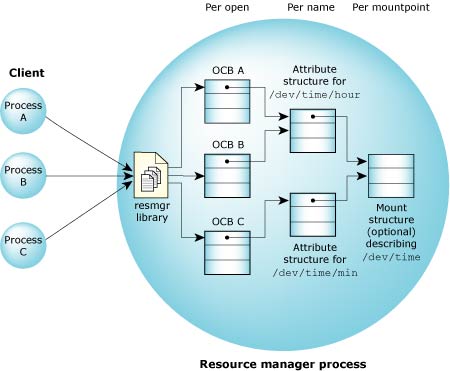
Multiple clients with multiple OCBs, all linked to one mount structure.
The Open Control Block (OCB) maintains the state information about a particular session involving a client and a resource manager. It's created during open handling and exists until a close is performed.
This structure is used by the iofunc layer helper functions. (Later on, we'll show you how to extend this to include your own data).
The OCB structure contains at least the following:
typedef struct _iofunc_ocb {
    IOFUNC_ATTR_T   *attr;
    int32_t         ioflag;
    off_t           offset;
    uint16_t        sflag;
    uint16_t        flags;
} iofunc_ocb_t;
where the values represent:
The iofunc_attr_t structure defines the characteristics of the device that you're supplying the resource manager for. This is used in conjunction with the OCB structure.
The attribute structure contains at least the following:
typedef struct _iofunc_attr {
    IOFUNC_MOUNT_T            *mount;
    uint32_t                  flags;
    int32_t                   lock_tid;
    uint16_t                  lock_count;
    uint16_t                  count;
    uint16_t                  rcount;
    uint16_t                  wcount;
    uint16_t                  rlocks;
    uint16_t                  wlocks;
    struct _iofunc_mmap_list  *mmap_list;
    struct _iofunc_lock_list  *lock_list;
    void                      *list;
    uint32_t                  list_size;
    off_t                     nbytes;
    ino_t                     inode;
    uid_t                     uid;
    gid_t                     gid;
    time_t                    mtime;
    time_t                    atime;
    time_t                    ctime;
    mode_t                    mode;
    nlink_t                   nlink;
    dev_t                     rdev;
} iofunc_attr_t;
where the values represent:
Since your resource manager uses these flags, you can tell right away which fields of the attribute structure have been modified by the various iofunc-layer helper routines. That way, if you need to write the entries to some medium, you can write just those that have changed. The user-defined area for flags is IOFUNC_ATTR_PRIVATE (see <sys/iofunc.h>).
For details on updating your attribute structure, see the section on "Updating the time for reads and writes" below.
| This counter: | tracks the number of: |
|---|---|
| count | OCBs using this attribute in any manner. When this count goes to zero, it means that no one is using this attribute. |
| rcount | OCBs using this attribute for reading. |
| wcount | OCBs using this attribute for writing. |
| rlocks | read locks currently registered on the attribute. |
| wlocks | write locks currently registered on the attribute. |
These counts aren't exclusive. For example, if an OCB has specified that the resource is opened for reading and writing, then count, rcount, and wcount will all be incremented. (See the iofunc_attr_init(), iofunc_lock_default(), iofunc_lock(), iofunc_ocb_attach(), and iofunc_ocb_detach() functions.)
|
One or more of the three time members may be invalidated as a result of calling an iofunc-layer function. This is to avoid having each and every I/O message handler go to the kernel and request the current time of day, just to fill in the attribute structure's time member(s). |
POSIX states that these times must be valid when the fstat() is performed, but they don't have to reflect the actual time that the associated change occurred. Also, the times must change between fstat() invocations if the associated change occurred between fstat() invocations. If the associated change never occurred between fstat() invocations, then the time returned should be the same as returned last time. Furthermore, if the associated change occurred multiple times between fstat() invocations, then the time need only be different from the previously returned time.
There's a helper function that fills the members with the correct time; you may wish to call it in the appropriate handlers to keep the time up-to-date on the device -- see the iofunc_time_update() function.
The members of the mount structure, specifically the conf and flags members, modify the behavior of some of the iofunc layer functions. This optional structure contains at least the following:
typedef struct _iofunc_mount {
    uint32_t            flags;
    uint32_t            conf;
    dev_t               dev;
    int32_t             blocksize;
    iofunc_funcs_t      *funcs;
} iofunc_mount_t;
The variables are:
Note that the options mentioned above for the conf member are returned by the iofunc layer _IO_PATHCONF default handler.
struct _iofunc_funcs {
   unsigned     nfuncs;
   IOFUNC_OCB_T *(*ocb_calloc) (resmgr_context_t *ctp,
                                IOFUNC_ATTR_T *attr);
   void         (*ocb_free) (IOFUNC_OCB_T *ocb);
};
where:
The io_read handler is responsible for returning data bytes to the client after receiving an _IO_READ message. Examples of functions that send this message are read(), readdir(), fread(), and fgetc(). Let's start by looking at the format of the message itself:
struct _io_read {
    uint16_t            type;
    uint16_t            combine_len;
    int32_t             nbytes;
    uint32_t            xtype;
};

typedef union {
    struct _io_read     i;
    /* unsigned char    data[nbytes];    */
    /* nbytes is returned with MsgReply  */
} io_read_t;
As with all resource manager messages, we've defined union that contains the input (coming into the resource manager) structure and a reply or output (going back to the client) structure. The io_read() function is prototyped with an argument of io_read_t *msg -- that's the pointer to the union containing the message.
Since this is a read(), the type member has the value _IO_READ. The items of interest in the input structure are:
We'll create an io_read() function that will serve as our handler that actually returns some data (the fixed string "Hello, world\n"). We'll use the OCB to keep track of our position within the buffer that we're returning to the client.
When we get the _IO_READ message, the nbytes member tells us exactly how many bytes the client wants to read. Suppose that the client issues:
read (fd, buf, 4096);
In this case, it's a simple matter to return our entire "Hello, world\n" string in the output buffer and tell the client that we're returning 13 bytes, i.e. the size of the string.
However, consider the case where the client is performing the following:
while (read (fd, &character, 1) != EOF) {
    printf ("Got a character \"%c\"\n", character);
}
Granted, this isn't a terribly efficient way for the client to perform reads! In this case, we would get msg->i.nbytes set to 1 (the size of the buffer that the client wants to get). We can't simply return the entire string all at once to the client -- we have to hand it out one character at a time. This is where the OCB's offset member comes into play.
Here's a complete io_read() function that correctly handles these cases:
#include <errno.h>
#include <stdio.h>
#include <stddef.h>
#include <stdlib.h>
#include <unistd.h>
#include <sys/iofunc.h>
#include <sys/dispatch.h>

int io_read (resmgr_context_t *ctp, io_read_t *msg, RESMGR_OCB_T *ocb);

static char                     *buffer = "Hello world\n";

static resmgr_connect_funcs_t   connect_funcs;
static resmgr_io_funcs_t        io_funcs;
static iofunc_attr_t            attr;

main(int argc, char **argv)
{
    /* declare variables we'll be using */
    resmgr_attr_t        resmgr_attr;
    dispatch_t           *dpp;
    dispatch_context_t   *ctp;
    int                  id;

    /* initialize dispatch interface */
    if((dpp = dispatch_create()) == NULL) {
        fprintf(stderr, "%s: Unable to allocate dispatch handle.\n",
                argv[0]);
        return EXIT_FAILURE;
    }

    /* initialize resource manager attributes */
    memset(&resmgr_attr, 0, sizeof resmgr_attr);
    resmgr_attr.nparts_max = 1;
    resmgr_attr.msg_max_size = 2048;

    /* initialize functions for handling messages */
    iofunc_func_init(_RESMGR_CONNECT_NFUNCS, &connect_funcs,
                     _RESMGR_IO_NFUNCS, &io_funcs);
    io_funcs.read = io_read;

    /* initialize attribute structure used by the device */
    iofunc_attr_init(&attr, S_IFNAM | 0666, 0, 0);
    attr.nbytes = strlen(buffer)+1;

    /* attach our device name */
    if((id = resmgr_attach(dpp, &resmgr_attr, "/dev/sample", _FTYPE_ANY, 0,
                 &connect_funcs, &io_funcs, &attr)) == -1) {
        fprintf(stderr, "%s: Unable to attach name.\n", argv[0]);
        return EXIT_FAILURE;
    }

    /* allocate a context structure */
    ctp = dispatch_context_alloc(dpp);

    /* start the resource manager message loop */
    while(1) {
        if((ctp = dispatch_block(ctp)) == NULL) {
            fprintf(stderr, "block error\n");
            return EXIT_FAILURE;
        }
        dispatch_handler(ctp);
    }
}

int
io_read (resmgr_context_t *ctp, io_read_t *msg, RESMGR_OCB_T *ocb)
{
    int         nleft;
    int         nbytes;
    int         nparts;
    int         status;

    if ((status = iofunc_read_verify (ctp, msg, ocb, NULL)) != EOK)
        return (status);

    if ((msg->i.xtype & _IO_XTYPE_MASK) != _IO_XTYPE_NONE)
        return (ENOSYS);

    /*
     *  On all reads (first and subsequent), calculate
     *  how many bytes we can return to the client,
     *  based upon the number of bytes available (nleft)
     *  and the client's buffer size
     */

    nleft = ocb->attr->nbytes - ocb->offset;
    nbytes = min (msg->i.nbytes, nleft);

    if (nbytes > 0) {
        /* set up the return data IOV */
        SETIOV (ctp->iov, buffer + ocb->offset, nbytes);

        /* set up the number of bytes (returned by client's read()) */
        _IO_SET_READ_NBYTES (ctp, nbytes);

        /*
         * advance the offset by the number of bytes
         * returned to the client.
         */

        ocb->offset += nbytes;

        nparts = 1;
    } else {
        /*
         * they've asked for zero bytes or they've already previously
         * read everything
         */

        _IO_SET_READ_NBYTES (ctp, 0);

        nparts = 0;
    }

    /* mark the access time as invalid (we just accessed it) */

    if (msg->i.nbytes > 0)
        ocb->attr->flags |= IOFUNC_ATTR_ATIME;

    return (_RESMGR_NPARTS (nparts));
}
The ocb maintains our context for us by storing the offset field, which gives us the position within the buffer, and by having a pointer to the attribute structure attr, which tells us how big the buffer actually is via its nbytes member.
Of course, we had to give the resource manager library the address of our io_read() handler function so that it knew to call it. So the code in main() where we had called iofunc_func_init() became:
/* initialize functions for handling messages */
iofunc_func_init(_RESMGR_CONNECT_NFUNCS, &connect_funcs,
                 _RESMGR_IO_NFUNCS, &io_funcs);
io_funcs.read = io_read;
We also needed to add the following to the area above main():
#include <errno.h>
#include <unistd.h>

int io_read (resmgr_context_t *ctp, io_read_t *msg, RESMGR_OCB_T *ocb);

static char *buffer = "Hello world\n";"
Where did the attribute structure's nbytes member get filled in? In main(), just after we did the iofunc_attr_init(). We modified main() slightly:
After this line:
iofunc_attr_init (&attr, S_IFNAM | 0666, 0, 0);
We added this one:
attr.nbytes = strlen (buffer)+1;
At this point, if you were to run the resource manager (our simple resource manager used the name /dev/sample), you could do:
# cat /dev/sample
Hello, world
The return line (_RESMGR_NPARTS(nparts)) tells the resource manager library to:
Where does it get the IOV array? It's using ctp->iov. That's why we first used the SETIOV() macro to make ctp->iov point to the data to reply with.
If we had no data, as would be the case of a read of zero bytes, then we'd do a return (_RESMGR_NPARTS(0)). But read() returns with the number of bytes successfully read. Where did we give it this information? That's what the _IO_SET_READ_NBYTES() macro was for. It takes the nbytes that we give it and stores it in the context structure (ctp). Then when we return to the library, the library takes this nbytes and passes it as the second parameter to the MsgReplyv(). The second parameter tells the kernel what the MsgSend() should return. And since the read() function is calling MsgSend(), that's where it finds out how many bytes were read.
We also update the access time for this device in the read handler. For details on updating the access time, see the section on "Updating the time for reads and writes" below.
You can add functionality to the resource manager you're writing in these fundamental ways:
The first two are almost identical, because the default functions really don't do that much by themselves -- they rely on the POSIX helper functions. The third approach has advantages and disadvantages.
Since the default functions (e.g. iofunc_open_default()) can be installed in the jump table directly, there's no reason you couldn't embed them within your own functions.
Here's an example of how you would do that with your own io_open() handler:
main (int argc, char **argv)
{
    ...

    /* install all of the default functions */
    iofunc_func_init (_RESMGR_CONNECT_NFUNCS, &connect_funcs,
                      _RESMGR_IO_NFUNCS, &io_funcs);

    /* take over the open function */
    connect_funcs.open = io_open;
    ...
}

int
io_open (resmgr_context_t *ctp, io_open_t *msg,
         RESMGR_HANDLE_T *handle, void *extra)
{
    return (iofunc_open_default (ctp, msg, handle, extra));
}
Obviously, this is just an incremental step that lets you gain control in your io_open() when the message arrives from the client. You may wish to do something before or after the default function does its thing:
/* example of doing something before */

extern int accepting_opens_now;

int
io_open (resmgr_context_t *ctp, io_open_t *msg,
         RESMGR_HANDLE_T *handle, void *extra)
{
    if (!accepting_opens_now) {
        return (EBUSY);
    }

    /*
     *  at this point, we're okay to let the open happen,
     *  so let the default function do the "work".
     */

    return (iofunc_open_default (ctp, msg, handle, extra));
}
Or:
/* example of doing something after */

int
io_open (resmgr_context_t *ctp, io_open_t *msg,
         RESMGR_HANDLE_T *handle, void *extra)
{
    int     sts;

    /*
     * have the default function do the checking
     * and the work for us
     */

    sts = iofunc_open_default (ctp, msg, handle, extra);

    /*
     *  if the default function says it's okay to let the open
     *  happen, we want to log the request
     */

    if (sts == EOK) {
        log_open_request (ctp, msg);
    }
    return (sts);
}
It goes without saying that you can do something before and after the standard default POSIX handler.
The principal advantage of this approach is that you can add to the functionality of the standard default POSIX handlers with very little effort.
The default functions make use of helper functions -- these functions can't be placed directly into the connect or I/O jump tables, but they do perform the bulk of the work.
Here's the source for the two functions iofunc_chmod_default() and iofunc_stat_default():
int
iofunc_chmod_default (resmgr_context_t *ctp, io_chmod_t *msg,
                      iofunc_ocb_t *ocb)
{
    return (iofunc_chmod (ctp, msg, ocb, ocb -> attr));
}

int
iofunc_stat_default (resmgr_context_t *ctp, io_stat_t *msg,
                     iofunc_ocb_t *ocb)
{
    iofunc_time_update (ocb -> attr);
    iofunc_stat (ocb -> attr, &msg -> o);
    return (_RESMGR_PTR (ctp, &msg -> o,
                         sizeof (msg -> o)));
}
Notice how the iofunc_chmod() handler performs all the work for the iofunc_chmod_default() default handler. This is typical for the simple functions.
The more interesting case is the iofunc_stat_default() default handler, which calls two helper routines. First it calls iofunc_time_update() to ensure that all of the time fields (atime, ctime and mtime) are up to date. Then it calls iofunc_stat(), which builds the reply. Finally, the default function builds a pointer in the ctp structure and returns it.
The most complicated handling is done by the iofunc_open_default() handler:
int
iofunc_open_default (resmgr_context_t *ctp, io_open_t *msg,
                     iofunc_attr_t *attr, void *extra)
{
    int     status;

    iofunc_attr_lock (attr);

    if ((status = iofunc_open (ctp, msg, attr, 0, 0)) != EOK) {
        iofunc_attr_unlock (attr);
        return (status);
    }

    if ((status = iofunc_ocb_attach (ctp, msg, 0, attr, 0))
        != EOK) {
        iofunc_attr_unlock (attr);
        return (status);
    }

    iofunc_attr_unlock (attr);
    return (EOK);
}
This handler calls four helper functions:
Sometimes a default function will be of no help for your particular resource manager. For example, iofunc_read_default() and iofunc_write_default() functions implement /dev/null -- they do all the work of returning 0 bytes (EOF) or swallowing all the message bytes (respectively).
You'll want to do something in those handlers (unless your resource manager doesn't support the _IO_READ or _IO_WRITE messages).
Note that even in such cases, there are still helper functions you can use: iofunc_read_verify() and iofunc_write_verify().
The io_write handler is responsible for writing data bytes to the media after receiving a client's _IO_WRITE message. Examples of functions that send this message are write() and fflush(). Here's the message:
struct _io_write {
    uint16_t            type;
    uint16_t            combine_len;
    int32_t             nbytes;
    uint32_t            xtype;
    /* unsigned char    data[nbytes]; */
};

typedef union {
    struct _io_write    i;
    /*  nbytes is returned with MsgReply  */
} io_write_t;
As with the io_read_t, we have a union of an input and an output message, with the output message being empty (the number of bytes actually written is returned by the resource manager library directly to the client's MsgSend()).
The data being written by the client almost always follows the header message stored in struct _io_write. The exception is if the write was done using pwrite() or pwrite64(). More on this when we discuss the xtype member.
To access the data, we recommend that you reread it into your own buffer. Let's say you had a buffer called inbuf that was "big enough" to hold all the data you expected to read from the client (if it isn't big enough, you'll have to read the data piecemeal).
The following is a code snippet that can be added to one of the simple resource manager examples. It prints out whatever it's given (making the assumption that it's given only character text):
int
io_write (resmgr_context_t *ctp, io_write_t *msg, RESMGR_OCB_T *ocb)
{
    int     status;
    char    *buf;

    if ((status = iofunc_write_verify(ctp, msg, ocb, NULL)) != EOK)
        return (status);

    if ((msg->i.xtype & _IO_XTYPE_MASK) != _IO_XTYPE_NONE)
        return(ENOSYS);

    /* set up the number of bytes (returned by client's write()) */

    _IO_SET_WRITE_NBYTES (ctp, msg->i.nbytes);

    buf = (char *) malloc(msg->i.nbytes + 1);
    if (buf == NULL)
        return(ENOMEM);

    /*
     *  Reread the data from the sender's message buffer.
     *  We're not assuming that all of the data fit into the
     *  resource manager library's receive buffer.
     */

    resmgr_msgread(ctp, buf, msg->i.nbytes, sizeof(msg->i));
    buf [msg->i.nbytes] = '\0'; /* just in case the text is not NULL terminated */
    printf ("Received %d bytes = '%s'\n", msg -> i.nbytes, buf);
    free(buf);

    if (msg->i.nbytes > 0)
        ocb->attr->flags |= IOFUNC_ATTR_MTIME | IOFUNC_ATTR_CTIME;

    return (_RESMGR_NPARTS (0));
}
Of course, we'll have to give the resource manager library the address of our io_write handler so that it'll know to call it. In the code for main() where we called iofunc_func_init(), we'll add a line to register our io_write handler:
/* initialize functions for handling messages */
iofunc_func_init(_RESMGR_CONNECT_NFUNCS, &connect_funcs,
                 _RESMGR_IO_NFUNCS, &io_funcs);
io_funcs.write = io_write;
You may also need to add the following prototype:
int io_write (resmgr_context_t *ctp, io_write_t *msg,
              RESMGR_OCB_T *ocb);
At this point, if you were to run the resource manager (our simple resource manager used the name /dev/sample), you could write to it by doing echo Hello > /dev/sample as follows:
# echo Hello > /dev/sample
Received 6 bytes = 'Hello'
Notice how we passed the last argument to resmgr_msgread() (the offset argument) as the size of the input message buffer. This effectively skips over the header and gets to the data component.
If the buffer you supplied wasn't big enough to contain the entire message from the client (e.g. you had a 4 KB buffer and the client wanted to write 1 megabyte), you'd have to read the buffer in stages, using a for loop, advancing the offset passed to resmgr_msgread() by the amount read each time.
Unlike the io_read handler sample, this time we didn't do anything with ocb->offset. In this case there's no reason to. The ocb->offset would make more sense if we were managing things that had advancing positions such as a file position.
The reply is simpler than with the io_read handler, since a write() call doesn't expect any data back. Instead, it just wants to know if the write succeeded and if so, how many bytes were written. To tell it how many bytes were written we used the _IO_SET_WRITE_NBYTES() macro. It takes the nbytes that we give it and stores it in the context structure (ctp). Then when we return to the library, the library takes this nbytes and passes it as the second parameter to the MsgReplyv(). The second parameter tells the kernel what the MsgSend() should return. And since the write() function is calling MsgSend(), that's where it finds out how many bytes were written.
Since we're writing to the device, we should also update the modification, and potentially, the creation time. For details on updating the modification and change of file status times, see the section on "Updating the time for reads and writes" below.
You can return to the resource manager library from your handler functions in various ways. This is complicated by the fact that the resource manager library can reply for you if you want it to, but you must tell it to do so and put the information that it'll use in all the right places.
In this section, we'll discuss the following ways of returning to the resource manager library:
To reply to the client such that the function the client is calling (e.g. read()) will return with an error, you simply return with an appropriate errno value (from <errno.h>).
return (ENOMEM);
In the case of a read(), this causes the read to return -1 with errno set to ENOMEM.
Sometimes you'll want to reply with a header followed by one of N buffers, where the buffer used will differ each time you reply. To do this, you can set up an IOV array whose elements point to the header and to a buffer.
The context structure already has an IOV array. If you want the resource manager library to do your reply for you, then you must use this array. But the array must contain enough elements for your needs. To ensure that this is the case, you'd set the nparts_max member of the resmgr_attr_t structure that you passed to resmgr_attach() when you registered your name in the pathname space.
The following example assumes that the variable i contains the offset into the array of buffers of the desired buffer to reply with. The 2 in _RESMGR_NPARTS(2) tells the library how many elements in ctp->iov to reply with.
my_header_t     header;
a_buffer_t      buffers[N];

...

SETIOV(&ctp->iov[0], &header, sizeof(header));
SETIOV(&ctp->iov[1], &buffers[i], sizeof(buffers[i]));
return (_RESMGR_NPARTS(2));
An example of this would be replying to a read() where all the data existed in a single buffer. You'll typically see this done in two ways:
return (_RESMGR_PTR(ctp, buffer, nbytes));
And:
SETIOV (ctp->iov, buffer, nbytes);
return (_RESMGR_NPARTS(1));
The first method, using the _RESMGR_PTR() macro, is just a convenience for the second method where a single IOV is returned.
This can be done in a few ways. The most simple would be:
return (EOK);
But you'll often see:
return (_RESMGR_NPARTS(0));
Note that in neither case are you causing the MsgSend() to return with a 0. The value that the MsgSend() returns is the value passed to the _IO_SET_READ_NBYTES(), _IO_SET_WRITE_NBYTES(), and other similar macros. These two were used in the read and write samples above.
In this case, you give the client the data and get the resource manager library to do the reply for you. However, the reply data won't be valid by that time. For example, if the reply data was in a buffer that you wanted to free before returning, you could use the following:
resmgr_msgwrite (ctp, buffer, nbytes, 0);
free (buffer);
return (EOK);
The resmgr_msgwrite() copies the contents of buffer into the client's reply buffer immediately. Note that a reply is still required in order to unblock the client so it can examine the data. Next we free the buffer. Finally, we return to the resource manager library such that it does a reply with zero-length data. Since the reply is of zero length, it doesn't overwrite the data already written into the client's reply buffer. When the client returns from its send call, the data is there waiting for it.
In all of the previous examples, it's the resource manager library that calls MsgReply*() or MsgError() to unblock the client. In some cases, you may not want the library to reply for you. For instance, you might have already done the reply yourself, or you'll reply later. In either case, you'd return as follows:
return (_RESMGR_NOREPLY);
An example of a resource manager that would reply to clients later is a pipe resource manager. If the client is doing a read of your pipe but you have no data for the client, then you have a choice:
Or:
Another example might be if the client wants you to write out to some device but doesn't want to get a reply until the data has been fully written out. Here are the sequence of events that might follow:
The first issue, though, is whether the client wants to be left blocked. If the client doesn't want to be left blocked, then it opens with the O_NONBLOCK flag:
fd = open("/dev/sample", O_RDWR | O_NONBLOCK);
The default is to allow you to block it.
One of the first things done in the read and write samples above was to call some POSIX verification functions: iofunc_read_verify() and iofunc_write_verify(). If we pass the address of an int as the last parameter, then on return the functions will stuff that int with nonzero if the client doesn't want to be blocked (O_NONBLOCK flag was set) or with zero if the client wants to be blocked.
int    nonblock;

if ((status = iofunc_read_verify (ctp, msg, ocb,
                                  &nonblock)) != EOK)
    return (status);

...

int    nonblock;

if ((status = iofunc_write_verify (ctp, msg, ocb,
                                   &nonblock)) != EOK)
    return (status);
When it then comes time to decide if we should reply with an error or reply later, we do:
if (nonblock) {
    /* client doesn't want to be blocked */
    return (EAGAIN);
} else {
    /*
    *  The client is willing to be blocked.
    *  Save at least the ctp->rcvid so that you can
    *  reply to it later.
    */
    ...
    return (_RESMGR_NOREPLY);
}
The question remains: How do you do the reply yourself? The only detail to be aware of is that the rcvid to reply to is ctp->rcvid. If you're replying later, then you'd save ctp->rcvid and use the saved value in your reply.
MsgReply(saved_rcvid, 0, buffer, nbytes);
Or:
iov_t    iov[2];

SETIOV(&iov[0], &header, sizeof(header));
SETIOV(&iov[1], &buffers[i], sizeof(buffers[i]));
MsgReplyv(saved_rcvid, 0, iov, 2);
Note that you can fill up the client's reply buffer as data becomes available by using resmgr_msgwrite() and resmgr_msgwritev(). Just remember to do the MsgReply*() at some time to unblock the client.
|
If you're replying to an _IO_READ or _IO_WRITE message, the status argument for MsgReply*() must be the number of bytes read or written. |
The default action in most cases is for the library to cause the client's function to fail with ENOSYS:
return (_RESMGR_DEFAULT);
Topics in this session include:
The io_read, io_write, and io_openfd message structures contain a member called xtype. From struct _io_read:
struct _io_read {
    ...
    uint32_t            xtype;
    ...
}
Basically, the xtype contains extended type information that can be used to adjust the behavior of a standard I/O function. Most resource managers care about only a few values:
For example:
struct myread_offset {
    struct _io_read        read;
    struct _xtype_offset   offset;
}
Some resource managers can be sure that their clients will never call pread*() or pwrite*(). (For example, a resource manager that's controlling a robot arm probably wouldn't care.) In this case, you can treat this type of message as an error.
struct myreadcond {
    struct _io_read        read;
    struct _xtype_readcond cond;
}
As with _IO_XTYPE_OFFSET, if your resource manager isn't prepared to handle readcond(), you can treat this type of message as an error.
The following code sample demonstrates how to handle the case where you're not expecting any extended types. In this case, if you get a message that contains an xtype, you should reply with ENOSYS. The example can be used in either an io_read or io_write handler.
int
io_read (resmgr_context_t *ctp, io_read_t *msg,
         RESMGR_OCB_T *ocb)
{
    int    status;

    if ((status = iofunc_read_verify(ctp, msg, ocb, NULL))
         != EOK) {
        return (status);
    }

    /* No special xtypes */
    if ((msg->i.xtype & _IO_XTYPE_MASK) != _IO_XTYPE_NONE)
        return (ENOSYS);

    ...
}
Here are code examples that demonstrate how to handle an _IO_READ or _IO_WRITE message when a client calls:
The following sample code demonstrates how to handle _IO_READ for the case where the client calls one of the pread*() functions.
/* we are defining io_pread_t here to make the code below
   simple */
typedef struct {
    struct _io_read         read;
    struct _xtype_offset    offset;
} io_pread_t;

int
io_read (resmgr_context_t *ctp, io_read_t *msg,
         RESMGR_OCB_T *ocb)
{
    off64_t offset; /* where to read from */
    int     status;

    if ((status = iofunc_read_verify(ctp, msg, ocb, NULL))
         != EOK) {
        return(status);
    }

    switch(msg->i.xtype & _IO_XTYPE_MASK) {
    case _IO_XTYPE_NONE:
        offset = ocb->offset;
        break;
    case _IO_XTYPE_OFFSET:
        /*
         *  io_pread_t is defined above.
         *  Client is doing a one-shot read to this offset by
         *  calling one of the pread*() functions
         */
        offset = ((io_pread_t *) msg)->offset.offset;
        break;
    default:
        return(ENOSYS);
    }

    ...
}
The following sample code demonstrates how to handle _IO_WRITE for the case where the client calls one of the pwrite*() functions. Keep in mind that the struct _xtype_offset information follows the struct _io_write in the sender's message buffer. This means that the data to be written follows the struct _xtype_offset information (instead of the normal case where it follows the struct _io_write). So, you must take this into account when doing the resmgr_msgread() call in order to get the data from the sender's message buffer.
/* we are defining io_pwrite_t here to make the code below
   simple */
typedef struct {
    struct _io_write        write;
    struct _xtype_offset    offset;
} io_pwrite_t;

int
io_write (resmgr_context_t *ctp, io_write_t *msg,
          RESMGR_OCB_T *ocb)
{
    off64_t offset; /* where to write */
    int     status;
    size_t  skip;   /* offset into msg to where the data
                       resides */

    if ((status = iofunc_write_verify(ctp, msg, ocb, NULL))
         != EOK) {
        return(status);
    }

    switch(msg->i.xtype & _IO_XTYPE_MASK) {
    case _IO_XTYPE_NONE:
        offset = ocb->offset;
        skip = sizeof(io_write_t);
        break;
    case _IO_XTYPE_OFFSET:
        /*
         *  io_pwrite_t is defined above
         *  client is doing a one-shot write to this offset by
         *  calling one of the pwrite*() functions
         */
        offset = ((io_pwrite_t *) msg)->offset.offset;
        skip = sizeof(io_pwrite_t);
        break;
    default:
        return(ENOSYS);
    }

    ...

    /*
     *  get the data from the sender's message buffer,
     *  skipping all possible header information
     */
    resmgr_msgreadv(ctp, iovs, niovs, skip);

    ...
}
The same type of operation that was done to handle the pread()/_IO_XTYPE_OFFSET case can be used for handling the client's readcond() call:
typedef struct {
    struct _io_read        read;
    struct _xtype_readcond cond;
} io_readcond_t
Then:
struct _xtype_readcond *cond
...
    CASE _IO_XTYPE_READCOND:
        cond = &((io_readcond_t *)msg)->cond
        break;
}
Then your manager has to properly interpret and deal with the arguments to readcond(). For more information, see the Library Reference.
In the read sample above we did:
if (msg->i.nbytes > 0)
    ocb->attr->flags |= IOFUNC_ATTR_ATIME;
According to POSIX, if the read succeeds and the reader had asked for more than zero bytes, then the access time must be marked for update. But POSIX doesn't say that it must be updated right away. If you're doing many reads, you may not want to read the time from the kernel for every read. In the code above, we mark the time only as needing to be updated. When the next _IO_STAT or _IO_CLOSE_OCB message is processed, the resource manager library will see that the time needs to be updated and will get it from the kernel then. This of course has the disadvantage that the time is not the time of the read.
Similarly for the write sample above, we did:
if (msg->i.nbytes > 0)
    ocb->attr->flags |= IOFUNC_ATTR_MTIME | IOFUNC_ATTR_CTIME;
so the same thing will happen.
If you do want to have the times represent the read or write times, then after setting the flags you need only call the iofunc_time_update() helper function. So the read lines become:
if (msg->i.nbytes > 0) {
    ocb->attr->flags |= IOFUNC_ATTR_ATIME;
    iofunc_time_update(ocb->attr);
}
and the write lines become:
if (msg->i.nbytes > 0) {
    ocb->attr->flags |= IOFUNC_ATTR_MTIME | IOFUNC_ATTR_CTIME;
    iofunc_time_update(ocb->attr);
}
You should call iofunc_time_update() before you flush out any cached attributes. As a result of changing the time fields, the attribute structure will have the IOFUNC_ATTR_DIRTY_TIME bit set in the flags field, indicating that this field of the attribute must be updated when the attribute is flushed from the cache.
In this section:
In order to conserve network bandwidth and to provide support for atomic operations, combine messages are supported. A combine message is constructed by the client's C library and consists of a number of I/O and/or connect messages packaged together into one. Let's see how they're used.
Consider a case where two threads are executing the following code, trying to read from the same file descriptor:
a_thread ()
{
    char buf [BUFSIZ];

    lseek (fd, position, SEEK_SET);
    read (fd, buf, BUFSIZ);
    ...
}
The first thread performs the lseek() and then gets preempted by the second thread. When the first thread resumes executing, its offset into the file will be at the end of where the second thread read from, not the position that it had lseek()'d to.
This can be solved in one of three ways:
Let's look at these three methods.
In the first approach, if the two threads use a mutex between themselves, the following issue arises: every read(), lseek(), and write() operation must use the mutex.
If this practice isn't enforced, then you still have the exact same problem. For example, suppose one thread that's obeying the convention locks the mutex and does the lseek(), thinking that it's protected. However, another thread (that's not obeying the convention) can preempt it and move the offset to somewhere else. When the first thread resumes, we again encounter the problem where the offset is at a different (unexpected) location. Generally, using a mutex will be successful only in very tightly managed projects, where a code review will ensure that each and every thread's file functions obey the convention.
The second approach -- of using different file descriptors -- is a good general-purpose solution, unless you explicitly wanted the file descriptor to be shared.
In order for the readblock() function to be able to effect an atomic seek/read operation, it must ensure that the requests it sends to the resource manager will all be processed at the same time. This is done by combining the _IO_LSEEK and _IO_READ messages into one message. Thus, when the base layer performs the MsgReceive(), it will receive the entire readblock() request in one atomic message.
Another place where combine messages are useful is in the stat() function, which can be implemented by calling open(), fstat(), and close() in sequence.
Rather than generate three separate messages (one for each of the functions), the C library combines them into one contiguous message. This boosts performance, especially over a networked connection, and also simplifies the resource manager, because it's not forced to have a connect function to handle stat().
The resource manager library handles combine messages by presenting each component of the message to the appropriate handler routines. For example, if we get a combine message that has an _IO_LSEEK and _IO_READ in it (e.g. readblock()), the library will call our io_lseek() and io_read() functions for us in turn.
But let's see what happens in the resource manager when it's handling these messages. With multiple threads, both of the client's threads may very well have sent in their "atomic" combine messages. Two threads in the resource manager will now attempt to service those two messages. We again run into the same synchronization problem as we originally had on the client end -- one thread can be part way through processing the message and can then be preempted by the other thread.
The solution? The resource manager library provides callouts to lock the OCB while processing any message (except _IO_CLOSE and _IO_UNBLOCK --we'll return to these). As an example, when processing the readblock() combine message, the resource manager library performs callouts in this order:
Therefore, in our scenario, the two threads within the resource manager would be mutually exclusive to each other by virtue of the lock -- the first thread to acquire the lock would completely process the combine message, unlock the lock, and then the second thread would perform its processing.
Let's examine several of the issues that are associated with handling combine messages:
As we've seen, a combine message really consists of a number of "regular" resource manager messages combined into one large contiguous message. The resource manager library handles each component in the combine message separately by extracting the individual components and then out calling to the handlers you've specified in the connect and I/O function tables, as appropriate, for each component.
This generally doesn't present any new wrinkles for the message handlers themselves, except in one case. Consider the readblock() combine message:
Ordinarily, after processing the _IO_LSEEK message, your handler would return the current position within the file. However, the next message (the _IO_READ) also returns data. By convention, only the last data-returning message within a combine message will actually return data. The intermediate messages are allowed to return only a pass/fail indication.
The impact of this is that the _IO_LSEEK message handler has to be aware of whether or not it's being invoked as part of combine message handling. If it is, it should only return either an EOK (indicating that the lseek() operation succeeded) or an error indication to indicate some form of failure.
But if the _IO_LSEEK handler isn't being invoked as part of combine message handling, it should return the EOK and the new offset (or, in case of error, an error indication only).
Here's a sample of the code for the default iofunc-layer lseek() handler:
int
iofunc_lseek_default (resmgr_context_t *ctp,
                      io_lseek_t *msg,
                      iofunc_ocb_t *ocb)
{
    /*
     *  performs the lseek processing here
     *  may "early-out" on error conditions
     */
     . . .

    /* decision re: combine messages done here */
    if (msg -> i.combine_len & _IO_COMBINE_FLAG) {
        return (EOK);
    }

    msg -> o = offset;
    return (_RESMGR_PTR (ctp, &msg -> o, sizeof (msg -> o)));
}
The relevant decision is made in this statement:
if (msg -> i.combine_len & _IO_COMBINE_FLAG)
If the _IO_COMBINE_FLAG bit is set in the combine_len member, this indicates that the message is being processed as part of a combine message.
When the resource manager library is processing the individual components of the combine message, it looks at the error return from the individual message handlers. If a handler returns anything other than EOK, then processing of further combine message components is aborted. The error that was returned from the failing component's handler is returned to the client.
The second issue associated with handling combine messages is how to access the data area for subsequent message components.
For example, the writeblock() combine message format has an lseek() message first, followed by the write() message. This means that the data associated with the write() request is further in the received message buffer than would be the case for just a simple _IO_WRITE message:
This issue is easy to work around. There's a resource manager library function called resmgr_msgread() that knows how to get the data corresponding to the correct message component. Therefore, in the io_write handler, if you used resmgr_msgread() instead of MsgRead(), this would be transparent to you.
|
Resource managers should always use resmgr_msg*() cover functions. |
For reference, here's the source for resmgr_msgread():
int resmgr_msgread( resmgr_context_t *ctp,
                    void *msg,
                    int nbytes,
                    int offset)
{
    return MsgRead(ctp->rcvid, msg, nbytes, ctp->offset + offset);
}
As you can see, resmgr_msgread() simply calls MsgRead() with the offset of the component message from the beginning of the combine message buffer. For completeness, there's also a resmgr_msgwrite() that works in an identical manner to MsgWrite(), except that it dereferences the passed ctp to obtain the rcvid.
As mentioned above, another facet of the operation of the readblock() function from the client's perspective is that it's atomic. In order to process the requests for a particular OCB in an atomic manner, we must lock and unlock the attribute structure pointed to by the OCB, thus ensuring that only one resource manager thread has access to the OCB at a time.
The resource manager library provides two callouts for doing this:
These are members of the I/O functions structure. The handlers that you provide for those callouts should lock and unlock the attribute structure pointed to by the OCB by calling iofunc_attr_lock() and iofunc_attr_unlock(). Therefore, if you're locking the attribute structure, there's a possibility that the lock_ocb callout will block for a period of time. This is normal and expected behavior. Note also that the attributes structure is automatically locked for you when your I/O function is called.
Let's take a look at the general case for the io_open handler -- it doesn't always correspond to the client's open() call!
For example, consider the stat() and access() client function calls.
For a stat() client call, we essentially perform the sequence open()/fstat()/close(). Note that if we actually did that, three messages would be required. For performance reasons, we implement the stat() function as one single combine message:
The _IO_CONNECT_COMBINE_CLOSE message causes the io_open handler to be called. It then implicitly (at the end of processing for the combine message) causes the io_close_ocb handler to be called.
For the access() function, the client's C library will open a connection to the resource manager and perform a stat() call. Then, based on the results of the stat() call, the client's C library access() may perform an optional devctl() to get more information. In any event, because access() opened the device, it must also call close() to close it:
Notice how the access() function opened the pathname/device -- it sent it an _IO_CONNECT_COMBINE message along with the _IO_STAT message. This creates an OCB (when the io_open handler is called), locks the associated attribute structure (via io_lock_ocb()), performs the stat (io_stat()), and then unlocks the attributes structure (io_unlock_ocb()). Note that we don't implicitly close the OCB -- this is left for a later, explicit, message. Contrast this handling with that of the plain stat() above.
This section contains:
In our /dev/sample example, we had a static buffer associated with the entire resource. Sometimes you may want to keep a pointer to a buffer associated with the resource, rather than in a global area. To maintain the pointer with the resource, we would have to store it in the attribute structure. Since the attribute structure doesn't have any spare fields, we would have to extend it to contain that pointer.
Sometimes you may want to add extra entries to the standard iofunc_*() OCB (iofunc_ocb_t).
Let's see how we can extend both of these structures. The basic strategy used is to encapsulate the existing attributes and OCB structures within a newly defined superstructure that also contains our extensions. Here's the code (see the text following the listing for comments):
/* Define our overrides before including <sys/iofunc.h>  */
struct device;
#define IOFUNC_ATTR_T       struct device  /* see note 1 */
struct ocb;
#define IOFUNC_OCB_T        struct ocb     /* see note 1 */

#include <sys/iofunc.h>
#include <sys/dispatch.h>

struct ocb {                               /* see note 2 */
    iofunc_ocb_t            hdr;           /* see note 4; must always be first */
    struct ocb              *next;
    struct ocb              **prev;        /* see note 3 */
};

struct device {                            /* see note 2 */
    iofunc_attr_t           attr;          /* must always be first */
    struct ocb              *list;         /* waiting for write */
};

/* Prototypes, needed since we refer to them a few lines down */

struct ocb *ocb_calloc (resmgr_context_t *ctp, struct device *device);
void ocb_free (struct ocb *ocb);

iofunc_funcs_t ocb_funcs = { /* our ocb allocating & freeing functions */
    _IOFUNC_NFUNCS,
    ocb_calloc,
    ocb_free
};

/* The mount structure.  We have only one, so we statically declare it */

iofunc_mount_t          mountpoint = { 0, 0, 0, 0, &ocb_funcs };

/* One struct device per attached name (there's only one name in this
   example) */

struct device           deviceattr;

main()
{
    ...

    /*
     *  deviceattr will indirectly contain the addresses
     *  of the OCB allocating and freeing functions
     */

    deviceattr.attr.mount = &mountpoint;
    resmgr_attach (..., &deviceattr);

    ...
}

/*
 * ocb_calloc
 *
 *  The purpose of this is to give us a place to allocate our own OCB.
 *  It is called as a result of the open being done
 *  (e.g. iofunc_open_default causes it to be called). We
 *  registered it through the mount structure.
 */
IOFUNC_OCB_T
ocb_calloc (resmgr_context_t *ctp, IOFUNC_ATTR_T *device)
{
    struct ocb *ocb;

    if (!(ocb = calloc (1, sizeof (*ocb)))) {
        return 0;
    }

    /* see note 3 */
    ocb -> prev = &device -> list;
    if (ocb -> next = device -> list) {
        device -> list -> prev = &ocb -> next;
    }
    device -> list = ocb;

    return (ocb);
}

/*
 * ocb_free
 *
 * The purpose of this is to give us a place to free our OCB.
 * It is called as a result of the close being done
 * (e.g. iofunc_close_ocb_default causes it to be called). We
 * registered it through the mount structure.
 */
void
ocb_free (IOFUNC_OCB_T *ocb)
{
    /* see note 3 */
    if (*ocb -> prev = ocb -> next) {
        ocb -> next -> prev = ocb -> prev;
        }
        free (ocb);
}
Here are the notes for the above code:
You can also extend the iofunc_mount_t structure in the same manner as the attribute and OCB structures. In this case, you'd define:
#define IOFUNC_MOUNT_T struct newmount
then declare the new structure:
struct newmount {
    iofunc_mount_t          mount;
    int                   ourflag;
};
The devctl() function is a general-purpose mechanism for communicating with a resource manager. Clients can send data to, receive data from, or both send and receive data from a resource manager. The format of the client devctl() call is:
devctl( int fd,
        int dcmd,
        void * data,
        size_t nbytes,
        int * return_info);
The following values (described in detail in the devctl() documentation in the Library Reference) map directly to the _IO_DEVCTL message itself:
struct _io_devctl {
        uint16_t                  type;
        uint16_t                  combine_len;
        int32_t                   dcmd;
        int32_t                   nbytes;
        int32_t                   zero;
/*      char                      data[nbytes]; */
};

struct _io_devctl_reply {
        uint32_t                  zero;
        int32_t                   ret_val;
        int32_t                   nbytes;
        int32_t                   zero2;
/*      char                      data[nbytes]; */
    } ;

typedef union {
        struct _io_devctl         i;
        struct _io_devctl_reply   o;
} io_devctl_t;
As with most resource manager messages, we've defined a union that contains the input structure (coming into the resource manager), and a reply or output structure (going back to the client). The io_devctl resource manager handler is prototyped with the argument:
io_devctl_t *msg
which is the pointer to the union containing the message.
The type member has the value _IO_DEVCTL.
The combine_len field has meaning for a combine message; see the "Combine messages" section in this chapter.
The nbytes value is the nbytes that's passed to the devctl() function. The value contains the size of the data to be sent to the device driver, or the maximum size of the data to be received from the device driver.
The most interesting item of the input structure is the dcmd. that's passed to the devctl() function. This command is formed using the macros defined in <devctl.h>:
#define _POSIX_DEVDIR_NONE        0
#define _POSIX_DEVDIR_TO          0x80000000
#define _POSIX_DEVDIR_FROM        0x40000000
#define __DIOF(class, cmd, data)  ((sizeof(data)<<16) + ((class)<<8) + (cmd) + _POSIX_DEVDIR_FROM)
#define __DIOT(class, cmd, data)  ((sizeof(data)<<16) + ((class)<<8) + (cmd) + _POSIX_DEVDIR_TO)
#define __DIOTF(class, cmd, data) ((sizeof(data)<<16) + ((class)<<8) + (cmd) + _POSIX_DEVDIR_TOFROM)
#define __DION(class, cmd)        (((class)<<8) + (cmd) + _POSIX_DEVDIR_NONE)
It's important to understand how these macros pack data to create a command. An 8-bit class (defined in <devctl.h>) is combined with an 8-bit subtype that's manager-specific, and put together in the lower 16 bits of the integer.
The upper 16 bits contain the direction (TO, FROM) as well as a hint about the size of the data structure being passed. This size is only a hint put in to uniquely identify messages that may use the same class and code but pass different data structures.
In the following example, a cmd is generated to indicate that the client is sending data to the server (TO), but not receiving anything in return. The only bits that the library or the resource manager layer look at are the TO and FROM bits to determine which arguments are to be passed to MsgSend().
struct _my_devctl_msg {
    ...
}

#define MYDCMD  __DIOT(_DCMD_MISC, 0x54, struct _my_devctl_msg)
|
The size of the structure that's passed as the last field to the __DIO* macros must be less than 214 == 16 KB. Anything larger than this interferes with the upper two directional bits. |
The data directly follows this message structure, as indicated by the /* char data[nbytes] */ comment in the _io_devctl structure.
You can add the following code samples to either of the examples provided in the "Simple device resource manager examples" section. Both of those code samples provided the name /dev/sample. With the changes indicated below, the client can use devctl() to set and retrieve a global value (an integer in this case) that's maintained in the resource manager.
The first addition defines what the devctl() commands are going to be. This is generally put in a common or shared header file:
typedef union _my_devctl_msg {
        int tx;             //Filled by client on send
        int rx;             //Filled by server on reply
} data_t;

#define MY_CMD_CODE      1
#define MY_DEVCTL_GETVAL __DIOF(_DCMD_MISC,  MY_CMD_CODE + 0, int)
#define MY_DEVCTL_SETVAL __DIOT(_DCMD_MISC,  MY_CMD_CODE + 1, int)
#define MY_DEVCTL_SETGET __DIOTF(_DCMD_MISC, MY_CMD_CODE + 2, union _my_devctl_msg)
In the above code, we defined three commands that the client can use:
Add this code to the main() function:
io_funcs.devctl = io_devctl; /* For handling _IO_DEVCTL, sent by devctl() */
And the following code gets added before the main() function:
int io_devctl(resmgr_context_t *ctp, io_devctl_t *msg, RESMGR_OCB_T *ocb);

int global_integer = 0;
Now, you need to include the new handler function to handle the _IO_DEVCTL message:
int io_devctl(resmgr_context_t *ctp, io_devctl_t *msg, RESMGR_OCB_T *ocb) {
    int     nbytes, status, previous;
    union {
        data_t  data;
        int     data32;
        // ... other devctl types you can receive
    } *rx_data;


    /*
     Let common code handle DCMD_ALL_* cases.
     You can do this before or after you intercept devctl's depending
     on your intentions.  Here we aren't using any pre-defined values
     so let the system ones be handled first.
    */
    if ((status = iofunc_devctl_default(ctp, msg, ocb)) != _RESMGR_DEFAULT) {
        return(status);
    }
    status = nbytes = 0;

    /*
     Note this assumes that you can fit the entire data portion of
     the devctl into one message.  In reality you should probably
     perform a MsgReadv() once you know the type of message you
     have received to suck all of the data in rather than assuming
     it all fits in the message.  We have set in our main routine
     that we'll accept a total message size of up to 2k so we
     don't worry about it in this example where we deal with ints.
    */
    rx_data = _DEVCTL_DATA(msg->i);

    /*
     Three examples of devctl operations.
     SET: Setting a value (int) in the server
     GET: Getting a value (int) from the server
     SETGET: Setting a new value and returning with the previous value
    */
    switch (msg->i.dcmd) {
    case MY_DEVCTL_SETVAL:
        global_integer = rx_data->data32;
        nbytes = 0;
        break;

    case MY_DEVCTL_GETVAL:
        rx_data->data32 = global_integer;
        nbytes = sizeof(rx_data->data32);
        break;

    case MY_DEVCTL_SETGET:
        previous = global_integer;
        global_integer = rx_data->data.tx;
        rx_data->data.rx = previous;        //Overwrites tx data
        nbytes = sizeof(rx_data->data.rx);
        break;

    default:
        return(ENOSYS);
    }

    /* Clear the return message ... note we saved our data _after_ this */
    memset(&msg->o, 0, sizeof(msg->o));

    /*
     If you wanted to pass something different to the return
     field of the devctl() you could do it through this member.
    */
    msg->o.ret_val = status;

    /* Indicate the number of bytes and return the message */
    msg->o.nbytes = nbytes;
    return(_RESMGR_PTR(ctp, &msg->o, sizeof(msg->o) + nbytes));
}
When working with devctl() handler code, you should be familiar with the following:
For your convenience, we've defined a union of all of the messages that this server can receive. However, this won't work with large data messages. In this case, you'd use resmgr_msgread() to read the message from the client. Our messages are never larger than sizeof( int) and this comfortably fits into the minimum receive buffer size.
If you add the following handler code, a client should be able to open /dev/sample and subsequently set and retrieve the global integer value:
int main(int argc, char **argv) {
    int     fd, ret, val;
    data_t  data;

    if ((fd = open("/dev/sample", O_RDONLY)) == -1) {
            return(1);
    }

    /* Find out what the value is set to initially */
    val = -1;
    ret = devctl(fd, MY_DEVCTL_GETVAL, &val, sizeof(val), NULL);
    printf("GET returned %d w/ server value %d \n", ret, val);

    /* Set the value to something else */
    val = 25;
    ret = devctl(fd, MY_DEVCTL_SETVAL, &val, sizeof(val), NULL);
    printf("SET returned %d \n", ret);

    /* Verify we actually did set the value */
    val = -1;
    ret = devctl(fd, MY_DEVCTL_GETVAL, &val, sizeof(val), NULL);
    printf("GET returned %d w/ server value %d == 25? \n", ret, val);

    /* Now do a set/get combination */
    memset(&data, 0, sizeof(data));
    data.tx = 50;
    ret = devctl(fd, MY_DEVCTL_SETGET, &data, sizeof(data), NULL);
    printf("SETGET returned with %d w/ server value %d == 25?\n", ret, data.rx);

    /* Check set/get worked */
    val = -1;
    ret = devctl(fd, MY_DEVCTL_GETVAL, &val, sizeof(val), NULL);
    printf("GET returned %d w/ server value %d == 50? \n", ret, val);

    return(0);
}
A client uses ionotify() and select() to ask a resource manager about the status of certain conditions (e.g. whether input data is available). The conditions may or may not have been met. The resource manager can be asked to:
The select() function differs from ionotify() in that most of the work is done in the library. For example, the client code would be unaware that any event is involved, nor would it be aware of the blocking function that waits for the event. This is all hidden in the library code for select().
However, from a resource manager's point of view, there's no difference between ionotify() and select(); they're handled with the same code.
For more information on the ionotify() and select() functions, see the Library Reference.
|
If multiple threads in the same client perform simultaneous operations with select() and ionotify(), notification races may occur. |
Since ionotify() and select() require the resource manager to do the same work, they both send the _IO_NOTIFY message to the resource manager. The io_notify handler is responsible for handling this message. Let's start by looking at the format of the message itself:
struct _io_notify {
    uint16_t                    type;
    uint16_t                    combine_len;
    int32_t                     action;
    int32_t                     flags;
    struct sigevent             event;
};

struct _io_notify_reply {
    uint32_t                    flags;
};

typedef union {
    struct _io_notify           i;
    struct _io_notify_reply     o;
} io_notify_t;
|
The code samples used in this chapter are not always POSIX-compliant. |
As with all resource manager messages, we've defined a union that contains the input structure (coming into the resource manager), and a reply or output structure (going back to the client). The io_notify handler is prototyped with the argument:
io_notify_t *msg
which is the pointer to the union containing the message. The items in the input structure are:
The type member has the value _IO_NOTIFY.
The combine_len field has meaning for a combine message; see the "Combine messages" section in this chapter.
The action member is used by the iofunc_notify() helper function to tell it whether it should:
Since iofunc_notify() looks at this, you don't have to worry about it.
The flags member contains the conditions that the client is interested in and can be any mixture of the following:
The event member is what the resource manager delivers once a condition is met.
A resource manager needs to keep a list of clients that want to be notified as conditions are met, along with the events to use to do the notifying. When a condition is met, the resource manager must traverse the list to look for clients that are interested in that condition, and then deliver the appropriate event. As well, if a client closes its file descriptor, then any notification entries for that client must be removed from the list.
To make all this easier, the following structure and helper functions are provided for you to use in a resource manager:
You can add the following code samples to either of the examples provided in the "Simple device resource manager examples" section. Both of those code samples provided the name /dev/sample. With the changes indicated below, clients can use writes to send it data, which it'll store as discrete messages. Other clients can use either ionotify() or select() to request notification when that data arrives. When clients receive notification, they can issue reads to get the data.
You'll need to replace this code that's located above the main() function:
#include <sys/iofunc.h>
#include <sys/dispatch.h>

static resmgr_connect_funcs_t    connect_funcs;
static resmgr_io_funcs_t         io_funcs;
static iofunc_attr_t             attr;
with the following:
struct device_attr_s;
#define IOFUNC_ATTR_T   struct device_attr_s

#include <sys/iofunc.h>
#include <sys/dispatch.h>

/*
 * define structure and variables for storing the data that is received.
 * When clients write data to us, we store it here.  When clients do
 * reads, we get the data from here.  Result ... a simple message queue.
*/
typedef struct item_s {
    struct item_s   *next;
    char            *data;
} item_t;

/* the extended attributes structure */
typedef struct device_attr_s {
    iofunc_attr_t   attr;
    iofunc_notify_t notify[3];  /* notification list used by iofunc_notify*() */
    item_t          *firstitem; /* the queue of items */
    int             nitems;     /* number of items in the queue */
} device_attr_t;

/* We only have one device; device_attr is its attribute structure */

static device_attr_t    device_attr;

int io_read(resmgr_context_t *ctp, io_read_t  *msg, RESMGR_OCB_T *ocb);
int io_write(resmgr_context_t *ctp, io_write_t *msg, RESMGR_OCB_T *ocb);
int io_notify(resmgr_context_t *ctp, io_notify_t *msg, RESMGR_OCB_T *ocb);
int io_close_ocb(resmgr_context_t *ctp, void *reserved, RESMGR_OCB_T *ocb);

static resmgr_connect_funcs_t  connect_funcs;
static resmgr_io_funcs_t       io_funcs;
We need a place to keep data that's specific to our device. A good place for this is in an attribute structure that we can associate with the name we registered: /dev/sample. So, in the code above, we defined device_attr_t and IOFUNC_ATTR_T for this purpose. We talk more about this type of device-specific attribute structure in the section, "Extending Data Control Structures (DCS)."
We need two types of device-specific data:
Note that we removed the definition of attr, since we use device_attr instead.
Of course, we have to give the resource manager library the address of our handlers so that it'll know to call them. In the code for main() where we called iofunc_func_init(), we'll add the following code to register our handlers:
/* initialize functions for handling messages */
iofunc_func_init(_RESMGR_CONNECT_NFUNCS, &connect_funcs,
                 _RESMGR_IO_NFUNCS, &io_funcs);
io_funcs.notify = io_notify; /* for handling _IO_NOTIFY, sent as
                                a result of client calls to ionotify()
                                and select() */
io_funcs.write = io_write;
io_funcs.read = io_read;
io_funcs.close_ocb = io_close_ocb;
And, since we're using device_attr in place of attr, we need to change the code wherever we use it in main(). So, you'll need to replace this code:
/* initialize attribute structure used by the device */
iofunc_attr_init(&attr, S_IFNAM | 0666, 0, 0);

/* attach our device name */
id = resmgr_attach(dpp,            /* dispatch handle        */
                   &resmgr_attr,   /* resource manager attrs */
                   "/dev/sample",  /* device name            */
                   _FTYPE_ANY,     /* open type              */
                   0,              /* flags                  */
                   &connect_funcs, /* connect routines       */
                   &io_funcs,      /* I/O routines           */
                   &attr);         /* handle                 */
with the following:
/* initialize attribute structure used by the device */
iofunc_attr_init(&device_attr.attr, S_IFNAM | 0666, 0, 0);
IOFUNC_NOTIFY_INIT(device_attr.notify);
device_attr.firstitem = NULL;
device_attr.nitems = 0;

/* attach our device name */
id = resmgr_attach(dpp,            /* dispatch handle        */
                   &resmgr_attr,   /* resource manager attrs */
                   "/dev/sample",  /* device name            */
                   _FTYPE_ANY,     /* open type              */
                   0,              /* flags                  */
                   &connect_funcs, /* connect routines       */
                   &io_funcs,      /* I/O routines           */
                   &device_attr);  /* handle                 */
Note that we set up our device-specific data in device_attr. And, in the call to resmgr_attach(), we passed &device_attr (instead of &attr) for the handle parameter.
Now, you need to include the new handler function to handle the _IO_NOTIFY message:
int
io_notify(resmgr_context_t *ctp, io_notify_t *msg, RESMGR_OCB_T *ocb)
{
    device_attr_t   *dattr = (device_attr_t *) ocb->attr;
    int             trig;

    /*
     * 'trig' will tell iofunc_notify() which conditions are currently
     * satisfied.  'dattr->nitems' is the number of messages in our list of
     * stored messages.
    */

    trig = _NOTIFY_COND_OUTPUT;         /* clients can always give us data */
    if (dattr->nitems > 0)
        trig |= _NOTIFY_COND_INPUT;      /* we have some data available */

    /*
     * iofunc_notify() will do any necessary handling, including adding
     * the client to the notification list is need be.
    */

    return (iofunc_notify(ctp, msg, dattr->notify, trig, NULL, NULL));
}
As stated above, our io_notify handler will be called when a client calls ionotify() or select(). In our handler, we're expected to remember who those clients are, and what conditions they want to be notified about. We should also be able to respond immediately with conditions that are already true. The iofunc_notify() helper function makes this easy.
The first thing we do is to figure out which of the conditions we handle have currently been met. In this example, we're always able to accept writes, so in the code above we set the _NOTIFY_COND_OUTPUT bit in trig. We also check nitems to see if we have data and set the _NOTIFY_COND_INPUT if we do.
We then call iofunc_notify(), passing it the message that was received (msg), the notification lists (notify), and which conditions have been met (trig). If one of the conditions that the client is asking about has been met, and the client wants us to poll for the condition before arming, then iofunc_notify() will return with a value that indicates what condition has been met and the condition will not be armed. Otherwise, the condition will be armed. In either case, we'll return from the handler with the return value from iofunc_notify().
Earlier, when we talked about the three possible conditions, we mentioned that if you specify _NOTIFY_COND_INPUT, the client is notified when there's one or more units of input data available and that the number of units is up to you. We said a similar thing about _NOTIFY_COND_OUTPUT and _NOTIFY_COND_OBAND. In the code above, we let the number of units for all these default to 1. If you want to use something different, then you must declare an array such as:
int notifycounts[3] = { 10, 2, 1 };
This sets the units for: _NOTIFY_COND_INPUT to 10; _NOTIFY_COND_OUTPUT to 2; and _NOTIFY_COND_OBAND to 1. We would pass notifycounts to iofunc_notify() as the second to last parameter.
Then, as data arrives, we notify whichever clients have asked for notification. In this sample, data arrives through clients sending us _IO_WRITE messages and we handle it using an io_write handler.
int
io_write(resmgr_context_t *ctp, io_write_t *msg,
         RESMGR_OCB_T *ocb)
{
    device_attr_t   *dattr = (device_attr_t *) ocb->attr;
    int             i;
    char            *p;
    int             status;
    char            *buf;
    item_t          *newitem;

    if ((status = iofunc_write_verify(ctp, msg, ocb, NULL))
         != EOK)
        return (status);

    if ((msg->i.xtype & _IO_XTYPE_MASK) != _IO_XTYPE_NONE)
        return (ENOSYS);

    if (msg->i.nbytes > 0) {

        /* Get and store the data */

        if ((newitem = malloc(sizeof(item_t))) == NULL)
            return (errno);
        if ((newitem->data = malloc(msg->i.nbytes+1)) ==
            NULL) {
            free(newitem);
            return (errno);
        }
        /* reread the data from the sender's message buffer */
        resmgr_msgread(ctp, newitem->data, msg->i.nbytes,
                       sizeof(msg->i));
        newitem->data[msg->i.nbytes] = NULL;

        if (dattr->firstitem)
            newitem->next = dattr->firstitem;
        else
            newitem->next = NULL;
        dattr->firstitem = newitem;
        dattr->nitems++;

        /*
         * notify clients who may have asked to be notified
         * when there is data
        */

        if (IOFUNC_NOTIFY_INPUT_CHECK(dattr->notify,
            dattr->nitems, 0))
            iofunc_notify_trigger(dattr->notify, dattr->nitems,
                                  IOFUNC_NOTIFY_INPUT);
    }

    /* set up the number of bytes (returned by client's
       write()) */

    _IO_SET_WRITE_NBYTES(ctp, msg->i.nbytes);

    if (msg->i.nbytes > 0)
        ocb->attr->attr.flags |= IOFUNC_ATTR_MTIME |
                                 IOFUNC_ATTR_CTIME;

    return (_RESMGR_NPARTS(0));
}
The important part of the above io_write() handler is the code within the following section:
if (msg->i.nbytes > 0) {
    ....
}
Here we first allocate space for the incoming data, and then use resmgr_msgread() to copy the data from the client's send buffer into the allocated space. Then, we add the data to our queue.
Next, we pass the number of input units that are available to IOFUNC_NOTIFY_INPUT_CHECK() to see if there are enough units to notify clients about. This is checked against the notifycounts that we mentioned above when talking about the io_notify handler. If there are enough units available then we call iofunc_notify_trigger() telling it that nitems of data are available (IOFUNC_NOTIFY_INPUT means input is available). The iofunc_notify_trigger() function checks the lists of clients asking for notification (notify) and notifies any that asked about data being available.
Any client that gets notified will then perform a read to get the data. In our sample, we handle this with the following io_read handler:
int
io_read(resmgr_context_t *ctp, io_read_t *msg, RESMGR_OCB_T *ocb)
{
    device_attr_t   *dattr = (device_attr_t *) ocb->attr;
    int             status;

    if ((status = iofunc_read_verify(ctp, msg, ocb, NULL)) != EOK)
        return (status);

    if ((msg->i.xtype & _IO_XTYPE_MASK) != _IO_XTYPE_NONE)
        return (ENOSYS);

    if (dattr->firstitem) {
        int     nbytes;
        item_t  *item, *prev;

        /* get last item */
        item = dattr->firstitem;
        prev = NULL;
        while (item->next != NULL) {
            prev = item;
            item = item->next;
        }

        /*
         * figure out number of bytes to give, write the data to the
         * client's reply buffer, even if we have more bytes than they
         * are asking for, we remove the item from our list
        */
        nbytes = min (strlen (item->data), msg->i.nbytes);

        /* set up the number of bytes (returned by client's read()) */
        _IO_SET_READ_NBYTES (ctp, nbytes);

        /*
         * write the bytes to the client's reply buffer now since we
         * are about to free the data
        */
        resmgr_msgwrite (ctp, item->data, nbytes, 0);

        /* remove the data from the queue */
        if (prev)
            prev->next = item->next;
        else
            dattr->firstitem = NULL;
        free(item->data);
        free(item);
        dattr->nitems--;
    } else {
        /* the read() will return with 0 bytes */
        _IO_SET_READ_NBYTES (ctp, 0);
    }

    /* mark the access time as invalid (we just accessed it) */

    if (msg->i.nbytes > 0)
        ocb->attr->attr.flags |= IOFUNC_ATTR_ATIME;

    return (EOK);
}
The important part of the above io_read handler is the code within this section:
if (firstitem) {
    ....
}
We first walk through the queue looking for the oldest item. Then we use resmgr_msgwrite() to write the data to the client's reply buffer. We do this now because the next step is to free the memory that we're using to store that data. We also remove the item from our queue.
Lastly, if a client closes their file descriptor, we must remove them from our list of clients. This is done using a io_close_ocb handler:
int
io_close_ocb(resmgr_context_t *ctp, void *reserved, RESMGR_OCB_T *ocb)
{
    device_attr_t   *dattr = (device_attr_t *) ocb->attr;

    /*
     * a client has closed their file descriptor or has terminated.
     * Remove them from the notification list.
    */

    iofunc_notify_remove(ctp, dattr->notify);

    return (iofunc_close_ocb_default(ctp, reserved, ocb));
}
In the io_close_ocb handler, we called iofunc_notify_remove() and passed it ctp (contains the information that identifies the client) and notify (contains the list of clients) to remove the client from the lists.
A resource manager may need to receive and handle pulses, perhaps because an interrupt handler has returned a pulse or some other thread or process has sent a pulse.
The main issue with pulses is that they have to be received as a message -- this means that a thread has to explicitly perform a MsgReceive() in order to get the pulse. But unless this pulse is sent to a different channel than the one that the resource manager is using for its main messaging interface, it will be received by the library. Therefore, we need to see how a resource manager can associate a pulse code with a handler routine and communicate that information to the library.
The pulse_attach() function can be used to associate a pulse code with a handler function. Therefore, when the dispatch layer receives a pulse, it will look up the pulse code and see which associated handler to call to handle the pulse message.
You may also want to define your own private message range to communicate with your resource manager. Note that the range 0x0 to 0x1FF is reserved for the OS. To attach a range, you use the message_attach() function.
In this example, we create the same resource manager, but this time we also attach to a private message range and attach a pulse, which is then used as a timer event:
#include <stdio.h>
#include <stddef.h>
#include <stdlib.h>

#define THREAD_POOL_PARAM_T     dispatch_context_t
#include <sys/iofunc.h>
#include <sys/dispatch.h>

static resmgr_connect_funcs_t   connect_func;
static resmgr_io_funcs_t        io_func;
static iofunc_attr_t            attr;

int
timer_tick(message_context_t *ctp, int code, unsigned flags, void *handle) {

    union sigval             value = ctp->msg->pulse.value;
    /*
     *  Do some useful work on every timer firing
     *  ....
     */
    printf("received timer event, value %d\n", value.sival_int);
    return 0;
}

int
message_handler(message_context_t *ctp, int code, unsigned flags, void *handle) {
    printf("received private message, type %d\n", code);
    return 0;
}

int
main(int argc, char **argv) {
    thread_pool_attr_t    pool_attr;
    resmgr_attr_t         resmgr_attr;
    struct sigevent       event;
    struct _itimer        itime;
    dispatch_t            *dpp;
    thread_pool_t         *tpp;
    resmgr_context_t      *ctp;
    int                   timer_id;
    int                   id;


    if((dpp = dispatch_create()) == NULL) {
        fprintf(stderr,
                "%s: Unable to allocate dispatch handle.\n",
                argv[0]);
        return EXIT_FAILURE;
    }

    memset(&pool_attr, 0, sizeof pool_attr);
    pool_attr.handle = dpp;
    /*  We are doing resmgr and pulse-type attaches.
     *
     *  If you're going to use custom messages or pulses with
     *  the message_attach() or pulse_attach() functions,
     *  then you MUST use the dispatch functions
     *  (i.e. dispatch_block(),  dispatch_handler(), ...),
     *  NOT the resmgr functions (resmgr_block(), resmgr_handler()).
     */
    pool_attr.context_alloc = dispatch_context_alloc;
    pool_attr.block_func = dispatch_block;
    pool_attr.unblock_func = dispatch_unblock;
    pool_attr.handler_func = dispatch_handler;
    pool_attr.context_free = dispatch_context_free;
    pool_attr.lo_water = 2;
    pool_attr.hi_water = 4;
    pool_attr.increment = 1;
    pool_attr.maximum = 50;

    if((tpp = thread_pool_create(&pool_attr, POOL_FLAG_EXIT_SELF)) == NULL) {
        fprintf(stderr, "%s: Unable to initialize thread pool.\n",argv[0]);
        return EXIT_FAILURE;
    }

    iofunc_func_init(_RESMGR_CONNECT_NFUNCS, &connect_func, _RESMGR_IO_NFUNCS,
                     &io_func);
    iofunc_attr_init(&attr, S_IFNAM | 0666, 0, 0);

    memset(&resmgr_attr, 0, sizeof resmgr_attr);
    resmgr_attr.nparts_max = 1;
    resmgr_attr.msg_max_size = 2048;

    if((id = resmgr_attach(dpp, &resmgr_attr, "/dev/sample", _FTYPE_ANY, 0,
                 &connect_func, &io_func, &attr)) == -1) {
        fprintf(stderr, "%s: Unable to attach name.\n", argv[0]);
        return EXIT_FAILURE;
    }

    /* We want to handle our own private messages, of type 0x5000 to 0x5fff */
    if(message_attach(dpp, NULL, 0x5000, 0x5fff, &message_handler, NULL) == -1) {
        fprintf(stderr, "Unable to attach to private message range.\n");
         return EXIT_FAILURE;
    }

    /* Initialize an event structure, and attach a pulse to it */
    if((event.sigev_code = pulse_attach(dpp, MSG_FLAG_ALLOC_PULSE, 0, &timer_tick,
                                        NULL)) == -1) {
        fprintf(stderr, "Unable to attach timer pulse.\n");
         return EXIT_FAILURE;
    }

    /* Connect to our channel */
    if((event.sigev_coid = message_connect(dpp, MSG_FLAG_SIDE_CHANNEL)) == -1) {
        fprintf(stderr, "Unable to attach to channel.\n");
        return EXIT_FAILURE;
    }

    event.sigev_notify = SIGEV_PULSE;
    event.sigev_priority = -1;
    /* We could create several timers and use different sigev values for each */
    event.sigev_value.sival_int = 0;

    if((timer_id = TimerCreate(CLOCK_REALTIME, &event)) == -1) {;
        fprintf(stderr, "Unable to attach channel and connection.\n");
        return EXIT_FAILURE;
    }

    /* And now set up our timer to fire every second */
    itime.nsec = 1000000000;
    itime.interval_nsec = 1000000000;
    TimerSettime(timer_id, 0, &itime, NULL);

    /* Never returns */
    thread_pool_start(tpp);
}
We can either define our own pulse code (e.g. #define OurPulseCode 57), or we can ask the pulse_attach() function to dynamically generate one for us (and return the pulse code value as the return code from pulse_attach()) by specifying the pulse code as _RESMGR_PULSE_ALLOC.
See the pulse_attach(), MsgSendPulse(), MsgDeliverEvent(), and MsgReceive() functions in the Library Reference for more information on receiving and generating pulses.
The resource manager library provides another convenient service for us: it knows how to handle dup() messages.
Suppose that the client executed code that eventually ended up performing:
fd = open ("/dev/sample", O_RDONLY);
...
fd2 = dup (fd);
...
fd3 = dup (fd);
...
close (fd3);
...
close (fd2);
...
close (fd);
Our resource manager would get an _IO_CONNECT message for the first open(), followed by two _IO_DUP messages for the two dup() calls. Then, when the client executed the close() calls, we would get three _IO_CLOSE messages.
Since the dup() functions generate duplicates of the file descriptors, we don't want to allocate new OCBs for each one. And since we're not allocating new OCBs for each dup(), we don't want to release the memory in each _IO_CLOSE message when the _IO_CLOSE messages arrive! If we did that, the first close would wipe out the OCB.
The resource manager library knows how to manage this for us; it keeps count of the number of _IO_DUP and _IO_CLOSE messages sent by the client. Only on the last _IO_CLOSE message will the library synthesize a call to our _IO_CLOSE_OCB handler.
|
Most users of the library will want to have the default functions manage the _IO_DUP and _IO_CLOSE messages; you'll most likely never override the default actions. |
Another convenient service that the resource manager library does for us is unblocking.
When a client issues a request (e.g. read()), this translates (via the client's C library) into a MsgSend() to our resource manager. The MsgSend() is a blocking call. If the client receives a signal during the time that the MsgSend() is outstanding, our resource manager needs to have some indication of this so that it can abort the request.
Because the library set the _NTO_CHF_UNBLOCK flag when it called ChannelCreate(), we'll receive a pulse whenever the client tries to unblock from a MsgSend() that we have MsgReceive()'d.
As an aside, recall that in the Neutrino messaging model the client can be in one of two states as a result of calling MsgSend(). If the server hasn't yet received the message (via the server's MsgReceive()), the client is in a SEND-blocked state -- the client is waiting for the server to receive the message. When the server has actually received the message, the client transits to a REPLY-blocked state -- the client is now waiting for the server to reply to the message (via MsgReply()).
When this happens and the pulse is generated, the resource manager library handles the pulse message and synthesizes an _IO_UNBLOCK message.
Looking through the resmgr_io_funcs_t and the resmgr_connect_funcs_t structures (see the Library Reference), you'll notice that there are actually two unblock message handlers: one in the I/O functions structure and one in the connect functions structure.
Why two? Because we may get an abort in one of two places. We can get the abort pulse right after the client has sent the _IO_OPEN message (but before we've replied to it), or we can get the abort during an I/O message.
Once we've performed the handling of the _IO_CONNECT message, the I/O functions' unblock member will be used to service an unblock pulse. Therefore, if you're supplying your own io_open handler, be sure to set up all relevant fields in the OCB before you call resmgr_open_bind(); otherwise, your I/O functions' version of the unblock handler may get called with invalid data in the OCB. (Note that this issue of abort pulses "during" message processing arises only if there are multiple threads running in your resource manager. If there's only one thread, then the messages will be serialized by the library's MsgReceive() function.)
The effect of this is that if the client is SEND-blocked, the server doesn't need to know that the client is aborting the request, because the server hasn't yet received it.
Only in the case where the server has received the request and is performing processing on that request does the server need to know that the client now wishes to abort.
For more information on these states and their interactions, see the MsgSend(), MsgReceive(), MsgReply(), and ChannelCreate() functions in the Library Reference; see also the chapter on Interprocess Communication in the System Architecture book.
If you're overriding the default unblock handler, you should always call the default handler to process any generic unblocking cases first. For example:
if((status = iofunc_unblock_default(...)) != _RESMGR_DEFAULT) {
return status;
}

/* Do your own thing to look for a client to unblock */
This ensures that any client waiting on a resource manager lists (such as an advisory lock list) will be unblocked if possible.
Resource managers that manage an actual hardware resource will likely need to handle interrupts generated by the hardware. For a detailed discussion on strategies for interrupt handlers, see the chapter on Writing an Interrupt Handler in this book.
How do interrupt handlers relate to resource managers? When a significant event happens within the interrupt handler, the handler needs to inform a thread in the resource manager. This is usually done via a pulse (discussed in the "Handling private messages and pulses" section), but it can also be done with the SIGEV_INTR event notification type. Let's look at this in more detail.
When the resource manager starts up, it transfers control to thread_pool_start(). This function may or may not return, depending on the flags passed to thread_pool_create() (if you don't pass any flags, the function returns after the thread pool is created). This means that if you're going to set up an interrupt handler, you should do so before starting the thread pool, or use one of the strategies we discussed above (such as starting a thread for your entire resource manager).
However, if you're going to use the SIGEV_INTR event notification type, there's a catch -- the thread that attaches the interrupt (via InterruptAttach() or InterruptAttachEvent()) must be the same thread that calls InterruptWait().
Here's an example that includes relevant portions of the interrupt service routine and the handling thread:
#define INTNUM 0
#include <stdio.h>
#include <stddef.h>
#include <stdlib.h>
#include <sys/iofunc.h>
#include <sys/dispatch.h>
#include <sys/neutrino.h>

static resmgr_connect_funcs_t   connect_funcs;
static resmgr_io_funcs_t        io_funcs;
static iofunc_attr_t            attr;

void *
interrupt_thread (void * data)
{
    struct sigevent event;
    int             id;

    /* fill in "event" structure */
    memset(&event, 0, sizeof(event));
    event.sigev_notify = SIGEV_INTR;

    /* Obtain I/O privileges */
    ThreadCtl( _NTO_TCTL_IO, 0 );

    /* intNum is the desired interrupt level */
    id = InterruptAttachEvent (INTNUM, &event, 0);

    /*... insert your code here ... */

    while (1) {
        InterruptWait (NULL, NULL);
        /*  do something about the interrupt,
         *  perhaps updating some shared
         *  structures in the resource manager
         *
         *  unmask the interrupt when done
         */
        InterruptUnmask(INTNUM, id);
    }
}

int
main(int argc, char **argv) {
    thread_pool_attr_t    pool_attr;
    resmgr_attr_t         resmgr_attr;
    dispatch_t            *dpp;
    thread_pool_t         *tpp;
    int                   id;


    if((dpp = dispatch_create()) == NULL) {
        fprintf(stderr,
                "%s: Unable to allocate dispatch handle.\n",
                argv[0]);
        return EXIT_FAILURE;
    }

    memset(&pool_attr, 0, sizeof pool_attr);
    pool_attr.handle = dpp;
    pool_attr.context_alloc = dispatch_context_alloc;
    pool_attr.block_func = dispatch_block;
    pool_attr.unblock_func = dispatch_unblock;
    pool_attr.handler_func = dispatch_handler;
    pool_attr.context_free = dispatch_context_free;
    pool_attr.lo_water = 2;
    pool_attr.hi_water = 4;
    pool_attr.increment = 1;
    pool_attr.maximum = 50;

    if((tpp = thread_pool_create(&pool_attr,
                                 POOL_FLAG_EXIT_SELF)) == NULL) {
        fprintf(stderr, "%s: Unable to initialize thread pool.\n",
                argv[0]);
        return EXIT_FAILURE;
    }

    iofunc_func_init(_RESMGR_CONNECT_NFUNCS, &connect_funcs,
                     _RESMGR_IO_NFUNCS, &io_funcs);
    iofunc_attr_init(&attr, S_IFNAM | 0666, 0, 0);

    memset(&resmgr_attr, 0, sizeof resmgr_attr);
    resmgr_attr.nparts_max = 1;
    resmgr_attr.msg_max_size = 2048;

    if((id = resmgr_attach(dpp, &resmgr_attr, "/dev/sample",
                           _FTYPE_ANY, 0,
                 &connect_funcs, &io_funcs, &attr)) == -1) {
        fprintf(stderr, "%s: Unable to attach name.\n", argv[0]);
        return EXIT_FAILURE;
    }

    /* Start the thread that will handle interrupt events. */
    pthread_create (NULL, NULL, interrupt_thread, NULL);

    /* Never returns */
    thread_pool_start(tpp);
}
Here the interrupt_thread() function uses InterruptAttachEvent() to bind the interrupt source (intNum) to the event (passed in event), and then waits for the event to occur.
This approach has a major advantage over using a pulse. A pulse is delivered as a message to the resource manager, which means that if the resource manager's message-handling threads are busy processing requests, the pulse will be queued until a thread does a MsgReceive().
With the InterruptWait() approach, if the thread that's executing the InterruptWait() is of sufficient priority, it unblocks and runs immediately after the SIGEV_INTR is generated.
In this section:
Let's look at our multi-threaded resource manager example in more detail:
#include <errno.h>
#include <stdio.h>
#include <stddef.h>
#include <stdlib.h>
#include <unistd.h>

/*
 *  define THREAD_POOL_PARAM_T such that we can avoid a compiler
 *  warning when we use the dispatch_*() functions below
 */
#define THREAD_POOL_PARAM_T dispatch_context_t

#include <sys/iofunc.h>
#include <sys/dispatch.h>

static resmgr_connect_funcs_t    connect_funcs;
static resmgr_io_funcs_t         io_funcs;
static iofunc_attr_t             attr;

main(int argc, char **argv)
{
    /* declare variables we'll be using */
    thread_pool_attr_t   pool_attr;
    resmgr_attr_t        resmgr_attr;
    dispatch_t           *dpp;
    thread_pool_t        *tpp;
    dispatch_context_t   *ctp;
    int                  id;

    /* initialize dispatch interface */
    if((dpp = dispatch_create()) == NULL) {
        fprintf(stderr,
                "%s: Unable to allocate dispatch handle.\n",
                argv[0]);
        return EXIT_FAILURE;
    }

    /* initialize resource manager attributes */
    memset(&resmgr_attr, 0, sizeof resmgr_attr);
    resmgr_attr.nparts_max = 1;
    resmgr_attr.msg_max_size = 2048;

    /* initialize functions for handling messages */
    iofunc_func_init(_RESMGR_CONNECT_NFUNCS, &connect_funcs,
                     _RESMGR_IO_NFUNCS, &io_funcs);

    /* initialize attribute structure used by the device */
    iofunc_attr_init(&attr, S_IFNAM | 0666, 0, 0);

    /* attach our device name */
    id = resmgr_attach(
            dpp,            /* dispatch handle        */
            &resmgr_attr,   /* resource manager attrs */
            "/dev/sample",  /* device name            */
            _FTYPE_ANY,     /* open type              */
            0,              /* flags                  */
            &connect_funcs, /* connect routines       */
            &io_funcs,      /* I/O routines           */
            &attr);         /* handle                 */
    if(id == -1) {
        fprintf(stderr, "%s: Unable to attach name.\n", argv[0]);
        return EXIT_FAILURE;
    }

    /* initialize thread pool attributes */
    memset(&pool_attr, 0, sizeof pool_attr);
    pool_attr.handle = dpp;
    pool_attr.context_alloc = dispatch_context_alloc;
    pool_attr.block_func = dispatch_block;
    pool_attr.unblock_func = dispatch_unblock;
    pool_attr.handler_func = dispatch_handler;
    pool_attr.context_free = dispatch_context_free;
    pool_attr.lo_water = 2;
    pool_attr.hi_water = 4;
    pool_attr.increment = 1;
    pool_attr.maximum = 50;

    /* allocate a thread pool handle */
    if((tpp = thread_pool_create(&pool_attr,
                                 POOL_FLAG_EXIT_SELF)) == NULL) {
        fprintf(stderr, "%s: Unable to initialize thread pool.\n",
                argv[0]);
        return EXIT_FAILURE;
    }

    /* start the threads, will not return */
    thread_pool_start(tpp);
}
The thread pool attribute (pool_attr) controls various aspects of the thread pool, such as which functions get called when a new thread is started or dies, the total number of worker threads, the minimum number, and so on.
Here's the _thread_pool_attr structure:
typedef struct _thread_pool_attr {
  THREAD_POOL_HANDLE_T  *handle;
  THREAD_POOL_PARAM_T   *(*block_func)(THREAD_POOL_PARAM_T *ctp);
  void                  (*unblock_func)(THREAD_POOL_PARAM_T *ctp);
  int                   (*handler_func)(THREAD_POOL_PARAM_T *ctp);
  THREAD_POOL_PARAM_T   *(*context_alloc)(
                            THREAD_POOL_HANDLE_T *handle);
  void                  (*context_free)(THREAD_POOL_PARAM_T *ctp);
  pthread_attr_t        *attr;
  unsigned short        lo_water;
  unsigned short        increment;
  unsigned short        hi_water;
  unsigned short        maximum;
  unsigned              reserved[8];
} thread_pool_attr_t;
The functions that you fill into the above structure can be taken from the dispatch layer (dispatch_block(), ...), the resmgr layer (resmgr_block(), ...) or they can be of your own making. If you're not using the resmgr layer functions, then you'll have to define THREAD_POOL_PARAM_T to some sort of context structure for the library to pass between the various functions. By default, it's defined as a resmgr_context_t but since this sample is using the dispatch layer, we needed it to be adispatch_context_t. We defined it prior to doing the includes above since the header files refer to it. THREAD_POOL_PARAM_T
Part of the above structure contains information telling the resource manager library how you want it to handle multiple threads (if at all). During development, you should design your resource manager with multiple threads in mind. But during testing, you'll most likely have only one thread running (to simplify debugging). Later, after you've ensured that the base functionality of your resource manager is stable, you may wish to "turn on" multiple threads and revisit the debug cycle.
The following members control the number of threads that are running:
The important parameters specify the maximum thread count and the increment. The value for maximum should ensure that there's always a thread in a RECEIVE-blocked state. If you're at the number of maximum threads, then your clients will block until a free thread is ready to receive data. The value you specify for increment will cut down on the number of times your driver needs to create threads. It's probably wise to err on the side of creating more threads and leaving them around rather than have them being created/destroyed all the time.
You determine the number of threads you want to be RECEIVE-blocked on the MsgReceive() at any time by filling in the lo_water parameter.
If you ever have fewer than lo_water threads RECEIVE-blocked, the increment parameter specifies how many threads should be created at once, so that at least lo_water number of threads are once again RECEIVE-blocked.
Once the threads are done their processing, they will return to the block function. The hi_water variable specifies an upper limit to the number of threads that are RECEIVE-blocked. Once this limit is reached, the threads will destroy themselves to ensure that no more than hi_water number of threads are RECEIVE-blocked.
To prevent the number of threads from increasing without bounds, the maximum parameter limits the absolute maximum number of threads that will ever run simultaneously.
When threads are created by the resource manager library, they'll have a stack size as specified by the thread_stack_size parameter. If you want to specify stack size or priority, fill in pool_attr.attr with a proper pthread_attr_t pointer.
The thread_pool_attr_t structure contains pointers to several functions:
The library provides the following thread pool functions:
|
In the example provided in the multi-threaded resource managers section, thread_pool_start(tpp) never returns because we set the POOL_FLAG_EXIT_SELF bit. Also, the POOL_FLAG_USE_SELF flag itself never returns, but the current thread becomes part of the thread pool. |
If no flags are passed (i.e. 0 instead of any flags), the function returns after the thread pool is created.
In this section:
Since a filesystem resource manager may potentially receive long pathnames, it must be able to parse and handle each component of the path properly.
Let's say that a resource manager registers the mountpoint /mount/, and a user types:
ls -l /mount/home
where /mount/home is a directory on the device.
ls does the following:
d = opendir("/mount/home");
while (...) {
    dirent = readdir(d);
    ...
}
If we wanted our resource manager to handle multiple devices, the change is really quite simple. We would call resmgr_attach() for each device name we wanted to register. We would also pass in an attributes structure that was unique to each registered device, so that functions like chmod() would be able to modify the attributes associated with the correct resource.
Here are the modifications necessary to handle both /dev/sample1 and /dev/sample2:
/*
 *  MOD [1]:  allocate multiple attribute structures,
 *            and fill in a names array (convenience)
 */

#define NumDevices  2
iofunc_attr_t     sample_attrs [NumDevices];
char              *names [NumDevices] =
{
    "/dev/sample1",
    "/dev/sample2"
};

main ()
{
    ...
    /*
     *  MOD [2]:  fill in the attribute structure for each device
     *           and call resmgr_attach for each device
     */
    for (i = 0; i < NumDevices; i++) {
        iofunc_attr_init (&sample_attrs [i],
                          S_IFCHR | 0666, NULL, NULL);
        pathID = resmgr_attach (dpp, &resmgr_attr, name[i],
                                 _FTYPE_ANY, 0,
                                 &my_connect_funcs,
                                 &my_io_funcs,
                                 &sample_attrs [i]);
    }
    ...
}
The first modification simply declares an array of attributes, so that each device has its own attributes structure. As a convenience, we've also declared an array of names to simplify passing the name of the device in the for loop. Some resource managers (such as devc-ser8250) construct the device names on the fly or fetch them from the command line.
The second modification initializes the array of attribute structures and then calls resmgr_attach() multiple times, once for each device, passing in a unique name and a unique attribute structure.
Those are all the changes required. Nothing in our io_read() or io_write() functions has to change -- the iofunc-layer default functions will gracefully handle the multiple devices.
Up until this point, our discussion has focused on resource managers that associate each device name via discrete calls to resmgr_attach(). We've shown how to "take over" a single pathname. (Our examples have used pathnames under /dev, but there's no reason you couldn't take over any other pathnames, e.g. /MyDevice.)
A typical resource manager can take over any number of pathnames. A practical limit, however, is on the order of a hundred -- the real limit is a function of memory size and lookup speed in the process manager.
What if you wanted to take over thousands or even millions of pathnames?
The most straightforward method of doing this is to take over a pathname prefix and manage a directory structure below that prefix (or mountpoint).
Here are some examples of resource managers that may wish to do this:
And those are just the most obvious ones. The reasons (and possibilities) are almost endless.
The common characteristic of these resource managers is that they all implement filesystems. A filesystem resource manager differs from the "device" resource managers (that we have shown so far) in the following key areas:
Let's look at these points in turn.
When we specified the flags argument to resmgr_attach() for our sample resource manager, we specified a 0, implying that the library should "use the defaults."
If we specified the value _RESMGR_FLAG_DIR instead of 0, the library would allow the resolution of pathnames at or below the specified mountpoint.
Once we've specified a mountpoint, it would then be up to the resource manager to determine a suitable response to an open request. Let's assume that we've defined a mountpoint of /sample_fsys for our resource manager:
pathID = resmgr_attach
             (dpp,
             &resmgr_attr,
             "/sample_fsys",    /* mountpoint */
            _FTYPE_ANY,
             _RESMGR_FLAG_DIR,   /* it's a directory */
             &connect_funcs,
             &io_funcs,
             &attr);
Now when the client performs a call like this:
fopen ("/sample_fsys/spud", "r");
we receive an _IO_CONNECT message, and our io_open handler will be called. Since we haven't yet looked at the _IO_CONNECT message in depth, let's take a look now:
struct _io_connect {
    unsigned short  type;
    unsigned short  subtype;     /* _IO_CONNECT_*              */
    unsigned long   file_type;   /* _FTYPE_* in sys/ftype.h    */
    unsigned short  reply_max;
    unsigned short  entry_max;
    unsigned long   key;
    unsigned long   handle;
    unsigned long   ioflag;      /* O_* in fcntl.h, _IO_FLAG_* */
    unsigned long   mode;        /* S_IF* in sys/stat.h        */
    unsigned short  sflag;       /* SH_* in share.h            */
    unsigned short  access;      /* S_I in sys/stat.h          */
    unsigned short  zero;
    unsigned short  path_len;
    unsigned char   eflag;       /* _IO_CONNECT_EFLAG_*        */
    unsigned char   extra_type;  /* _IO_EXTRA_*                */
    unsigned short  extra_len;
    unsigned char   path[1];     /* path_len, null, extra_len  */
};
Looking at the relevant fields, we see ioflag, mode, sflag, and access, which tell us how the resource was opened.
The path_len parameter tells us how many bytes the pathname takes; the actual pathname appears in the path parameter. Note that the pathname that appears is not /sample_fsys/spud, as you might expect, but instead is just spud -- the message contains only the pathname relative to the resource manager's mountpoint. This simplifies coding because you don't have to skip past the mountpoint name each time, the code doesn't have to know what the mountpoint is, and the messages will be a little bit shorter.
Note also that the pathname will never have relative (. and ..) path components, nor redundant slashes (e.g. spud//stuff) in it -- these are all resolved and removed by the time the message is sent to the resource manager.
When writing filesystem resource managers, we encounter additional complexity when dealing with the pathnames. For verification of access, we need to break apart the passed pathname and check each component. You can use strtok() and friends to break apart the string, and then there's iofunc_check_access(), a convenient iofunc-layer call that performs the access verification of pathname components leading up to the target. (See the Library Reference page for the iofunc_open() for information detailing the steps needed for this level of checking.)
|
The binding that takes place after the name is validated requires that every path that's handled has its own attribute structure passed to iofunc_open_default(). Unexpected behavior will result if the wrong attribute is bound to the pathname that's provided. |
When the _IO_READ handler is called, it may need to return data for either a file (if S_ISDIR (ocb->attr->mode) is false) or a directory (if S_ISDIR (ocb->attr->mode) is true). We've seen the algorithm for returning data, especially the method for matching the returned data's size to the smaller of the data available or the client's buffer size.
A similar constraint is in effect for returning directory data to a client, except we have the added issue of returning block-integral data. What this means is that instead of returning a stream of bytes, where we can arbitrarily package the data, we're actually returning a number of struct dirent structures. (In other words, we can't return 1.5 of those structures; we always have to return an integral number.)
A struct dirent looks like this:
struct dirent {
    ino_t           d_ino;
    off_t           d_offset;
    unsigned short  d_reclen;
    unsigned short  d_namelen;
    char            d_name [NAME_MAX + 1];
};
The d_ino member contains a mountpoint-unique file serial number. This serial number is often used in various disk-checking utilities for such operations as determining infinite-loop directory links. (Note that the inode value cannot be zero, which would indicate that the inode represents an unused entry.)
The d_offset member is typically used to identify the directory entry itself. For a disk-based filesystem, this value might be the actual offset into the on-disk directory structure.
Other implementations may assign a directory entry index number (0 for the first directory entry in that directory, 1 for the next, and so on). The only constraint is that the numbering scheme used must be consistent between the _IO_LSEEK message handler and the _IO_READ message handler.
For example, if you've chosen to have d_offset represent a directory entry index number, this means that if an _IO_LSEEK message causes the current offset to be changed to 7, and then an _IO_READ request arrives, you must return directory information starting at directory entry number 7.
The d_reclen member contains the size of this directory entry and any other associated information (such as an optional struct stat structure appended to the struct dirent entry; see below).
The d_namelen parameter indicates the size of the d_name parameter, which holds the actual name of that directory entry. (Since the size is calculated using strlen(), the \0 string terminator, which must be present, is not counted.)
So in our io_read handler, we need to generate a number of struct dirent entries and return them to the client. If we have a cache of directory entries that we maintain in our resource manager, it's a simple matter to construct a set of IOVs to point to those entries. If we don't have a cache, then we must manually assemble the directory entries into a buffer and then return an IOV that points to that.
Instead of returning just the struct dirent in the _IO_READ message, you can also return a struct stat. Although this will improve efficiency, returning the struct stat is entirely optional. If you don't return one, the users of your device will then have to call the stat() function to get that information. (This is basically a usage question. If your device is typically used in such a way that readdir() is called, and then stat() is called, it will be more efficient to return both. See the documentation for readdir() in the Library Reference for more information.)
The extra struct stat information is returned after each directory entry:
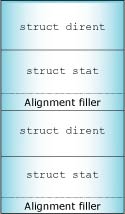
Returning the optional struct stat along with the struct dirent entry can improve efficiency.
|
The struct stat must be aligned on an 8-byte boundary. The d_reclen member of the struct dirent must contain the size of both structures, including any filler necessary for alignment. |
Generally, a resource manager receives these types of messages:
A connect message is issued by the client to perform an operation based on a pathname. This may be a message that establishes a longer term relationship between the client and the resource manager (e.g. open()), or it may be a message that is a "one-shot" event (e.g. rename()).
The library looks at the connect_funcs parameter (of type resmgr_connect_funcs_t -- see the Library Reference) and calls out to the appropriate function.
If the message is the _IO_CONNECT message (and variants) corresponding with the open() outcall, then a context needs to be established for further I/O messages that will be processed later. This context is referred to as an OCB (Open Control Block) -- it holds any information required between the connect message and subsequent I/O messages.
Basically, the OCB is a good place to keep information that needs to be stored on a per-open basis. An example of this would be the current position within a file. Each open file descriptor would have its own file position. The OCB is allocated on a per-open basis. During the open handling, you'd initialize the file position; during read and write handling, you'd advance the file position. For more information, see the section "The open control block (OCB) structure."
An I/O message is one that relies on an existing binding (e.g. OCB) between the client and the resource manager.
An an example, an _IO_READ (from the client's read() function) message depends on the client's having previously established an association (or context) with the resource manager by issuing an open() and getting back a file descriptor. This context, created by the open() call, is then used to process the subsequent I/O messages, like the _IO_READ.
There are good reasons for this design. It would be inefficient to pass the full pathname for each and every read() request, for example. The open() handler can also perform tasks that we want done only once (e.g. permission checks), rather than with each I/O message. Also, when the read() has read 4096 bytes from a disk file, there may be another 20 megabytes still waiting to be read. Therefore, the read() function would need to have some context information telling it the position within the file it's reading from, how much has been read, and so on.
The resmgr_io_funcs_t structure is filled in a manner similar to the connect functions structure resmgr_connect_funcs_t.
Notice that the I/O functions all have a common parameter list. The first entry is a resource manager context structure, the second is a message (the type of which matches the message being handled and contains parameters sent from the client), and the last is an OCB (containing what we bound when we handled the client's open() function).
The _resmgr_attr_t control structure contains at least the following:
typedef struct _resmgr_attr {
    unsigned            flags;
    unsigned            nparts_max;
    unsigned            msg_max_size;
    int                 (*other_func)(resmgr_context_t *,
                                      void *msg);
    unsigned            reserved[4];
} resmgr_attr_t;
These members will be important when you start writing your own handler functions.
If you specify a value of zero for nparts_max, the resource manager library will bump the values to the minimum usable by the library itself. Why would you want to set the size of the IOV array? As we've seen in the Getting the resource manager library to do the reply section, you can tell the resource manager library to do our replying for us. We may want to give it an IOV array that points to N buffers containing the reply data. But, since we'll ask the library to do the reply for us, we need to use its IOV array, which of course would need to be big enough to point to our N buffers.
If the resource manager library gets an I/O message that it doesn't know how to handle, it'll call the routine specified by the other_func member, if non-NULL. (If it's NULL, the resource manager library will return an ENOSYS to the client, effectively stating that it doesn't know what this message means.)
You might specify a non-NULL value for other_func in the case where you've specified some form of custom messaging between clients and your resource manager, although the recommended approach for this is the devctl() function call (client) and the _IO_DEVCTL message handler (server) or a MsgSend*() function call (client) and the _IO_MSG message handler (server).
For non-I/O message types, you should use the message_attach() function, which attaches a message range for the dispatch handle. When a message with a type in that range is received, the dispatch_block() function calls a user-supplied function that's responsible for doing any specific work, such as replying to the client.
|
|
|
|