![[Previous]](prev.gif) |
![[Contents]](contents.gif) |
![[Index]](keyword_index.gif) |
![[Next]](next.gif) |
|
|
|
|
 |
This version of this document is no longer maintained. For the latest documentation, see http://www.qnx.com/developers/docs. |
This appendix describes how to package a Board Support Package (BSP) to be compatible with the QNX Momentics development suite.
For information about licensing, see our website, http://www.qnx.com.
The best way to start creating a BSP is to copy an existing EPL BSP for a similar board. Depending on the features of a BSP, the directory structure might look something like this:
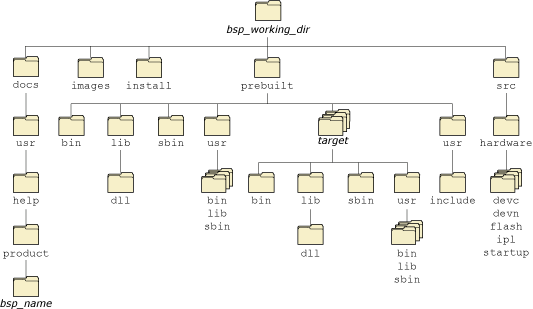
Directory structure of a BSP.
For more information about building a BSP, see the Working with a BSP chapter in this guide.
 |
Don't change the directory structure, or your BSP won't work with
the IDE or our Makefiles.
You can rename the directories for the documentation (bsp_name
in the diagram above) and for the drivers, but don't change the major
directories.
The setupbsp command, which installs a BSP, overwrites all occurrences of the roots.mk file, so don't change these files. |
We provide a script, packagebsp, that packages your BSP so that it will be compatible with QNX Momentics. This script uses zip to create an archive for all supported hosts.
You can use the command line or a configuration file to specify the following inputs to the packagebsp script:
Depending on the options you specify, the script produces:
Or:
For more details, see the entry for packagebsp in the Utilities Reference.
|
If you package your BSP on a Windows host, the permissions for the files might not be correct if your users install it on a Linux or QNX Neutrino host. In this case, you should tell your users what ownership and permissions you expect each file to have. |
You should include documentation with your BSP that describes how to use it. The QNX Momentics documentation includes some templates for BSP documentation including installation and release notes; see QNX BSP Documentation Templates in the online help.
You can provide your documentation in these forms:
|
To find the places where you need to fill in the templates, look for my-. Also watch for other instructions in italics. |
Copy the com.qnx.doc.bsp_doc_templates plugin to your BSP's documentation directory, and then modify the copy. Use this form for the plugin's directory name:
com.company_name.doc.bsp_manufacturer_board_version.timestamp
You need to specify the following pieces:
The name of the directory should match the plugin ID and version, as specified in plugin.xml.
The plugin includes:
<?xml version="1.0" encoding="UTF-8"?>
<?eclipse version="3.0"?>
<plugin id="com.qnx.doc.bsp_doc_templates"
    name="QNX BSP Documentation Templates"
    version="1.0.0.20070814"
    provider-name="QNX Software Systems">

    <extension point="org.eclipse.help.toc">
      <toc file="toc.xml" primary="true" />
      <index path="index"/>
   </extension>
   <extension point="com.qnx.tools.ide.qde.ui.qdeSummary">
      <summary file="fsummary.xml" />
   </extension>

</plugin>
Change this to reflect the name of your BSP, the plugin version, and the name of your company. Be sure to change the plugin ID -- that's how Eclipse identifies the plugin. For example:
<?xml version="1.0" encoding="UTF-8"?>
<?eclipse version="3.0"?>
<plugin id="com.my_company.doc.bsp_intel_DBPXA270DP"
    name="Intel DBPXA270DP Board Support Package"
    version="1.0.0.20071031"
    provider-name="My Company Name">

    <extension point="org.eclipse.help.toc">
      <toc file="toc.xml" primary="true" />
      <index path="index"/>
   </extension>
   <extension point="com.qnx.tools.ide.qde.ui.qdeSummary">
      <summary file="fsummary.xml" />
   </extension>

</plugin>
Change the titles and the list of supported boards, tell the reader how to get technical support and provide feedback, and fill in the copyright notice.
|
If you change the structure of this file (e.g. by adding or removing sections), be sure to make corresponding changes to the plugin's toc.xml file, which the IDE's help system uses to populate its Contents pane. |
When you run packagebsp, use the -p option or the doc_plugin entry in the configuration file to specify the paths of the plugins or Java Archive (JAR) files for your documentation.
For more information about plugins, see Eclipse: Building Commercial-Quality Plug-ins by Eric Clayberg and Dan Rubel (Addison-Wesley, 2006).
Copy the bsp_doc_templates directory and the bsp_doc_templates.toc file from $QNX_TARGET/usr/help/product to usr/help/product in your BSP's documentation directory, changing their names to something appropriate for your BSP, and then modify the copies.
The templates include:
1|QNX BSP Documentation Templates|./bsp_doc_templates/bookset.html
Change this to reflect the name of your BSP. For example:
1|Intel DBPXA270DP Board Support Package (BSP)|./Intel_DBPXA270DP_bsp/bookset.html
Change the titles and the list of supported boards, tell the reader how to get technical support and provide feedback, and fill in the copyright notice.
2|Read Me|./readme/bsp_readme.html
You don't need to change these files.
|
If you change the structure of this file (e.g. by adding or removing sections), be sure to make corresponding changes to readme/book.toc, which the Photon helpviewer uses to populate its Topics pane. For more information, see the entry for helpviewer in the Utilities Reference. |
When you run packagebsp, use:
The packagebsp script will help you package everything that you need to ship with your BSP, but you should test your BSP by installing and building it on another system. You should try to build the BSP on the command line and in the IDE. Where you're going to build the BSP affects how you install it; for more information, see the installation notes.
For more information about building a BSP, see the Working with a BSP chapter in this guide.
|
|
|
|