![[Previous]](../prev.gif) |
![[Contents]](../contents.gif) |
![[Index]](../keyword_index.gif) |
![[Next]](../next.gif) |
|
|
|
|
 |
This version of this document is no longer maintained. For the latest documentation, see http://www.qnx.com/developers/docs. |
Draw text
int PgDrawText( char const *ptr,
                int len,
                PhPoint_t const *pos,
                int flags );

int PgDrawTextv( char const *ptr,
                 int len,
                 PhPoint_t const *pos,
                 int flags );

int PgDrawTextChars( char const *ptr,
                     int len,
                     PhPoint_t const *pos,
                     int flags );

int PgDrawTextCx( void *dc,
                  char const *ptr,
                  int len,
                  PhPoint_t const *pos,
                  int flags );

int PgDrawTextvCx( void *dc,
                   char const *ptr,
                   int len,
                   PhPoint_t const *pos,
                   int flags );

int PgDrawTextCharsCx( void *dc,
                       char const *ptr,
                       int len,
                       PhPoint_t const *pos,
                       int flags );
ph
Each of these functions builds a command in the draw buffer to draw the text indicated by ptr at location pos, using the font specified in a previous call to PgSetFont().
The len parameter specifies the number of bytes required to store the string. For pure ASCII strings (characters 0 to 127), this is the number of characters. For multibyte strings, len may be larger than the number of characters. For double-byte strings, len is twice the number of characters.
By default, the function assumes that all strings consist of multibyte characters that conform to the ISO/IEC 10646-1 UTF-1 multibyte format. However, if Pg_TEXT_WIDECHAR is set, the function assumes each character is represented by 2 bytes that conform to the ISO/IEC 10646-1 UCS-2 double-byte format.
 |
PgDrawTextChars() assumes that len is the number of characters to draw. Using this number, PgDrawTextChars() determines the number of bytes required to store the string. |
| In order to: | You can: |
|---|---|
| Define the color of the text | Use PgSetTextColor(), PgSetTextDither(), or PgSetTextXORColor(), |
| Mask the text | Use PgSetTextTransPat(), |
| Fill the extent of the text | Set the background color with PgSetFillColor() or PgSetFillDither() and specify the Pg_BACK_FILL flag to PgDrawText() or PgDrawTextv() |
| Underline the text | Use PgSetUnderline() |
By default, the text is left-aligned (Pg_TEXT_LEFT), and the text is drawn with pos->y as its baseline. You can set flags to a combination of:
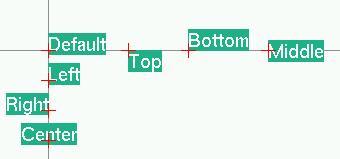
Text justification relative to the indicated positions.
|
If you call the "v" forms of these functions, the data isn't physically copied into the draw buffer. Instead, a pointer to the string is stored until the draw buffer is flushed. Make sure you call PgFlush() or PgFlushCx() before you modify the text. |
PgDrawText(), PgDrawTextv(), and PgDrawTextChars() work on the current draw context, while you can specify the draw context dc for PgDrawTextCx(), PgDrawTextCxv(), and PgDrawTextCharsCx().
DrawSimpleText() {
    char *s = "Hello World!";
    PhPoint_t p = { 8, 30 };
    char Helvetica18[MAX_FONT_TAG];

    if(PfGenerateFontName("Helvetica", 0, 18,
                          Helvetica18) == NULL) {
        perror("Unable to find font");
    } else {
        PgSetFont( Helvetica18 );
    }
    PgSetTextColor( Pg_WHITE );
    PgDrawText( s, strlen( s ), &p, 0 );
}
The above code draws:

DrawBackFillText() {
    char *s = "Hello World!";
    PhPoint_t p = { 8, 30 };
    char Helvetica18[MAX_FONT_TAG];

    if(PfGenerateFontName("Helvetica", 0, 18,
                          Helvetica18) == NULL) {
        perror("Unable to find font");
    } else {
        PgSetFont( Helvetica18 );
    }
    PgSetTextColor( Pg_WHITE );
    PgSetFillColor( Pg_PURPLE );
    PgDrawText( s, strlen( s ), &p, Pg_BACK_FILL );
}
The above code draws:

DrawUnderlineText() {
    char *s = "Hello World!";
    PhPoint_t p = { 8, 30 };
    char Helvetica18[MAX_FONT_TAG];

    if(PfGenerateFontName("Helvetica", 0, 18,
                          Helvetica18) == NULL) {
        perror("Unable to find font");
    } else {
        PgSetFont( Helvetica18 );
    }
    PgSetTextColor( Pg_WHITE );
    PgSetUnderline( Pg_RED, Pg_TRANSPARENT, 0 );
    PgDrawText( s, strlen( s ), &p, 0 );
    PgSetUnderline( Pg_TRANSPARENT, Pg_TRANSPARENT, 0 );
}
The above code draws:

DrawBackFillUnderlineText() {
    char *s = "Hello World!";
    PhPoint_t p = { 8, 30 };
    char Helvetica18[MAX_FONT_TAG];

    if(PfGenerateFontName("Helvetica", 0, 18,
                          Helvetica18) == NULL) {
        perror("Unable to find font");
    } else {
        PgSetFont( Helvetica18 );
    }
    PgSetTextColor( Pg_WHITE );
    PgSetFillColor( Pg_PURPLE );
    PgSetUnderline( Pg_RED, Pg_TRANSPARENT, 0 );
    PgDrawText( s, strlen( s ), &p, Pg_BACK_FILL );
    PgSetUnderline( Pg_TRANSPARENT, Pg_TRANSPARENT, 0 );
}
The above code draws:

Photon
| Safety: | |
|---|---|
| Interrupt handler | No |
| Signal handler | No |
| Thread | No |
PgDrawMultiTextArea*(), PgDrawString*(), PgFlush*(), PgSetFillColor*(), PgSetFillDither*(), PgSetFillTransPat*(), PgSetFont*(), PgSetTextColor*(), PgSetTextDither*(), PgSetTextTransPat*(), PgSetTextXORColor*(), PgSetUnderline*(), PhPoint_t
"Text" in the Raw Drawing and Animation chapter of the Photon Programmer's Guide
|
|
|
|