Multimedia player
mmplay [options]
- -Si|m|n
- The initial state of the main window (iconified, maximized,
or normal).
- -s server_name
- The name of the Photon server:
| If server_name is: |
This server is used: |
| node_path |
node_path/dev/photon |
| fullpath |
fullpath |
| relative_path |
/dev/relative_path |
- -u [url]
- Start only if a mmplay isn't already running.
You can specify an optional url in the form of "file://" or "http://" which mmplay loads, or
if another is running, this file is sent to the existing mmplay.
- -x position[%][r]
- The x coordinate of the upper-left corner of the window,
in pixels, or as a percentage of screen width if % is
specified. If r is specified, the coordinate is relative
to the current console.
- -y position[%][r]
- The y coordinate of the upper-left corner of the window,
in pixels, or as a percentage of screen height if % is
specified. If r is specified, the coordinate is relative
to the current console.
The mmplay utility is a multimedia player that can
play audio and video files in any format supported by the multimedia
library.
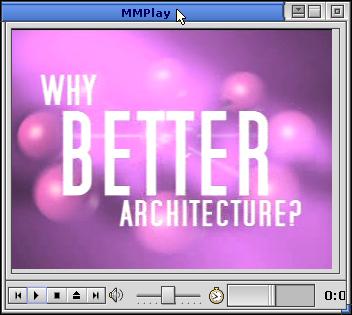
An example of mmplay.
The mmplay utility has the following keyboard shortcuts:
| Command |
Shortcut |
| Open a file |
O |
| Open a URL |
Ctrl-O |
| Play or pause |
P |
| Stop |
S |
| Mute |
M |
| Volume up |
--> |
| Volume down |
<-- |
| Rewind |
R |
| Fast forward |
F |
| Quit |
Q |
qnxplayer
![[Previous]](../prev.gif)
![[Contents]](../contents.gif)
![[Index]](../keyword_index.gif)
![[Next]](../next.gif)
