Middleware, development tools, realtime operating system
software and services for superior embedded design


Home
QNX Community Resources
Developer Support
QNX Documentation Library
QNX Developer Support

QNX Developer Support

QNX Software Systems
Developer Resources
Blogs
Board support packages
Foundry27 projects
Forums
Hardware support listing
Online video tutorials
Product documentation
Technical Articles

[Previous] [Contents] [Index] [Next]

mixer

Audio mixer

Syntax:

mixer [-@] [-c card] [-m device] [-o display_level]

Options:

-@
Show subchannel volumes.
-c card
The card ID of the mixer; the default is 0.
-m device
The device ID of the mixer; the default is 0.
-o display_level
Which settings are shown when the mixer starts up; display_level is one of:
  • 1 -- display the playback settings.
  • 2 -- display the record settings.
  • 3 -- display playback and open-settings.

Description:

The mixer command starts the audio-mixer-control application:
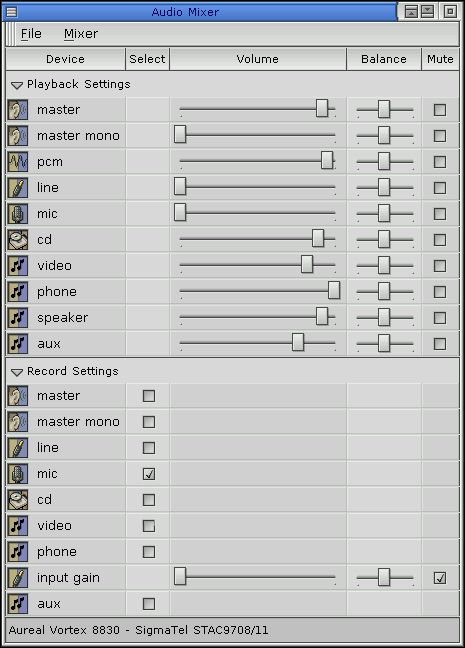
Sample mixer window


Note: The components of the mixer window depend on your system's hardware.

The mixer uses the device /dev/snd/mixerCcardDdevice, where card and device are the values specified for the -c and -m options.

Examples:

Start mixer for AuReal vortex 2:

mixer &

or, specifying the card and device explicitly:

mixer -@ -c 0 -m 0 &

Files:

libasound.so
The shared object for the sound library.
/etc/system/config/audio/card name.io-ado-cfg
Where card name (set by the ado_card_longname() function) is the long name used by the driver and where mixer stores configuration data.

See also:

phplay, phrecord


[Previous] [Contents] [Index] [Next]