![[Previous]](prev.gif) |
![[Contents]](contents.gif) |
![[Next]](next.gif) |
|
|
|
 |
This version of this document is no longer maintained. For the latest documentation, see http://www.qnx.com/developers/docs. |
This guide includes:
After installing the Photon Chinese Supplement, the following scalable Chinese fonts should be installed and ready to use on your system:
 |
The Photon Chinese Supplement provides Unicode fonts. Photon doesn't use code pages. |
The Photon Chinese Supplement includes an input method utility (cpim) that you can use to enter Chinese characters in Photon.
To run the cpim utility:
cpim &
A small window appears:
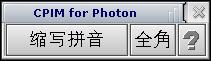
|
You may notice a Helpviewer error message in the pterm where you started cpim -- please ignore the message. |
To enable and disable cpim, press Ctrl-Space.
If you want to control cpim from an application, start it with the -h option to suppress the graphical user interface. You'll need to use PtFepCmd() to control the FEP; see the Photon Library Reference.
|
|
|